
Expert help needed

kamion

Suspended / Banned
Messages
1,887
Edit My Images
Yes
Hi guys & gals,
I need someone's help to rescue a family portrait I took when I was back in Malaysia. It didn't turn out very well and not a pretty sight. :( I'm hoping it can be rescued enough to print it poster sized. Particularly, the motion blur of my nephew.
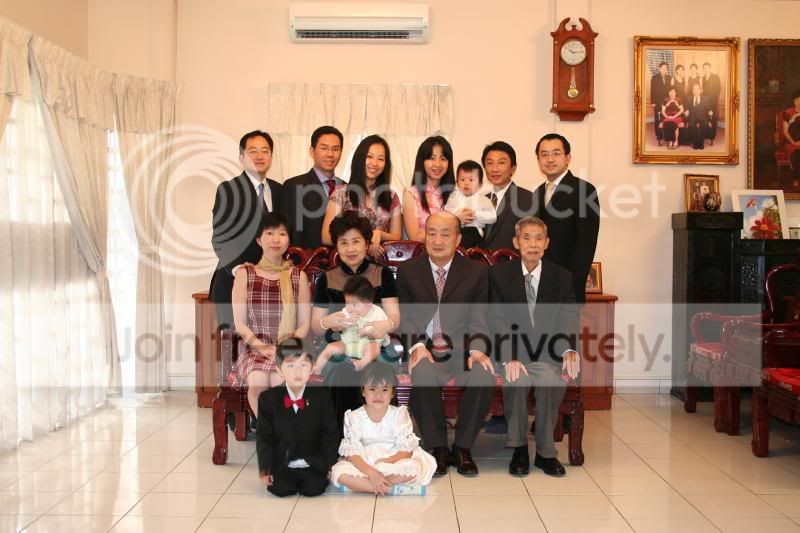
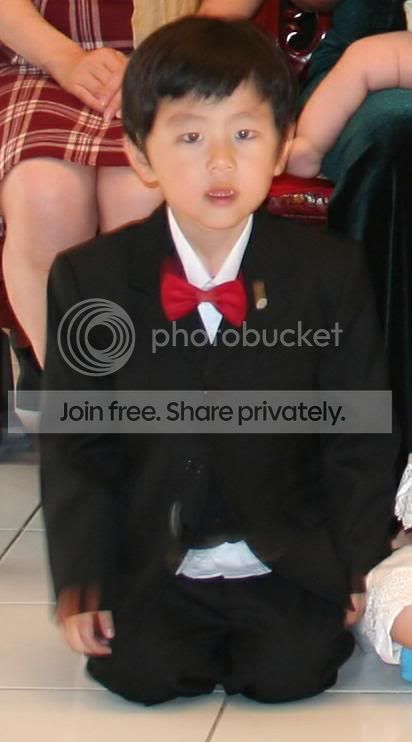
IMG_0889.jpg


kenji.jpg


I should have zoomed in more. Don't know why I didn't. :bonk:

Any one willing to help, please email me at kamion@hotmail.com so I can send you the pic. Thanks!

(If anyone's curious, I'm the one standing on the right)
 
the image posted here is a bit compressed already Kamion, but i will have a go.

Not much you can do with the motion blur, maybe blutac his ass to the floor next time!
 
Barry's Grandson has this problem too, he is simply a fidget....as this size it doesn't look too bad but poster size he may look a bit blurred.
 
Tch tch. A family portrait and you get crooked shots on a tripod and forget to set the white balance. ;)

Quick job Kamion. If this is more what you're looking for, then you can PM me and send me the original file. I should be able to sort out most of the motion blurring on junior, but this version is too small and compressed to do much with.

group.jpg
 
CT said:
Tch tch. A family portrait and you get crooked shots on a tripod and forget to set the white balance. ;)

Quick job Kamion. If this is more what you're looking for, then you can PM me and send me the original file. I should be able to sort out most of the motion blurring on junior, but this version is too small and compressed to do much with.

Well, I'll be the first to admit I don't know how to use my camera very well. :bonk:

I thought the white balance would be automatic? :thinking:

Yes, please help me, CT. You are my only hope. :D
 
kamion said:
Well, I'll be the first to admit I don't know how to use my camera very well. :bonk:

I thought the white balance would be automatic? :thinking:

Yes, please help me, CT. You are my only hope. :D

LOL. How can I refuse a plea like that? If you're shooting jpegs, then the Auto WB setting is fine usually in daylight situations. Don't rely on the camera to perform well under Tungsten or Flourescent light though on the Auto setting. Pretty well all DSLRs aren't hot on this at all. Set the WB manually or better still use a custom white balance exposure.

The elegant answer is to shoot RAW then you can adjust the WB to how you want it. :)
 
I got the original file OK Kamion. It's pretty damned good actually. I'll get back to you. :)
 
matty said:
the image posted here is a bit compressed already Kamion, but i will have a go.

Not much you can do with the motion blur, maybe blutac his ass to the floor next time!

Thanks for the offer matty. :thumbs: But CT has kindly taken up the task and I don't want to trouble more people.

As for getting them to sit still, :shrug: there's no way this boy will listen. Actually, this photo is one of 4 or 5 that was taken. There's one where he's actually mostly transparent. :shake:
 
Thank you, CT! I'll need to buy you some beers when we meet.
 
Ct is much better than me, you had a lucky escape!
 
That bow tie should be turned into an animated gif and made to revolve. The picture is crying out for it tbh
 
evilowl said:
That bow tie should be turned into an animated gif and made to revolve. The picture is crying out for it tbh

LOL. It looks like it's moving already without any photoshop. :P
 
All you can really do Allan is use the clone tool to remove the more obvious bits of blurring.
 
Back
Top