


ancient_mariner
Moderator
- Messages
- 27,766
- Name
- Toni
- Edit My Images
- No
Thanks Ancient, is there another sharing service people like to use?
Flickr is popular, or you can upload them at 1024px longest side and less than 500kb
Thanks Ancient, is there another sharing service people like to use?

Thanks. So the way I see it is that we have to diagnose this in stages, and we have take apart the variables that contributed to the result in your opening post.
One of the important variables that has been already mentioned is your scanning routine. It might, or might not be, that something in your scanning procedure is affecting your results. But let's set this aside as we know nothing about your scanning for now.
The other major impact in your results is exposure and development - major impact from both, even when your final output is a scan and not a print. We can say something about that now that you have provided a negative sample.
Exposure: with the negative above, you're in the 'it's a matter of taste' range: many will agree your image is not underexposed, some will say it's bang on, some will say it's a tad overexposed. It's imho a largely creative decision. Do you want a lot of detail in the carpet of fallen leaves in the bottom part of the image? You got it. Other people would have perhaps gone for a different compromise: 'I will give up some detail here for a stop more DOF to hope to get good sharpness from the leaves in the front down to at least some of those tree trunks'. Some would have gone for an even thinner negative to go for that 'existentialist Japanese photographer' look. Remember: exposure amount affects the amount of detail you will see in the SHADOWS, that is in the bits of the negative that are less dense.
Development: here I think it's where one of your problems might be: in my experience, and for my taste, you have significantly overdeveloped your image. Remember that length of development largely affects the bits of the image that received more lights, so the highlights. Your highlights are the bits of sky in the background and the blade of light hitting the fallen leaves. You have developed for too long, or used a too concentrate dilution of your developer, with the result that the highlights in your negative have become really dense.
Really dense highlights are an issue both when printing but ALSO when scanning: many consumer scanners struggle to get some reading through those very dense bits. To add to tha,t your scanning software has probably made some automatic decisions: where to allocate the majority of the dynamic range at hand (16 bit per channel if your scanner allows it, else 8 bits per channel, so 2^8-1=255 bits to describe the entire dynamic range)? The software probably decided to prioritise the midtones, to give you some separation in what some people would call 'zones IV-VI' which means your dense highlights ended up being clipped.
So I would suggest 2 changes going forward
- review your scanning routine: can you hijack the software so that it'll show you the FULL, unedited histogram of the RAW positive image? YOU should then decide, using e.g. the 'level' tools where to clip your highlights. There might still be detail in the negative and your scanner software is clipping it for you;
- even better, review your development routine. This type of photography has been done for a century (ask a few of those old bearded American large format photographers of the past); it is completely feasible to do high contrast canopy/woodland photography with film, but you'll need to master what is called N-* processing, or simply 'pull processing'.
Do some research on 'pull processing', plenty of info on the web, but be advised it'll be a rabbit hole. Much easier initial fix: reduce development time! Using the same exposure routine, develop this sort of scene for 25-30% less time. Or increase dilution of your developer and develop for the same amount.
E.g. did you do Rodinal 1:50 for 12 minutes? Try Rodinal 1:50 for 9 minutes next!
Your goal is to 'constrain' the huge dynamic range of the scene in front of you into the much more limited medium that is a black and white negative: you need to make it fit somehow, and to do that you act on development (and exposure but you exposed well here, so we can keep that fixed).
What if the output image is too 'low contrast'? Not a big problem, and certainly an easier problem to solve than if you overdeveloped: just increase contrast in Photoshop or use a high grade paper in the darkroom: achieve the contrast you want at postprocessing/printing stage, and not in the negative.
 but I will still take a look at Pull processing. Thanks
O
Ah, the focus mistake is all on me. I was using a Mamiya 645CM.

It does, and I have a prism too, but I guess I screwed up.Does the Mamiya lens have depth of field markings on it? If so you can use the markings to select the point of focus and the aperture required to give sharpness to the elements in the composition that require it.
@ancient_mariner please let me know if this works - reposting.
@ancient_mariner please let me know if this works - reposting.
@Barney here's a quick example of how pull processing can help you getting a negative that scans easily from a high contrast situation. I will see if I find the negative too.
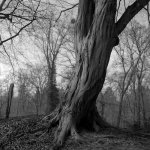
There was a huge lighting differential between the bark of the tree and the sky. I took an incident measurement off the bark, I was using 100 iso film. I exposed it at 32 ISO and cut the development time I found on the film's pdf, as published by the manufacturer, by 30%, as suggested above.
Here's a flat scan, where I defeated any scanner software automatic decisions
View attachment 469702
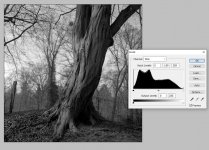
Here's what the histograms looks like in Photoshop
View attachment 469703
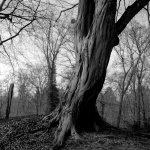
Apart from minor shadow clipping, I have everything I need in that histogram. I don't have highlight bleed, and I can start from this image and carry on. I happen to like the low contrast look, so I'd do little else here, but if you like more contrast, just add it in in photoshop (or printing). E.g.
View attachment 469704
I thinks its the second time I have used this film, and I did my homework gathering information from books, this and other forums, you tube etc trying to to establish the best developer to use with tabular grain type films and ended up choosing the Adox FX39 developer. Similarly, I looked for suitable developments times on phone apps, forums and other formats, you tube etc. This is the third developer I have used where the recommended times result in overexposure, I have had to reduce development times with HC110, Rodinal and now this FX39, The times I sourced stated dilution 1/14 rather than standard 1/9 for 14 minutes at 20c and even then without prior experience of the developer and learning from previous developers considered that too much and reduced it to 12 minutes. This by your analysis and recommendation, and sheepishly my own thoughts, it is still too much and next time I would be looking at 10 minutes.
With no experience, other than a couple of dozen rolls, I have to start somewhere.
I do not know if I dare risk another rabbit hole.

Well I had the same problem with imgur and am using imagebb or flikr....on review on imagebb they can delete your shots/account, I assume it's because of indecent shots or whatever.Thanks Ancient, is there another sharing service people like to use?