Exactly What has gone wrong here

Barney

Suspended / Banned
Messages
3,043
Name
Wayne
Edit My Images
No
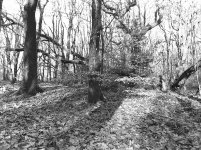
I am really disappointed with this photo, I stumbled on , what i considered a beautiful scene with light cascading through the forest and illuminating a few branches of a beech tree,. I thought it would make a nice photo.

What could I have done better?

Beech leaves.jpg
 
Trying to photograph forests with bright sunlight filtering through is extremely difficult. There's a huge difference in dynamic range between the sunlit areas and the other parts of the scene. Our eyes and brains do a fantastic job of allowing for this by opening and closing our pupils and then organising the scene we "see" in a way that means nothing is crushed or blown out.

Basically, photograph scenes like this in subdued light.

Photographic film and digital sensors can't do this well. They capture all the image in a single click of the shutter and as a result things are lost. Mobile phone cameras tend to do a better job because of all the fancy processing they do to allow non-photographers to capture images that don't resemble the results in a sticker-encrusted pack of 1980s snapshots developed at Boots. :D
 
I think that in such a situation, I'd have exposed for the bright areas and allowed the shadows to block up. It might have given a better indication of what you were seeing.
 
I think that in such a situation, I'd have exposed for the bright areas and allowed the shadows to block up. It might have given a better indication of what you were seeing.
How many stops Andrew?

I incident metered and just did what it said,
 
What kind of filter would you suggest might have benefited Clive? Polarizing?

I don't know what colours there are in the scene, but if the sky was blue than something yellow through orange to red would darken the sky. Which tone of filter you choose depends on the colours of the scene because it will also have the effect of lightening some of them. A polarising filter could work if the angle of the sun was right for the composition. But it looks like you were shooting almost straight towards the sun, so not really.

Nigel's suggestion about diffused light is valid unless you want to include the shadows.
 
I don't know what colours there are in the scene, but if the sky was blue than something yellow through orange to red would darken the sky. Which tone of filter you choose depends on the colours of the scene because it will also have the effect of lightening some of them. A polarising filter could work if the angle of the sun was right for the composition. But it looks like you were shooting almost straight towards the sun, so not really.

Nigel's suggestion about diffused light is valid unless you want to include the shadows.
the sun was behind me believe it or not, a very bright sunny day though with a blue sky. The scene is typically autumn with fallen brown and golden leaves and bare tree trunks.

The light picking out the few leaves left on the low hanging branches are what I considered so nice and outstanding.

I have not done no where near enough thought or research to coloured filters.
 
the sun was behind me believe it or not, a very bright sunny day though with a blue sky. The scene is typically autumn with fallen brown and golden leaves and bare tree trunks.

The light picking out the few leaves left on the low hanging branches are what I considered so nice and outstanding.

I have not done no where near enough thought or research to coloured filters.

For mono films yellow, orange and red filters give the effect of darkening a blue sky whilst lifting yellow, orange, red items in the scene. They don't have the same effect on grey skies though. Polarising filters work best at 90 degrees to the direction of sunlight.

Sometimes colour film works when mono doesn't.
 
I incident metered and just did what it said,
Where there's a great deal of contrast, incident metering may not be the best idea.

It all depends on choosing which part(s) of the scene are the most important to what you are trying to show. In this case, you may have got closer to what you wanted by using reflective metering, directly off the the brighter areas of the ground.
 
For mono films yellow, orange and red filters give the effect of darkening a blue sky whilst lifting yellow, orange, red items in the scene. They don't have the same effect on grey skies though. Polarising filters work best at 90 degrees to the direction of sunlight.

Sometimes colour film works when mono doesn't.
Thank you for that Clive
 
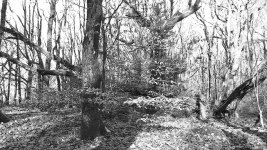
Try cropping it to 16.9 and exclude as much of the sky as you can. I'm not saying that will cure it. But, it will give you an indication as to if you are going in the right direction, or not. General rule of thumb though, lots of sky, bad.
 
Where there's a great deal of contrast, incident metering may not be the best idea.

It all depends on choosing which part(s) of the scene are the most important to what you are trying to show. In this case, you may have got closer to what you wanted by using reflective metering, directly off the the brighter areas of the ground.

I agree. If I was incident metering a scene like this I would have taken reading in both bright and dark areas and then averaged the result, perhaps leaning one way or the other depending on whether I wanted to favour the highlights or the shadows.
 
What could I have done better?

View attachment 469452

I think..... Got closer. Reduced exposure. Composed the light leaves up with a darker background.

With possibly a mainly brown/green background some orange autumn leaves would look lovely to the eye. But those colours don't obviously come through on black and white film.
 
I think..... Got closer. Reduced exposure. Composed the light leaves up with a darker background.

With possibly a mainly brown/green background some orange autumn leaves would look lovely to the eye. But those colours don't obviously come through on black and white film.
I think I should have got closer as well 50mm on 6x7 is very wide. I could not get closer as I would have blocked the ray of light that was illuminating the leaves. I have another lens now (127mm) and possibly would have used that but I cannot say for sure.

It was those light strewn leaves I wanted and ended up with half the woods in view, it still looked great through the viewfinder though.
 
Last edited:
Did you have this printed/scanned? If I were printing this then I'd probably print much darker, letting shadows go to black and looking for a hint of development in the brightest parts. It's probably a perfectly good negative, but needs to be handled correctly. Also worth saying that this kind of scene is a challenge for mono because most of what's attractive about it is the colours rather than the tones, and that's all lost in mono unless you start 'toning' the digital verson of the image.
 
I looked at this early today but wanted to see what others thought first.
My two penn'orth is:
- bracket the exposure for one stop over and one under, to see what Tuens out best
- consider playing in LR/PS with a mask to adjust the exposure on one side of the image then blend the two sides
- definitely use an orange filter on the lens if using film, or...
- if playing in Lightroom/PS, set it to B&W and use the Red./Orange/Green/Red filter sliders to see which combination works best. It'll probably be a combination.
 
Two answers.
Firstly, if taking it again, i would have used bracketing – essentially what is suggested above in an automated way
Secondly, I think that you might be able to get an HDR image in LR or Photoshop. Sorry, I'm on a train at the moment and can't test it out.
 
Thanks for all the advice received, I think every point made is valid, I got so much wrong. I seem to struggle with undergrowth and fine detail in general with film.

I had forgotten how much messing about I did with this image,

Here is the raw(as imported) JPEG file cropped as suggested earlier.

Beech tree highlight.jpg
 
Thanks for all the advice received, I think every point made is valid, I got so much wrong. I seem to struggle with undergrowth and fine detail in general with film.

I had forgotten how much messing about I did with this image,

Here is the raw(as imported) JPEG file cropped as suggested earlier.

View attachment 469637

Are you happy for people to try re-processing your image? (you have NO beside 'edit my images')
 
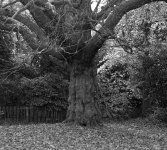
I was similarly unhappy with a recent shot. This is a pretty savage crop in order to get it uploaded. Ilford 5+ MF, 80mm lens.treecrop2.jpg
 
I was similarly unhappy with a recent shot. This is a pretty savage crop in order to get it uploaded. Ilford 5+ MF, 80mm lens.View attachment 469642

Looks like the focus is too far back. The foliage in the background is sharper than the tree trunk.
 
Are you happy for people to try re-processing your image? (you have NO beside 'edit my images')
you can have a go if you like on this occasion, :)

thanks
 
Looks like the focus is too far back. The foliage in the background is sharper than the tree trunk.
Yup. I should have been way more specific in terms of focus. That trunk is like a candle with the wax sttling along the sides and should ave been the centrepiece to a much greater extent.

I should have been using colour too. Those leaves in the foreground are mush - but a splash of colour might have made them a little more resolvable to the eye.
 
In that case do you think you could upload the full size unedited image to somewhere like Dropbox, Google Drive, etc. and then post the link here.
Apologies,
I don't do all that stuff and I would not know where to start, thank you for your kind offer though. Its appreciated.

To me if an image require lots of PP, i consider it no good and I tell myself that I must try harder to correct the faults at point of capture/development.
 
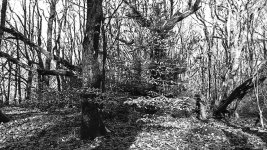
The image quality at this size makes it almost impossible to do anything meaningful, but here's a quick edit:

Barney tree-.jpg

And here's the changes I made:

Barney tree LR.jpg

To be honest I think you need a better scan to do any meaningful image development - getting it right in camera may not help for now, because it looks to me like the link between negative and screen is broken.

Is this the kind of look you were after?

The meeting pool 1 Reflection
by Toni Ertl, on Flickr

Or something like this?

Local walk - Woodland path
by Toni Ertl, on Flickr
 
The image quality at this size makes it almost impossible to do anything meaningful, but here's a quick edit:

View attachment 469648

And here's the changes I made:

View attachment 469649

To be honest I think you need a better scan to do any meaningful image development - getting it right in camera may not help for now, because it looks to me like the link between negative and screen is broken.
Thanks for trying, I know it must be tough with uploaded images.

What does that mean "it looks to me like the link between negative and screen is broken"
 
What does that mean "it looks to me like the link between negative and screen is broken"

The negative may actually be completely fine and usable for image creation, but because the scans are so poor and you don't really want to process the pictures, it's not been possible to get the images to look like you want. Your Spanish colour pictures (presumably digital) look OK, so it's likely the handling of the image after capture.

Thanks for trying, I know it must be tough with uploaded images.

The thing is that the image wasn't good before I started, and that's not necessarily your fault either.
 
Last edited:
Yup. I should have been way more specific in terms of focus. That trunk is like a candle with the wax sttling along the sides and should ave been the centrepiece to a much greater extent.

I should have been using colour too. Those leaves in the foreground are mush - but a splash of colour might have made them a little more resolvable to the eye.

It might be that autofocus has locked onto the stronger contrast of the fence or foliage at the back and there isn't enough frontal depth of field to render the closer part sharp.
 
I am really disappointed with this photo, I stumbled on , what i considered a beautiful scene with light cascading through the forest and illuminating a few branches of a beech tree,. I thought it would make a nice photo.

What could I have done better?

View attachment 469452

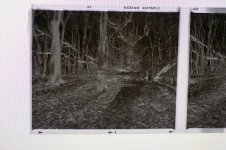
Can you show a phone shot of the negative against a bright uniform -white- background?
 
There's a strange pattern behind the neg - did you hold it in front of a monitor?
 

Thanks. So the way I see it is that we have to diagnose this in stages, and we have take apart the variables that contributed to the result in your opening post.

One of the important variables that has been already mentioned is your scanning routine. It might, or might not be, that something in your scanning procedure is affecting your results. But let's set this aside as we know nothing about your scanning for now.

The other major impact in your results is exposure and development - major impact from both, even when your final output is a scan and not a print. We can say something about that now that you have provided a negative sample.

Exposure: with the negative above, you're in the 'it's a matter of taste' range: many will agree your image is not underexposed, some will say it's bang on, some will say it's a tad overexposed. It's imho a largely creative decision. Do you want a lot of detail in the carpet of fallen leaves in the bottom part of the image? You got it. Other people would have perhaps gone for a different compromise: 'I will give up some detail here for a stop more DOF to hope to get good sharpness from the leaves in the front down to at least some of those tree trunks'. Some would have gone for an even thinner negative to go for that 'existentialist Japanese photographer' look. Remember: exposure amount affects the amount of detail you will see in the SHADOWS, that is in the bits of the negative that are less dense.

Development: here I think it's where one of your problems might be: in my experience, and for my taste, you have significantly overdeveloped your image. Remember that length of development largely affects the bits of the image that received more lights, so the highlights. Your highlights are the bits of sky in the background and the blade of light hitting the fallen leaves. You have developed for too long, or used a too concentrate dilution of your developer, with the result that the highlights in your negative have become really dense.

Really dense highlights are an issue both when printing but ALSO when scanning: many consumer scanners struggle to get some reading through those very dense bits. To add to tha,t your scanning software has probably made some automatic decisions: where to allocate the majority of the dynamic range at hand (16 bit per channel if your scanner allows it, else 8 bits per channel, so 2^8-1=255 bits to describe the entire dynamic range)? The software probably decided to prioritise the midtones, to give you some separation in what some people would call 'zones IV-VI' which means your dense highlights ended up being clipped.

So I would suggest 2 changes going forward
  1. review your scanning routine: can you hijack the software so that it'll show you the FULL, unedited histogram of the RAW positive image? YOU should then decide, using e.g. the 'level' tools where to clip your highlights. There might still be detail in the negative and your scanner software is clipping it for you;
  2. even better, review your development routine. This type of photography has been done for a century (ask a few of those old bearded American large format photographers of the past); it is completely feasible to do high contrast canopy/woodland photography with film, but you'll need to master what is called N-* processing, or simply 'pull processing'.

Do some research on 'pull processing', plenty of info on the web, but be advised it'll be a rabbit hole. Much easier initial fix: reduce development time! Using the same exposure routine, develop this sort of scene for 25-30% less time. Or increase dilution of your developer and develop for the same amount.

E.g. did you do Rodinal 1:50 for 12 minutes? Try Rodinal 1:50 for 9 minutes next!

Your goal is to 'constrain' the huge dynamic range of the scene in front of you into the much more limited medium that is a black and white negative: you need to make it fit somehow, and to do that you act on development (and exposure but you exposed well here, so we can keep that fixed).

What if the output image is too 'low contrast'? Not a big problem, and certainly an easier problem to solve than if you overdeveloped: just increase contrast in Photoshop or use a high grade paper in the darkroom: achieve the contrast you want at postprocessing/printing stage, and not in the negative.

 
Last edited:
@Barney here's a quick example of how pull processing can help you getting a negative that scans easily from a high contrast situation. I will see if I find the negative too.

There was a huge lighting differential between the bark of the tree and the sky. I took an incident measurement off the bark, I was using 100 iso film. I exposed it at 32 ISO and cut the development time I found on the film's pdf, as published by the manufacturer, by 30%, as suggested above.

Here's a flat scan, where I defeated any scanner software automatic decisions

l9W0akL.jpg


Here's what the histograms looks like in Photoshop

aYZAPu3.jpg


Apart from minor shadow clipping, I have everything I need in that histogram. I don't have highlight bleed, and I can start from this image and carry on. I happen to like the low contrast look, so I'd do little else here, but if you like more contrast, just add it in in photoshop (or printing). E.g.

TALscT7.jpg
 
Back
Top