

ETTR and color

sk66

Suspended / Banned
Messages
9,557
Name
Steven
Edit My Images
Yes
I have a lot of issues with the ETTR theory.
IMO, correlating DR to file bit depth is problematic at the least... if not entirely wrong. Correlating exposure to "detail" is erroneous. Using ETTR other than at minimum ISO doesn't make sense (for noise). And the whole issue with histograms and jpeg review images. (I will say that I do see a benefit to ETTR with very dark images where there is a lack of *sufficient* information)

But, I've noticed that ETTR also causes (can cause) color shifts. It is erroneous to say that a sensor is RGB... in reality a red photosite has a spectral response curve which is "red centric"... it may also have some sensitivity in the orange/yellow/far reds on either side of "red," but it will be most sensitive to "red." And the same is true for green and blue photosites. If a red photosite is collecting more energy from orange/yellow spectrums than it should due to overexposure, then that light may be determined to have been red instead of orange/yellow. And it may be determined to be red at a lower luminance value (because more energy collected from red wavelengths is the "same exposure" as fewer electrons collected from orange/yellow for a pixel with a greater red sensitivity). These individual spectral response curves/sensitivities are part of the demosaicing algorithms applied and these errors cannot be corrected easily... it's different from a universal WB temp/tint shift.

Here is a composite of two test images. Both images were taken in raw and processed exactly the same. The only difference is the top has a 2 stop longer exposure and was recovered with -2 exposure in LR. The overexposed image was not blown/clipped in any channel prior to recovery. WB was set with the picker using the #021 squares. And the minimum ISO for the camera (Nikon1) was used.
As you can see, the colors are not the same... most notable (in this case) in squares like 6/7/11/12... Those are easily apparent to the eye, but none exactly match if you check with a color meter...and more importantly, you will never get them all to match with any universal correction.

Neither image is a 100% color match... but the normal exposure is *much* closer. E.g., block 12 should be RGB 255/164/26, the ETTR image is 255/207/0, the normal exposure is 254/186/29. If I color correct patch 006 as close as possible, then other patches (i.e. patch 012) are even worse. The only way you would ever get every color right would be to adjust them all individually.
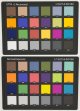
ETR-ColorSm.jpg

Anyone else notice this? Opinions?
 
Do the slight colour shifts make any difference in real world shooting? I see far to many people analysing this and analysing that. Just go out and enjoy your hobby, or job (which ever it may be.)

If colour matching is critical for example in product photography, then you will more than likely be shooting in a controlled environment anyway where the lighting is perfect and ETTR wouldn't be needed.
 
Last edited:
There's a danger of drawing general conclusions from a single sample that shows very subtle changes. You'd need to do the same test with different cameras and different processing regimes. Overall brightness looks a bit different to me too - did you set that by matching colour/brightness with one of the light grey squares?

On the other hand, you would expect to see some slight differences, probably for the reasons you cite. Nothing is 100% perfect. There may also be some adjustments going on under the hood with both the camera and Raw processor tweaking things. We tend to think of digital as having a dead straight characteristic curve with no reciprocity effects, but I doubt that's absolutely true.
 
Last edited:
There's a danger of drawing general conclusions from a single sample that shows very subtle changes. You'd need to do the same test with different cameras and different processing regimes. Overall brightness looks a bit different to me too - did you set that by matching colour/brightness with one of the light grey squares?


I've seen it with all of the cameras I've tried/used... but I can't say the results are uniform/consistent; just consistently "more wrong."
Part of the issue in this particular case is that the lighting used was a high CRI (90+) LED panel... but high CRI doesn't mean "perfect color." That's part of the reasons for the tests, I've been setting up an LED lighting system and I want to know what I'm working with. And I had talked myself into starting to use ETTR (again) for studio shots, so I decided to do some "sanity checks."

I set the levels using the #021 square. The normal exposure reads 176RGB and the recovered reads 178RGB... pushing the normal up to 178 doesn't change anything really (it's ~ +0.04EV).

On the other hand, you would expect to see some slight differences, probably for the reasons you cite. Nothing is 100% perfect. There may also be some adjustments going on under the hood with both the camera and Raw processor tweaking things. We tend to think of digital as having a dead straight characteristic curve with no reciprocity effects, but I doubt that's absolutely true.
Nope, nothing is perfect. I'm starting with slight color shifts due to the lighting, then causing even greater color shifts. So what may appear as a slight difference to you between these images (and on your monitor) is actually a greater shift from true (and some of the color shifts seem quite notable to me on my monitor).
There are *many* things that affect the result in the raw processing post camera (I'm unsure about in camera). Things like camera profile, tone curve applied, and gamma shift... but the differences seem to be baked into the raw files and they cannot be negated. Even if the image has only one color, it cannot be corrected using any traditional/simple method (in either image really).
I think I'll do a couple tests in bright sunlight to see if that generates any less error... not that I would use ETTR in that situation.

I can see many cases where this would not matter... i.e. landscapes where "true color" isn't really a major factor. And I can see many cases where you wouldn't recognize the issue because you just don't know (and you might not really care).
 
Last edited:
If colour matching is critical for example in product photography, then you will more than likely be shooting in a controlled environment anyway where the lighting is perfect and ETTR wouldn't be needed.
There is no such thing as "perfect lighting" it seems. And it's exactly because of studio/product shooting that I convinced myself to try ETTR again... I like to shoot "dark" images which can suffer from "insufficient information" and which are very intolerant of editing in post (gamma issues/banding/etc).
 
I think that you may be over-thinking this.
There is nothing "NEW" about exposing to the right, it's a technique that is/was used in film photography too, but it's nothing more than a technique that has both advantages and disadvantages.

In reality, there is no perfect solution to any perceived problem, we just need to exercise appropriate care, and what is appropriate does vary, according to the type of photography and the required standards.
One thing is certain though - all results will be skewed if any discontinuous spectrum lighting, such as CFL or LED lighting is used - so-called high CRI lights are always vastly inferior to daylight, flash or tungsten lights, all of which have a CRI of 100. That may change one day, and there are already signs of change with the specialised (and very expensive) lighting used in the movie industry, but it's going to take time and money to get that technology available for still photography.
 
One thing is certain though - all results will be skewed if any discontinuous spectrum lighting, such as CFL or LED lighting is used - so-called high CRI lights are always vastly inferior to daylight, flash or tungsten lights, all of which have a CRI of 100.
I accept that... and even in full spectrum lighting (sunlight) color accuracy probably won't be 100% simply due to the spectral curves of the sensor itself (none of my cameras are 100%).

I did run tests yesterday in bright sunlight... In that scenario it was a comparison of a normal exposure (protecting highlights) and an underexposed image recovered. The results were less variable, but I still could not get the two images to match 100%. I tested the Nikon1V2, D4, and D810... each had slightly different renditions, but the results are consistent in the inability to match the images 100%. And in every case, if the only thing I do is match(recover) the exposures, then the image w/o post manipulation seems slightly better.

My "take away" from all of this is that "the best results" will be achieved by combining multiple "proper exposures" with minimal manipulations whenever that is possible/necessary. It seems the "fix it in post" option is even less true than I previously thought.

Over-thinking? Maybe... I can certainly see many cases where it might not matter or one might not care.

ETTR was not something *I* was aware of or ever did with film. If you mean the zone system, well I was never that great at seeing in black and white...
 
My "take away" from all of this is that "the best results" will be achieved by combining multiple "proper exposures" with minimal manipulations whenever that is possible/necessary. It seems the "fix it in post" option is even less true than I previously thought.

I get what you're saying; I've not done any tests but reducing the exposure in post never seems quite the same as reducing the exposure at capture time. My 'take away' for studio stuff is... spend more time on the lighting in the first place.
 
I found something else interesting (at least to me)...

In LR I put a color checker sample on a point and then changed the exposure in .1EV steps. The RGB values did not move equally by color or by exposure step... they did not all change the same amount together, and the amount they changed would vary. I had thought they would/should just come up/down together evenly, but it appears that the exposure setting in LR is being applied back to the (raw) demosaicing algorithm.

My 'take away' for studio stuff is... spend more time on the lighting in the first place.

The only problem with that is very complex lighting can take *a whole lot more* time and be very frustrating... it is often nice to cheat it, or easier to just combine multiple exposures for different elements.

While I have been rather anal about this, it doesn't mean I won't push a dark image... it just means I might not if colors are critical, and I won't if there's no need for it.
 
I found something else interesting (at least to me)...

In LR I put a color checker sample on a point and then changed the exposure in .1EV steps. The RGB values did not move equally by color or by exposure step... they did not all change the same amount together, and the amount they changed would vary.

It might go back to the demosaicing for raw files but it can't for tiffs. However it may well do the transformation in HSB or HSL or LAB or some other space and that's unlikely to come out the same as in RGB.
 
Yeah, I haven't tried any file that has already been hard demosaiced, I have no idea how it would behave... I know LR's basic color corrections (WB) are CMYK.
Color corrections are generally best if done on the raw file...
 
Back
Top