EOS Utility

Just Dave

In Memoriam
Suspended / Banned
Messages
29,876
Name
Dave
Edit My Images
Yes
Hi

My EOS Utility has gone funny, when I used to connect my camera 7D and 400D, it used to auto start downloading images, but now it doesnt, Ive checked the settings and its all set up for it to do that, but for some strange reason it doesnt, cant remember if its since I added my battery grip to my 7D, its a genuine canon grip anyone any ideas, Ive uninstalled it and reinstalled but it still doesnt download I have to start EOS Utility manually

TIA

Dave
 
It's the opposite of my problem! I use LR4 to download my images, but for the life of me I can't stop EOS utility trying to get in first. I don't want to uninstall EOS Utility as I still occasionally use it for e.g. tethered shooting.

PS sorry to not answer your thread, but I suspect the problems are linked.
 
Click on preferences and then check the execute button
 
Click on preferences and then check the execute button

Thanks it is on execute, and Start Eos Utility Automatically to download when cams connected

And my cam is connected when I checked/changed the settings

It's the opposite of my problem! I use LR4 to download my images, but for the life of me I can't stop EOS utility trying to get in first. I don't want to uninstall EOS Utility as I still occasionally use it for e.g. tethered shooting.

PS sorry to not answer your thread, but I suspect the problems are linked.

As above preferences and then UN Check the execute button and uncheck Start Eos Utility Automatically


Oh forgot to say make sure you cams connected when you change the prefs :thumbs:
 
Last edited:
Still need help looked in Windows Clean install no mention of EOS Utility or canon, obviously I un-installed through control panel but did ask for prefs to go as well so when i re install it remembers them, but no mention in Windows Clean :shrug: Ive un installed done a regedit everything so WTF is it
 
Don't use this utility myself but it somehow might have been disabled at startup. Assuming you are using a PC go to the start menu and in Windows 7 type msconfig.exe. From the window that opens select startup and then look for any entries that refer to the EOS utility. Add a tick if there isn't one, reboot and see if it downloads when you connect the camera now.

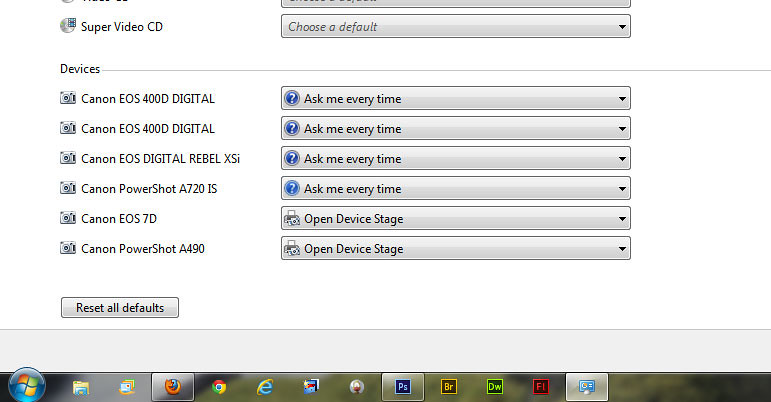
Another possibility is the autoplay options have changed. From the control panel you can change this.
 
Hi Paul

Neither of 3 cameras open Eos Utility when connected :(

looked in sound and hardware it say use autoplay for all media devices

on #1 suggestion Eos Utility isnt on the list :(

#2 it said ask every time

7648986746_3cc679e8e8_b.jpg


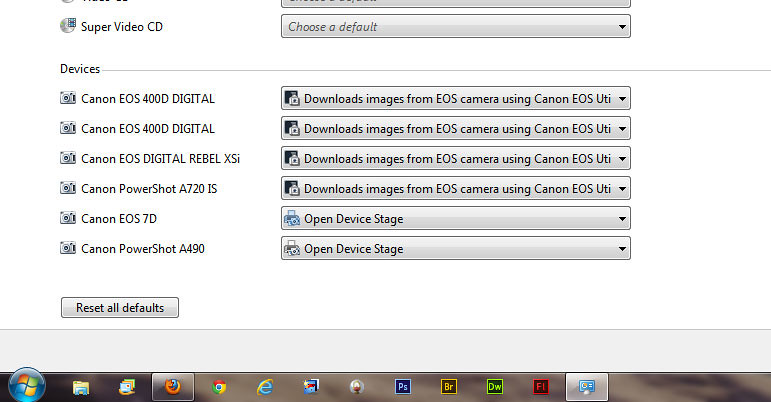
Changed to but where it say 7D theres two options the 1 you can see and the other Take No Action

7648986660_d9378eb86b_b.jpg
 
Last edited:
I noticed I was running eos utility 22.2 so updated, but now everytime I check the box start automatically and then close it down when I re start it its unchecked again I tried going to the EU folder and run the exe. as admin and also the same with the launcher file in that folder but its still unchecked after closing and reopening :suspect: :shrug:

one more thing the options in your #2 suggestion it still says Open Device Stage :shrug:

Hellllllllllllllllllp
 
Last edited:
Fixed the autorun for the CD/DVD thats working OK now edited all posts to do with that problem

In Device Manager, I also deleted the Host Controller of Universal Serial Bus controllers and its still not working after re booting and they reinstalled, I can open EU by clicking on it to download image just wont auto run :thinking: and every time I choose Start Eos Utility Automatically to download when cams connected, when I reopen it its unchecked again
 
Last edited:
I am having the very same problem with my camera too, its a 50d and it always used to start up utility as soon as I switched the camera on but now it does not and I have to open it manually.

Sorry I cannot help you, but you are not alone

spike
 
I am having the very same problem with my camera too, its a 50d and it always used to start up utility as soon as I switched the camera on but now it does not and I have to open it manually.

Sorry I cannot help you, but you are not alone

spike

Lets hope someone knows how to fix it Ive ask Neil g to have a look at my thread he maybe able to help us, on googling a lot of people have the same problem

Think its a registry problem
 
Last edited:
Surely someone got the solution is it registry (thinking maybe because autorun was disabled in the registry its obviously a installed prog thats made the changes my CDrom thats working now reg change) Usb recognises the camera is connected as it beeps, so why cant I change the options,(my cams connected) and Im running as admin
 
My pc win7 recognises the cam in other removable devices so uninstalled it from there DM then re booted plug cam in reinstalled, still dont start up and still cant change the option well I can but it unchecks when I restart
 
still not got it sorted

Neil was online yesterday so he may not be to help :( although I didnt get a reply from my PM to him so he may not have noticed it
 
Please Heeeeeeeeeelp I think its registry related, but what do I need to change, guessed it reg based anyway because the CDrom stopped starting up, both happened at the same time, and that was reg so guess this is samish
 
Just un installed USB Hubs and its still not working :( the usb is but utility will not start and I when I tick the box start when cams connected it lets me but if I look again its un checked
 
Last edited:
Got mine to work

On my new PC that I have just started up this evening I plugged in the 50D to the PC via usb and it came up with the box on the screen with all the different options on how to view the files, in that was an option to use eos utility so I clicked the box that said "always use this program etc etc" and clicked on eos utility and well it works every time now.

Hope that helps you a little more but it seems mine is sorted.

spike
 
Got mine to work

On my new PC that I have just started up this evening I plugged in the 50D to the PC via usb and it came up with the box on the screen with all the different options on how to view the files, in that was an option to use eos utility so I clicked the box that said "always use this program etc etc" and clicked on eos utility and well it works every time now.

Hope that helps you a little more but it seems mine is sorted.

spike

Nice one, mines still not sorted
 
well here are the regkeys..

http://msdn.microsoft.com/en-us/library/windows/desktop/hh127452(v=vs.85).aspx

i would compare with someone who has working EOS util.

EDITING YOUR REGISTRY INCORRECTLY CAN CAUSE ISSUES. BACKUP YOUR SYSTEM BEFORE PLAYING AROUND WITH IT.

Thanks Neil, I'll give those a go it must be a program that changed them I gout the USB to recognise when a memory stick was plugged by changing the reg and thats working, lets hope, the above does the trick :thumbs: Im going out for dinner so will do it tomorrow and let you know :thumbs:
 
Back
Top