Editing photos companies?

SazzyB100

Suspended / Banned
Messages
59
Name
Sarah
Edit My Images
Yes
Not sure if I am allowed to ask this here, but although I love taking photos of my 9 month old, I don't always have time to get the background just right before shooting! I can do really really basic editing but have a few photos where I would like the background removed as it is cluttered. Can anyone recommend anyone who can do this (and how much would I expect to pay?).

Thanks!

Photos are in jpeg or Nikon Raw (D7000 + 50mm + 18-200mm)
 
Most photographic studios/services should be able to do this. How much is going to vary, local prices and the time it takes to do, most people I know charge by the hour for this sort of editing.
Much more fun and cheaper to do it yourself, look up tutorials on background removal.
 
Last edited:
I'll have a go at them and give you a cheap price...
 
I have loaded one of the photos to Flickr:-
http://www.flickr.com/photos/sazzyb/sets/72157629287586161/

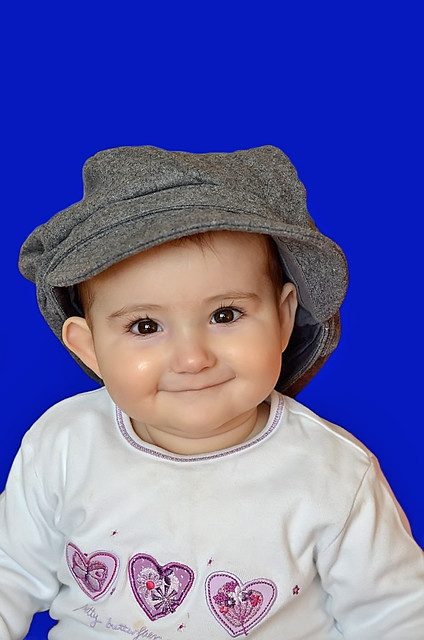
Perhaps someone can tell me if it can be done and if it is a quick job. I just want to get rid of the cluttered background, perhaps just replacing with a solid colour, like the dark purple by her ears.

I would love to learn to do it but working and looking after a baby doesn't leave much spare time!
 
As long as there is a good contrast between the model and the background, it shouldn't be too difficult. Hair tends to be the hardest thing to deal with realistically. If you do go to a commercial source, make sure you are happy with the result before parting with cash. I've seen some dreadful stuff from alleged `professional` retouchers.

But, why not see if you can get some cleaner shots? Far more satisfying, and cheaper.

NB: I've had a go at the one you've linked to, but don't want to post it here without your say-so.
 
My version...

Baby.jpg
 
Just a quickie,

Cropped it 8x10 and then used a black paintbrush over the background, 5 mins tops.

If you took your time you could easily make a better job.

686q.jpg
 
Oh wow that is brill! I have PS Elements, not the full one, and can't find a way to paint the background "quickly" although I have no idea what I am doing and am short on time!! How did you do that?! And thank you!! (To both who did photo edits for me!).
 
Last 2 is missing some of the hat...
 
Sarah, it is not that hard using Elements, here I used Elements 9.

1-Duplicate the main image as a layer, do this by going to the top bar and choosing Layer> Duplicate Layer.

2-Now go to Image > Magic Extractor and follow the Instruction and extract the image from the top layer (background copy) .

141504342.jpg


3- Now click on the Background layer in the Layers pallet to activate it, then choose the gradient tool and run it on the background.

141504343.jpg


This is just a quick and dirty example that took about two minutes in Elements 9. Hope this helps you get started.:)
 
Last edited:
Brill, as soon as I get a spare 10 mins I am going to have a go! You guys on here are brill!
 
Back
Top