Edit in Photoshop from within Lightroom as a JPEG

futureal33

Suspended / Banned
Messages
2,390
Name
Nick
Edit My Images
Yes
Afternoon all,

I am trying to pass files from Lightroom (4.1) to Photoshop (CS6) in JPEG format, but it is only allowing me to do it in either PSD or TIFF files...

Is there a reason why I cant pass from LR to CS6 as a JPEG?

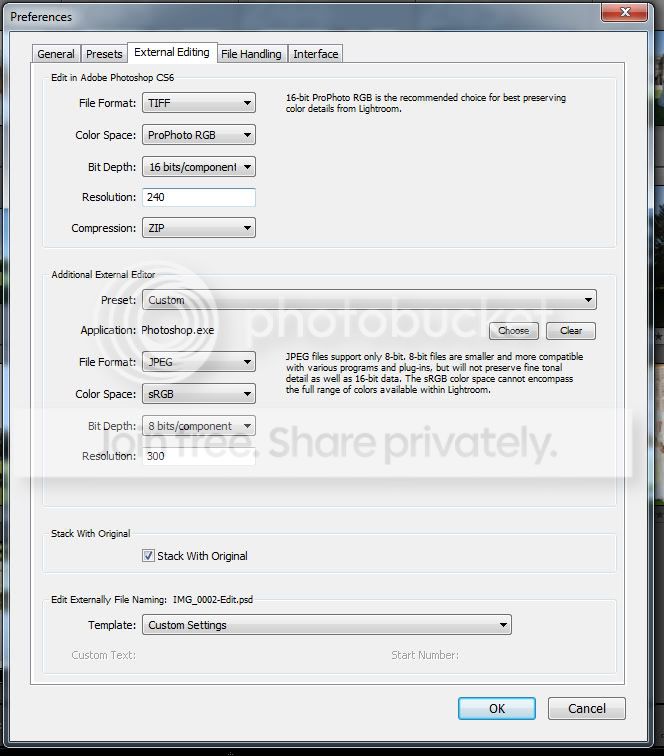
This is what I see from inside Lightroom settings:
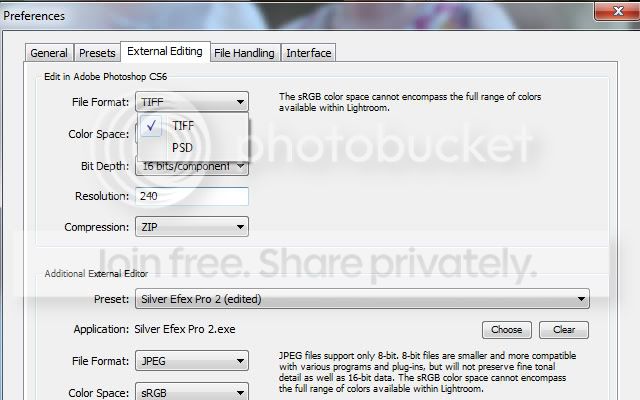
Untitled-1-3.jpg


Thanks :)
 
Why would you want to? As soon as you go to JPEG you lose a load of info that may be useful when you come back out of Photoshop. Or are your originals in JPEG format to start with?
 
I don't know why... but for some reason, if you set the Additional External Editor to CS6 then it does allow JPEG as a file format :shrug:
 
I don't know why... but for some reason, if you set the Additional External Editor to CS6 then it does allow JPEG as a file format :shrug:

Hi there,

Thanks for this info... however Im still having problems :(

I can set the external editor to be CS6, and can set it to JPEG etc as originally hoped for... however I cant REMOVE the default "edit in Photoshop CS6" option which appears at the top of this screenshot, and Lightroom is still exporting as a TIFF file!

Untitled-1-4.jpg


Any ideas?

Thank you
 
How are you opening the image from Lightroom? If you use the shortcut COMMAND - OPTION - E (I think CTRL - ALT - E on PC) then it will open with the additional editor instead of the default editor. Save the opened file and it will save a JPEG... or at least it does for me, I just tried it.
 
How are you opening the image from Lightroom? If you use the shortcut COMMAND - OPTION - E (I think CTRL - ALT - E on PC) then it will open with the additional editor instead of the default editor. Save the opened file and it will save a JPEG... or at least it does for me, I just tried it.

Keith - problem solved with your help :)
Many thanks!
 
Back
Top