
RKC
Suspended / Banned
- Messages
- 4,399
- Name
- Bob
- Edit My Images
- Yes



PureRaw isn't a complete raw editor and will only perform some initial processing on raw files, including their excellent Prime and DeepPrime noise reduction as well as lens optical corrections.
The processed image is then exported as a DNG for further editing in the editor of choice. DxO Photolab is the complete editor and includes the functionality of PureRaw
@RKC : It helps to think of PureRAW as DxO's version of Adobe Camera RAW (ACR) and PhotoLab as their version of Lightroom.
Edit: But PureRAW can do more than ACR as dja has said above.

I import through LR then batch-run all files through PureRaw (I don't take many images per shoot). Of course, you could do it the other way round as well. But I now swear by the product.


Yes, having no "whites" slider annoyed me too and I couldn't be arsed with using the Tone Curve as a workaround plus didn't really get on with much of the PL functionality so abandoned the product. As I use MFT gear, I now use just PureRaw instead to denoise raw images then do all my processing in ACR & Photoshop. I'm perfectly happy with this workflow.
How do you turn off Deep version Rich............got pure raw only and cant see away of just setting it to PrimeI do it the opposite way to you selecting the images I want to process then exporting them to LR.
Tend to use Prime which only uses lens correction rather than the Deep version with global sharpening turned off.
Sometimes think the Deep setting is a bit too aggressive and prefer to make my own minor adjustments in LR.
Whatever way its done the results are very impressive indeed, also acts as a very handy dng converter too.
I'll have a look in the morning Bob when I fire up the PC.How do you turn off Deep version Rich............got pure raw only and cant see away of just setting it to Prime
Only on the Deep Prime option, Prime just shows lens correctionIsn’t there a drop-down box where you can turn off lens sharpening? Or have I got the wrong end of the stick?
your right, found it which should have saw it but did not look again after trying it set to defaultsI'll have a look in the morning Bob when I fire up the PC.
Off the top of my head, I click process photos then the options come up
Its the middle of the three choices shown, but will check and reply on here.
Yes, having no "whites" slider annoyed me too and I couldn't be arsed with using the Tone Curve as a workaround plus didn't really get on with much of the PL functionality so abandoned the product. As I use MFT gear, I now use just PureRaw instead to denoise raw images then do all my processing in ACR & Photoshop. I'm perfectly happy with this workflow.
PureRaw exports aa dng file so the version of LR you have is irrelevant.I was wondering if i made a mistake buying Photolab when I could have used PureRaw as "pre-process" software, before outputting to LR, but then I remembered that my version of LR will never be updated to accommodate whichever camera body I buy next. I keep having to remind myself that...........
PureRaw exports aa dng file so the version of LR you have is irrelevant.
I'm still using LR 6.14, saying that two out of my three cameras are still supported by it.
Yes, of course, but I wouldn't necessarily want to put all my files through PureRaw (or Photolab.....)
I was wondering if i made a mistake buying Photolab when I could have used PureRaw as "pre-process" software, before outputting to LR, but then I remembered that my version of LR will never be updated to accommodate whichever camera body I buy next. I keep having to remind myself that...........

Takes me about 3 minutes per 10 files. As I don’t take many shots per shoot (I still think in film-cost terms!) and i do cull pre-processing, it’s not unacceptable. I just have to remember NOT to keyword before processing, as PureRaw naturally strips out all man-made metadata during its work.You would need an inordinate amount of time if my experience is anything to go by.
I'm not in a hurry so doesn't matter, reckon I would need to upgrade my PC if I did a lot of processing.
Im very happy to use both LR and PureRaw. Though if I wasn’t as heavily into LR, I do agree, PL would be my choice of editor. This old dog isn’t up to learning many more new tricks these days.I think you probably made a mistake buying PureRaw and keeping Lightroom/Adobe around.
PhotoLab is awesome and my sole choice of editing now.

Takes me about 3 minutes per 10 files. As I don’t take many shots per shoot (I still think in film-cost terms!) and i do cull pre-processing, it’s not unacceptable. I just have to remember NOT to keyword before processing, as PureRaw naturally strips out all man-made metadata during its work.
Im very happy to use both LR and PureRaw. Though if I wasn’t as heavily into LR, I do agree, PL would be my choice of editor. This old dog isn’t up to learning many more new tricks these days.
Horses for courses. I grew up with LR from its Rawshooter days, so although I don’t know it inside-out, I know enough to make it work for me. Today there are far more raw tools, most of them capable of excellent results.Fair do's.
Personally - I find it remarkably straightforward and you can create your customer workspace - keeping all the tools you use close at hand and arranged the way you like. LR does cataloguing etc more effectively - but I find it awkward and a much steeper learning curve than DXO.

The other change is that it will now process Fuji X-Trans files.I see that DXO have brought out a v2 version of PureRaw. From a quick look it seems that its only advantage over v1 is that integrates better with Lightroom. And it's not cheap to upgrade either......

Just incase like me you use Lightroom 6 as your DAM although DXO 2 gives the option to export from Lightroom 6 it will not work, assume because Lightroom 6 is old tech. Russ
Wasn't going to upgrade, been a bit miffed if I had though if it doesn't work with LR6Just incase like me you use Lightroom 6 as your DAM although DXO 2 gives the option to export from Lightroom 6 it will not work, assume because Lightroom 6 is old tech. Russ
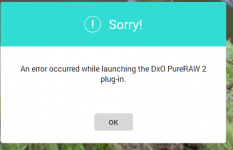
'through experience' I downloaded the new version to try it out , I use a Linear profile on images when sending to other apps but I also tried my camera profile for the Sony A9 ARW file and get same result.Just wondered if you have said that through experience or whether DXO told you that? The reason I ask is because they told me Photolab couldn't be linked to LR in the way i wanted, whereas in fact it can, and does so very well.
Hi,
As discussed above, I use Photolab in its "PureRAW equivalent" mode to pre-process my best files and then export them to Lightroom. I don't know if some setting has changed somewhere but I've noticed that the Photolab pre-process introduces colour balance and other changes which gives really horrible results. It seems to be a combination of white balance and added contrast and possibly other changes, because its impossible to return it to its original appearance using white balance only.
Has anyone else had this problem?