

You are using an out of date browser. It may not display this or other websites correctly.
You should upgrade or use an alternative browser.
You should upgrade or use an alternative browser.
DSLR Sensor cleaning kit.
- Thread starter swiftflo
- Start date
AndrewFlannigan
Suspended / Banned
- Messages
- 11,977
- Edit My Images
- No
I've been using this outfit on the few occassions I've needed to clean a sensor over the last couple of decades...
(A) is the Lenspen sensor cleaning kit. I found it sorted out most spots.
(B) is the Digipad cleaner system for really bad contamination.
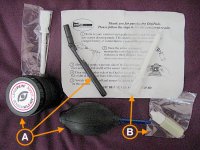
(A) is the Lenspen sensor cleaning kit. I found it sorted out most spots.
(B) is the Digipad cleaner system for really bad contamination.

Vintage Racer
Suspended / Banned
- Messages
- 730
- Name
- Glynn
- Edit My Images
- No
+1 for the above kit.........easy to use and works every time!
.
.

gremlin16
Suspended / Banned
- Messages
- 2,616
- Edit My Images
- Yes
Full frame kit I use:
https://amzn.to/3lnF1bG
APS-C kit I also use:
https://amzn.to/3jcFA5E
Video I made (it's for Nikon, but you get the idea)
Video
https://amzn.to/3lnF1bG
APS-C kit I also use:
https://amzn.to/3jcFA5E
Video I made (it's for Nikon, but you get the idea)
Video
AndrewFlannigan
Suspended / Banned
- Messages
- 11,977
- Edit My Images
- No
Amazon or Wex (among many others) do LensPen. DigiPad don't seem to be in evidence but there are various alternatives. I feel it's much better to use the LensPen system if you possible can. Cleaning swabs are a last resort in my opinion.Who stocks them please /.
Above all, take your time and be GENTLE!

Nikon f1.8
Suspended / Banned
- Messages
- 1,724
- Name
- Paul
- Edit My Images
- Yes
If it is just a hair will it not blow off ???

LeeRatters
Suspended / Banned
- Messages
- 7,354
- Name
- Lee
- Edit My Images
- Yes
Just don't use one of those sticky pad type things!

Craikeybaby
Suspended / Banned
- Messages
- 7,590
- Name
- Lewis
- Edit My Images
- Yes
For a hair I would use a rocket blower.
OP

swiftflo
Suspended / Banned
- Messages
- 1,336
- Name
- Peter
- Edit My Images
- Yes
If it is just a hair will it not blow off ???
Tried the blower but cannot shift it. Looking through the view finder it is in the top left hand corner. I have tried two different lens in case it was in either of them, so am assuming it is def on the sensor.For a hair I would use a rocket blower.

Ed Sutton
Suspended / Banned
- Messages
- 8,556
- Name
- Dave
- Edit My Images
- No
If it's visible in the viewfinder of a DSLR it's not on the sensor.Tried the blower but cannot shift it. Looking through the view finder it is in the top left hand corner. I have tried two different lens in case it was in either of them, so am assuming it is def on the sensor.
AndrewFlannigan
Suspended / Banned
- Messages
- 11,977
- Edit My Images
- No
Indeed.If it's visible in the viewfinder of a DSLR it's not on the sensor.
It is most likely between the focussing screen and the bottom of the prism. The 5D II has user replaceable screens so you just need to take it out, clean it top and bottom and also clean the bottom of the prism. That should solve your problem.
OP
swiftflo
Suspended / Banned
- Messages
- 1,336
- Name
- Peter
- Edit My Images
- Yes
Thanks for the info. Is there anywhere I can find instructions as how to take the screen out. Sorry but not very clever at some of these things.Indeed.
It is most likely between the focussing screen and the bottom of the prism. The 5D II has user replaceable screens so you just need to take it out, clean it top and bottom and also clean the bottom of the prism. That should solve your problem.
AndrewFlannigan
Suspended / Banned
- Messages
- 11,977
- Edit My Images
- No
I can't recall if it's in the main user manual. It's usually on the slip of paper that comes with replacement screens.Thanks for the info. Is there anywhere I can find instructions as how to take the screen out.
I no longer have a 5D but from memory it's
- Remove the lens
- Find the small tab that's at one end of the screen's front edge
- Using tweezers (not fingers) take hold of the tab and gently pull it downwards
- The screen should then slide out forwards
- Clean (only use a blower and a very soft brush, both sides of the screen and the underside of the prism
- Again with tweezers, gently replace the screen at the angle you removed it
- (make sure the tab is in the same place as when you removed it)
- ONLY once the screen is securely positioned, gently push the tab up with the tweezers until it locks in place
- Carefully clean the sensor with a blower (DON'T touch the sensor) in case you've pushed debris onto it.
OP
swiftflo
Suspended / Banned
- Messages
- 1,336
- Name
- Peter
- Edit My Images
- Yes
Many thanks.I can't recall if it's in the main user manual. It's usually on the slip of paper that comes with replacement screens.
I no longer have a 5D but from memory it's
There are some videos on the internet to show the process.
- Remove the lens
- Find the small tab that's at one end of the screen's front edge
- Using tweezers (not fingers) take hold of the tab and gently pull it downwards
- The screen should then slide out forwards
- Clean (only use a blower and a very soft brush, both sides of the screen and the underside of the prism
- Again with tweezers, gently replace the screen at the angle you removed it
- (make sure the tab is in the same place as when you removed it)
- ONLY once the screen is securely positioned, gently push the tab up with the tweezers until it locks in place
- Carefully clean the sensor with a blower (DON'T touch the sensor) in case you've pushed debris onto it.
AndrewFlannigan
Suspended / Banned
- Messages
- 11,977
- Edit My Images
- No
I'd look at some of the videos to check I have that sequence right, if I were you.Many thanks.
OP
swiftflo
Suspended / Banned
- Messages
- 1,336
- Name
- Peter
- Edit My Images
- Yes
Thanks again.I'd look at some of the videos to check I have that sequence right, if I were you.
LeeRatters
Suspended / Banned
- Messages
- 7,354
- Name
- Lee
- Edit My Images
- Yes
I remember swapping the focus screen when I had a Mk2 and it was a simple job but I did have the right tweezers type tool though.

tijuana taxi
Suspended / Banned
- Messages
- 15,748
- Name
- Rich
- Edit My Images
- Yes
OP
swiftflo
Suspended / Banned
- Messages
- 1,336
- Name
- Peter
- Edit My Images
- Yes
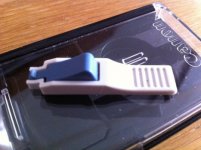
Thanks. I have now been informed that it could also be the Prism. I guess I may have to get it professionally look at.You ideally need the little tool designed for gripping the focus svreen
It looks like this below
I have one from my 5D days, but no Canon camera anymore.
@swiftflo So if you find you need it let me know and I'll drop it in the post
View attachment 346539
tijuana taxi
Suspended / Banned
- Messages
- 15,748
- Name
- Rich
- Edit My Images
- Yes
Thanks. I have now been informed that it could also be the Prism. I guess I may have to get it professionally look at.
Ok, hope you get it sorted out, but if you change your mind just let me know.

swanseamale47
Suspended / Banned
- Messages
- 10,876
- Name
- wayne clarke
- Edit My Images
- Yes
If it's on the screen or prism it wont show on the images, if it's showing on a pic then it's the sensor. Another option if it's not the sensor is to just ignore it, it wont do any harm.
AndrewFlannigan
Suspended / Banned
- Messages
- 11,977
- Edit My Images
- No
If the dirt is on the prism, it can only be on the bottom surface. Removing the focussing screen will give you access to that and you can clean it with a good blower. If it's stubborn, a Lenspen or similar will do the job.I guess I may have to get it professionally look at.
Or, as Wayne says, if it's not on the sensor, ignore it.

Last edited:
OP
swiftflo
Suspended / Banned
- Messages
- 1,336
- Name
- Peter
- Edit My Images
- Yes
Ok, hope you get it sorted out, but if you change your mind just let me know.
If it's on the screen or prism it wont show on the images, if it's showing on a pic then it's the sensor. Another option if it's not the sensor is to just ignore it, it wont do any harm.
Thanks everyone.If the dirt is on the prism, it can only be on the bottom surface. Removing the focussing screen will give you access to that and you can clean it with a good blower. If it's stubborn, a Lenspen or similar will do the job.
Or, as Wayne says, if it's not on the sensor, ignore it.