Dreaded Purple Fringing on Canon 10-22

dibbly dobbler

Suspended / Banned
Messages
3,158
Name
Mike
Edit My Images
Yes
Hi All. I have experienced this issue a lot with my 10-22 so really the question is would it be any better if I swapped to a Tokina 11-16 or is it just one of these things which affects all lenses in certain scenarios (ie areas of high contrast) ?

As a sub issue I have yet to find an easy way of fixing it with Photoshop Elements 9 - any suggestions ?

Thanks in advance for any replies :)
 
Last edited:
I don't know if the Tokina would be any better. This is a 100% crop from the corner of one of my most extreme examples with the Tokina.

11tmr7k.jpg


I don't use PSE, but in Lightroom 3 setting the purple saturation and luminance to minimum works well (as long as there isn't any purple in the picture of course)
 
Thanks for the reply :)

Very interested to see your image as above - I guess the DPF is just a fact of life to be dealt with then :thumbsdown:

I have had a couple of goes at correcting this in photoshop elements and although the magenta cast can be removed easily enough it removes it over the whole image which is hopeless!
 
Thanks for the reply :)

Very interested to see your image as above - I guess the DPF is just a fact of life to be dealt with then :thumbsdown:

I have had a couple of goes at correcting this in photoshop elements and although the magenta cast can be removed easily enough it removes it over the whole image which is hopeless!

Lightroom 4 is very effective with aberrations corrections, including purple fringing. See here http://blogs.adobe.com/lightroomjournal/2012/04/new-color-fringe-correction-controls.html Get a free 30 days trial.
 
Yep lightroom 4 has some very good tools for fixing this.
 
Not sure if you can do layer masks in elements (pretty sure you can though), but you can always apply your saturation layer so that the fringing is gone, then invert the mask (so it's all black and has no effect) then paint it back on to just the fringed areas. It's handy for when you can't quite eliminate severe fringing via automatic correction.
 
Devrij said:
Not sure if you can do layer masks in elements (pretty sure you can though), but you can always apply your saturation layer so that the fringing is gone, then invert the mask (so it's all black and has no effect) then paint it back on to just the fringed areas. It's handy for when you can't quite eliminate severe fringing via automatic correction.

Thankyou for the detailed reply! I am ashamed to say my photoshop skills are patchy at best and I've never quite got my head around layers :(
In all honesty it's going to have to be something simple if I am to get it to work!
 
Thanks for the reply :)

Very interested to see your image as above - I guess the DPF is just a fact of life to be dealt with then :thumbsdown:

I have had a couple of goes at correcting this in photoshop elements and although the magenta cast can be removed easily enough it removes it over the whole image which is hopeless!

Mike

If you have any Canon software get it loaded on your computer than download the latest version of Canons DPP software - it's free.

It allows you to remove the CA, correct the peripheral light fall off and if your really picky lens distortion as well.

It also has a new additional tool called a Lens Optimiser which is rather good but only seems to cover the more expensive lenses.

Look at my #13 post in this thread http://www.talkphotography.co.uk/forums/showthread.php?t=403543

I would stick with your 10-22, I have never seen CA from my lnes as bad as the sigma posted shot, and shooting tree branches against a bright sky is the worst possible situation for CA.

HTH

David
HTH

David
 
Hi David. Thanks very much that sounds very promising ! I do indeed have disk in the box my 60D came in which I have never bother to load up *hangs head in shame* - it has DPP 3.9 on it do I will give this a whirl later.
I do like the 10-22 but the DPF has always annoyed me so I guess it's good to know that the Canon is no worse than any other lens. I shoot a lot of sunsets etc where this kind of CA can often be an issue so I would like an idiot proof way of dealing with it!

Thanks again - I will report back later :)
 
Right - got DPP installed and had a quick play. I'm not sure on the correct workflow though - would you edit the RAW, save, then play in PSE ? What I'm finding is that the DPF doesn't appear until I've done the PSE bit at the end...

Most peoples complaint about DPP is that it's a bit clunky and not very intuitive to use, that may be true but it is free!

There are lots of video tutorials HERE but they don't play on my PC???.

I'm surprised by your comment about DPF not appearing until you get into PSE, by the time you are exporting from DPP all the fringing should have been taken care of.

HTH

David
 
Thanks again David :)

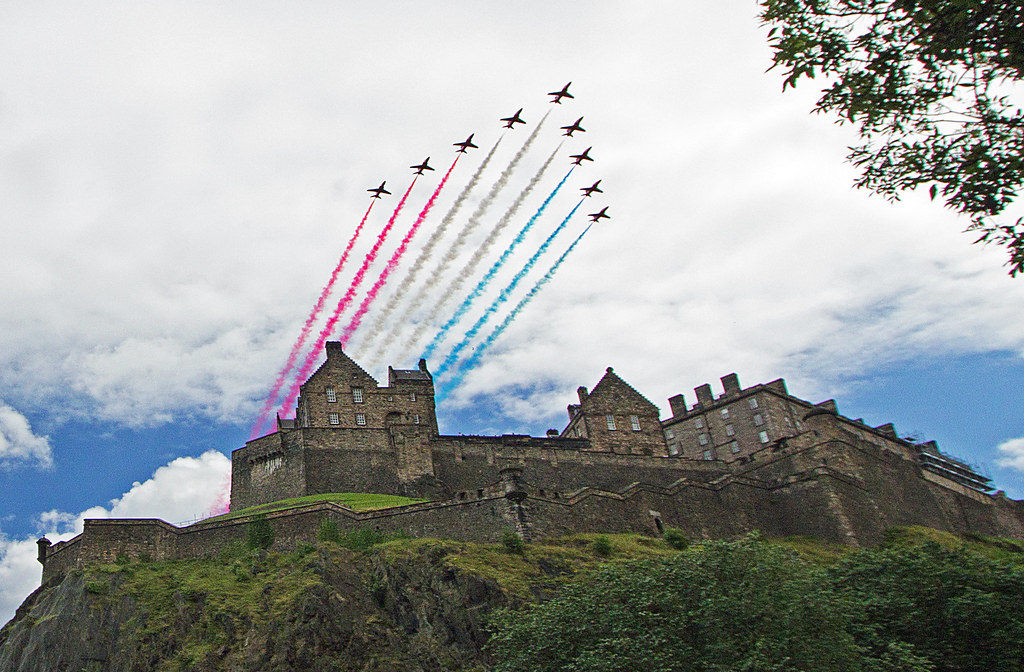
The shot I was working on was this one:


Red Arrows over Edinburgh Castle by dibbly dobbler, on Flickr

No filters to bring down the sky as I needed a decent shutter speed and wanted the jets sharp so I ended up with a very compromised image - dark foreground (ie the castle) and very bright/blown sky.

So to try and improve things I am lightening shadows on the foreground and heavily reducing the highlights in the sky - there didn't seem to be much range available in DPP but when I do it in PSE the DPF gets really really bad. Ended up just manually selecting it with a brush and desaturating it - a bit clunky but it worked :)
 
Back
Top