Dreaded Facebook compression and artifacts

sunnyside_up

<span class="poty">POTY (Joint) 2016</span>
Suspended / Banned
Messages
3,622
Name
Bethy
Edit My Images
No
So first - saved to every single hint and tip on the tinternet regarding best practices for Facebook - jpegs, pngs etc... taking into consideration file size, resolution, quality, overall pixel x pixel size etc... At full smack, it's fine, prints lovely... but as soon as I take it down for fb, the compression is giving me these crazy artifacts. Is it something in my processing that's doing this? Only really seems to show when I'm shooting on dark grey background, so I assume it has something to do with the blacks and not being able to handle gradient shades of.... Even when I've not altered my curves, I'm still getting this. Any ideas why? I seriously have tried everything I could regards to file saving. Sample from FB below... it's a screenshot crop of the image.

I've been getting it for awhile, not so noticable when viewing on a phone / device, but computer monitor... whoa! Makes me not want to post anything on Facebook with the dark grey background.

Thanks in advance, team.

B

Artifacts.jpg
 
People are more forgiving on FB, they tend not to be photographers.
Just give a link to Flickr as well for the pixel peepers...
 
People are more forgiving on FB, they tend not to be photographers.
Just give a link to Flickr as well for the pixel peepers...


Agreed but it's that demon on your shoulder whispering that YOU are aware lol...
The Flickr link is a good idea though :D
 
See there, I can't even see it on my phone, but on my monitor is abismal!!!
 
See there, I can't even see it on my phone, but on my monitor is abismal!!!
99% of people will view it on their phone.
So what's the problem?

Trees and wood spring to mind. :)


(BTW, it's 'abysmal' :police: )
 
See there, I can't even see it on my phone, but on my monitor is abismal!!!


Ok i've just switched laptop on, i know it's not going to help massively but i don't have a calibrated monitor or fancy laptop blah blah and it's actually barely noticeable on mine, so most of the general public probably won't see it either, unless it looks worse full image and all that?

Edit: i know it doesn't solve it, i get where you are coming from, it will only be fine if it was resolved lol
 
Last edited:
Ok i've just switched laptop on, i know it's not going to help massively but i don't have a calibrated monitor or fancy laptop blah blah and it's actually barely noticeable on mine, so most of the general public probably won't see it either, unless it looks worse full image and all that?

Edit: i know it doesn't solve it, i get where you are coming from, it will only be fine if it was resolved lol
Thanks for doing that.. .much appreciated.

Here's the facebook link to the image on my page... https://www.facebook.com/BethBotter...7080592069879/861661817278417/?type=3&theater

Have a looksie.
 
Thanks for doing that.. .much appreciated.

Here's the facebook link to the image on my page... https://www.facebook.com/BethBotter...7080592069879/861661817278417/?type=3&theater

Have a looksie.


I did.... seriously i wouldn't worry, it's barely noticeable, and by that i mean i can sort of see it but i'm searching for it because, well this thread :D It's not in your face omg what the hell is that type thing, so i unless some genius can come up with a fix, keep in mind most general public won't see it
 
I did.... seriously i wouldn't worry, it's barely noticeable, and by that i mean i can sort of see it but i'm searching for it because, well this thread :D It's not in your face omg what the hell is that type thing, so i unless some genius can come up with a fix, keep in mind most general public won't see it
Ahhh thanks mate. Much appreciated. Suppose because I know it's there, it like an itch you can't scratch.
Thanks for taking the time.
:)
 
I meant the pic :D

I can't see it on my laptop, but I have a bog standard setup. Most people will too.

Second chap doesn't look too happy!
Hahaha he wasn't... Nightmare session.

And thanks to you as well, for having a look. Must get over my ocd about it.
 
I'd love an answer to this, I've done exactly the same, every hint/tip and resource I can find on preparing photos for Facebook. I still see posterisation on grey and (especially) black backgrounds. I've no idea what else to try ....
 
It's gamma banding. On an uncalibrated machine it may look better or worse depending on how well the machine handles gamma. It doesn't look bad on my machine (calibrated MBPr) but even my computer exhibits some banding (i.e. it might not actually be in the image).
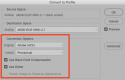
Images that are displayed smaller than they really are can exasperate the appearance of banding due to "compression" of the gradient. And FB converts images to it's own color space (sRGB-black scaled)... A black scaled profile is a "perceptual" V2 profile with black point compensation.

You could try converting the image to sRGB perceptual and editing for banding before uploading to FB... it might help.Screen Shot 2016-03-27 at 4.24.00 PM.png
 
Last edited:
I feel your pain Beth. It would really annoy me more if I were using FB as you are, to promote your work. The compression is terrible, but good to know what the issue is.
 
Two things to try:
  1. Add some noise - 1% monochromatic Gaussian, or fake film grain from LR or one of the emulation packages. It works to reduce banding introduced by processing so it might confuse facebook's processing too.
  2. Export as 2048px wide png; facebook is slightly kinder to this size and format. The Magic Export plugin for LR can create png files.
 
Back
Top