
DPP To Adobe?

John Lindsay

Suspended / Banned
Messages
126
Name
John Lindsay
Edit My Images
Yes
Hi All,


Just Processing the RAW shots from my First Wedding Shoot on Saturday.

I'm processing them in Canon Digital Photo Professional, to fix any white balance issues or over/under exposure etc, I then want to take them into Photoshop CS3 to do crops and or further editing (cloning out poles etc.)

So, I've changed all the files with wrong white balance, (of which there were quite a few as I went outside for the group shots and forgot to change off of the flash white balance preset) anyway, now I've changed them so the skies are nice and blue again, and the peoples faces aren't orange.

I go to look at them in Bridge, and the changes I have made in DPP don't seem to have applied, so I open it up in CS3, which opens it with Adobe's Camera Raw Converter, Still got the same problem though, the white balance and exposure tweaks I've made don't seem to be sticking.


Anyone any idea's what I need to do?


John
 
The more I look at it, I think it may be changing, but I just think the colours are better in DPP, it's something I've never really noticed before but it's annoying me now.

I'll work out how to do a screen shot with 2 files open side by side to let you see the difference.


John
 
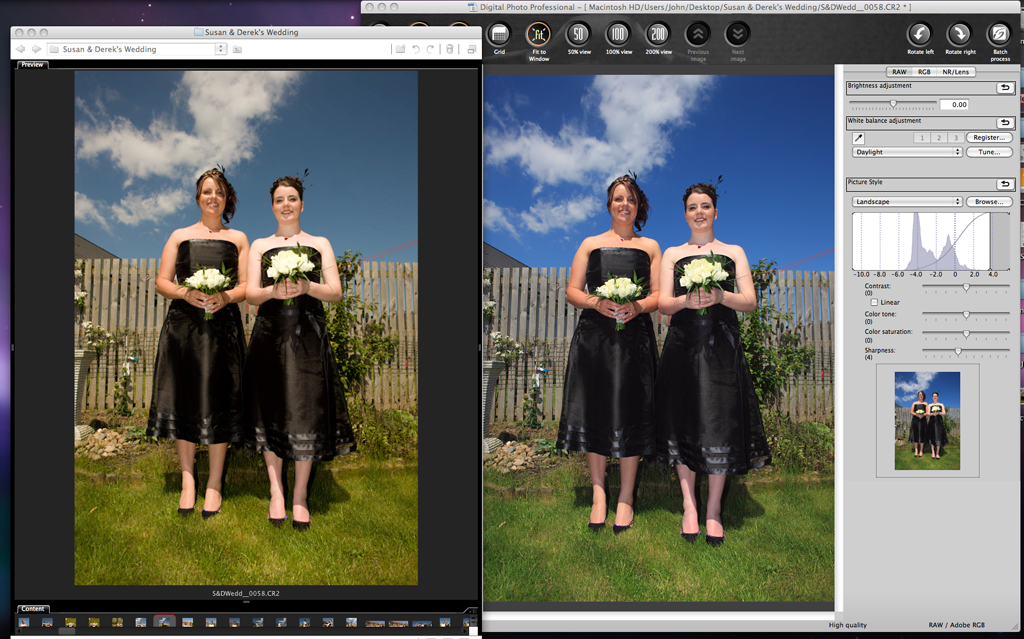
Screen Shot:

Bridge on the Left, DPP on the right:


2551881568_22dcdf708d_o.png


Any thoughts folks?


John
 
It's what I would have expected to be honest, DPP is better at converting Canon RAW than Adobe.

I just don't understand why everyone thinks Adobe is the best and only way to convert/manipulate images.
 
Having made the changes did you export the files to jpgs or tiffs? It's not enough to simple make some changes in DPP and save them as that doesn't actually affect the raw file, it just stores the changes for DPP to look at next time it reads the file but no other app will be able to see those changes.
 
I'm processing them in Canon Digital Photo Professional, to fix any white balance issues or over/under exposure etc, I then want to take them into Photoshop CS3 to do crops and or further editing (cloning out poles etc.)

Can't you do the cropping and cloning in DPP?

(walks off to ponder why people feel the need to clone out poles...)
 
I think DPP had such a bad rep with the original version most canon users (myself included), opted for other applications. The latest versions of DPP are very acceptable.

The problem Adobe have is they have to make an application that handles many camera makes and models. Plus the manufacturers, rightly so, tend to guard the camera/chip characteristics. If you look in the ACR module of CS3 you'll find a calibration option. You can use this to trim the saturation and luminance response of each channel to get the response you want. You'll probably increase red saturation and reduce green and blue.

If you have a Macbeth colour checker there is a procedure to calibrate individual cameras. Works for Lightroom as well
 
Thanks everyone for your help.

I think the problem is as pxl8 says, I didn't export the files, I just saved them.

So it's now away doing a batch process and the first few look to be the right colours, I'm happy with that.

Whiteflyer: I agree, I've never used DPP before, but I would say I'm happier with the results and will continue to process raws using it, I still think Photoshop is good for any other tweaks that need done, at the moment for example I'm struggling with my camera shooting squint, where the horizon isn't level, and if I forget to compensate for this when I shoot, I need to straighten and crop the image. It'll be going back in to be sorted ASAP!

Eau Rouge: I don't think you can crop or clone in DPP, and I want to clone out poles, not because they are people of polish origin, rather the groom has a lamp post growing out of his head in one shot which I couldn't avoid.

Chappers: That all sounds very technical lol, I want to get a screen calibrator in the near future, so I'll look into it then.


Anyway, Thanks again for all your help, I'm off to process another 700 or so shots :help: lol


John
 
The other thing I meant to ask was, If I now back up these Raw files, to a DVD, will the settings I have changed, stay in place for the next time I open them?


John
 
Yes, DPP is one of the few programs that saves the changes to the raw file, this doesn't mean edits are permanent as you can still revert to the original camera settings if you want to. DPP just appends data in the file. This has caused problems with other raw apps in the past but I've not heard of any problems for a year or more now.
 
Eau Rouge: I don't think you can crop or clone in DPP, and I want to clone out poles, not because they are people of polish origin, rather the groom has a lamp post growing out of his head in one shot which I couldn't avoid.

You can crop (Trimming tool) and clone (Stamp tool) in DPP. Maybe the clone tools in Photoshop are better, but the one in DPP meets my needs. The crop tool is a crop tool, it doesn't have a 'rule of thirds' grid, but other than that, it's a crop tool.
(I do understand why you'd want to crop out a pole from the grooms head :) )
 
If they want the poles cloned out .. they shouldnt have invited them to the wedding! :D
 
Back
Top