

John Lindsay
Suspended / Banned
- Messages
- 126
- Name
- John Lindsay
- Edit My Images
- Yes
Hi All,
Just Processing the RAW shots from my First Wedding Shoot on Saturday.
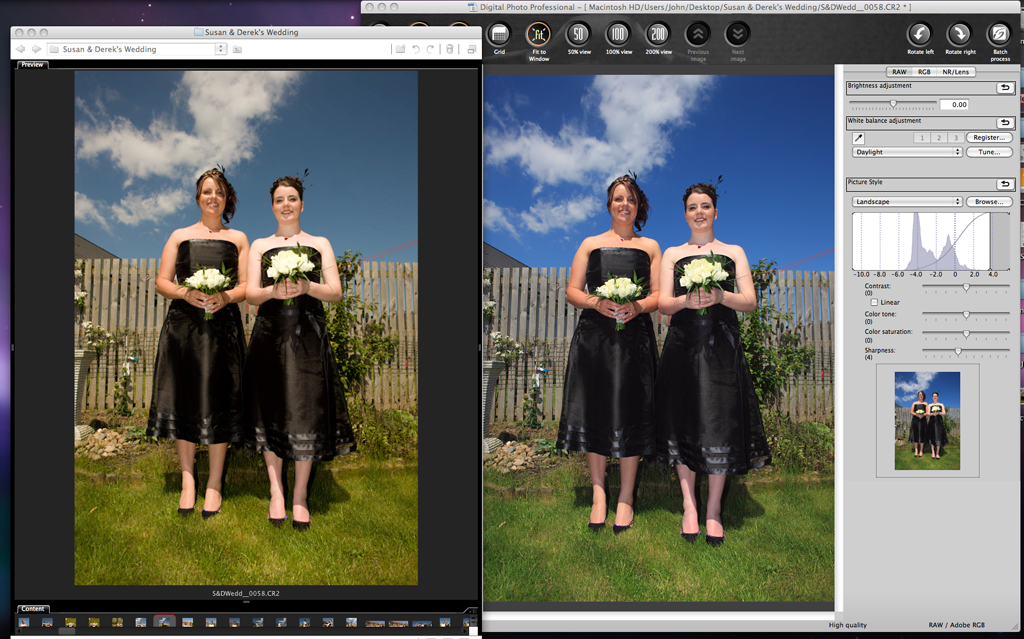
I'm processing them in Canon Digital Photo Professional, to fix any white balance issues or over/under exposure etc, I then want to take them into Photoshop CS3 to do crops and or further editing (cloning out poles etc.)
So, I've changed all the files with wrong white balance, (of which there were quite a few as I went outside for the group shots and forgot to change off of the flash white balance preset) anyway, now I've changed them so the skies are nice and blue again, and the peoples faces aren't orange.
I go to look at them in Bridge, and the changes I have made in DPP don't seem to have applied, so I open it up in CS3, which opens it with Adobe's Camera Raw Converter, Still got the same problem though, the white balance and exposure tweaks I've made don't seem to be sticking.
Anyone any idea's what I need to do?
John
Just Processing the RAW shots from my First Wedding Shoot on Saturday.
I'm processing them in Canon Digital Photo Professional, to fix any white balance issues or over/under exposure etc, I then want to take them into Photoshop CS3 to do crops and or further editing (cloning out poles etc.)
So, I've changed all the files with wrong white balance, (of which there were quite a few as I went outside for the group shots and forgot to change off of the flash white balance preset) anyway, now I've changed them so the skies are nice and blue again, and the peoples faces aren't orange.
I go to look at them in Bridge, and the changes I have made in DPP don't seem to have applied, so I open it up in CS3, which opens it with Adobe's Camera Raw Converter, Still got the same problem though, the white balance and exposure tweaks I've made don't seem to be sticking.
Anyone any idea's what I need to do?
John


 lol
lol

 )
)
