Do you think it may be because MS servers are too busy???

Box Brownie

Suspended / Banned
Messages
17,645
Edit My Images
No
Hi all

This is W7 Pro 64 bit

The last update was on 17th June which went fine was completed in under an hour in total and for the record I allow these by manually selecting as I have been keeping W10 at bay.

Well there was the usual first Tuesday of the month updates which I sorted through last night but Windows Update, which I have known to take say 30minutes to actually start the downloads was taking over an hour. So I stopped it.

This morning I thought I would try just one file and that also is in effect hanging Edit ~ about 3 hours and nothing 'happening' !

As a 'test' I tried manually getting it from the MS download centre and though the "Download" button is there and takes you to the "Thank You for downloading" page..........nothing happens. I have tried this in IE and Chrome an no difference.

So just what is going on???

Oh, FWIW I thought I would download the W10 ISO file here https://www.microsoft.com/en-gb/software-download/windows10 but the page now just comes up blank!

TIA for any insights and thoughts.

PS For the record, I will likely be doing a new build in the next 12 -24 months and yes paying for W10 which by then using the newer motherboard etc will be troublefree from the 'get go' as opposed to my concern that this homebrew box being none standard would not take too well to W10...................... :)
 
Last edited:
My updates happened in the background. My laptop slowed down for an hour or so and at next start up I had about 46000 updates.

(How can there possibly be 46000 updates in supposedly 'tried and tested' software?)
 
The Microsoft servers will be almost certainly be busy until end of day next Friday as the windows 10 doubters, those who hate change and those folk who have questionable transferable computer skills change their mind and upgrade to Windows 10 before the deadline on 29th July.
 
My updates happened in the background. My laptop slowed down for an hour or so and at next start up I had about 46000 updates.

(How can there possibly be 46000 updates in supposedly 'tried and tested' software?)

Which OS was that and what sort broadband speed have you got?

As for the number of updates, even if Win Update had lost the plot surely no way 46000 is possible!

The Microsoft servers will be almost certainly be busy until end of day next Friday as the windows 10 doubters, those who hate change and those folk who have questionable transferable computer skills change their mind and upgrade to Windows 10 before the deadline on 29th July.

Quite likely and also I read of and commented on another thread there is something W10 significant by way of a post free period upgrade due in early August........that is supposed to put W10 into a "new" place.
 
Last edited:
It's not down to MS server capacity. If I were you I'd download the July cumulative update for 7 and apply that from here https://support.microsoft.com/en-us/kb/3172605
Well, actually if it were me I'd upgrade your current install to 10, and if your WU is broken, I'd download the Win10 iso and do an inplace upgrade using that to 10.

The newer update you refer to is the Windows Anniversary Edition - if you want to see what this is like then enrol into Windows Insider Fast, the version you'll get is probably the release candidate.
 
Last edited:
It's not down to MS server capacity. If I were you I'd download the July cumulative update for 7 and apply that from here https://support.microsoft.com/en-us/kb/3172605
Well, actually if it were me I'd upgrade your current install to 10, and if your WU is broken, I'd download the Win10 iso and do an inplace upgrade using that to 10.

The newer update you refer to is the Windows Anniversary Edition - if you want to see what this is like then enrol into Windows Insider Fast, the version you'll get is probably the release candidate.

Thanks for that link will check it out :) As a cumulative update I wonder what it includes?

As for the W10 ISO as noted in my OP the page is blank :(
 
Thanks for that link will check it out :) As a cumulative update I wonder what it includes?

As for the W10 ISO as noted in my OP the page is blank :(
https://www.microsoft.com/en-gb/software-download/windows10ISO is up and running for me...
Given its not for you and WU isn't working either, I'd check DNS and also run an AV scan.

The Win 7 CU includes all previous patches, thereby saving you from having to install large numbers of individual patches.
 
https://www.microsoft.com/en-gb/software-download/windows10ISO is up and running for me...
Given its not for you and WU isn't working either, I'd check DNS and also run an AV scan.

The Win 7 CU includes all previous patches, thereby saving you from having to install large numbers of individual patches.

I found the Catalog site and interesting for sure :) I have downloaded the CU file and will use it later

In regard to the W10ISO page....................in Chrome it still fails where it only a few days ago was fine but does open in IE10 ! So will run that tonight?

Ref AV I have active scanning/protection using ESET.

In regard to WU running oh so slowly I found ref to KB 3138612 a WU update in March that I somehow made hidden....mention of W10 perhaps ;)

I found that in the catalog but the standalone installer of that KB stalls, not sure what that would happen but surmise the CU one will hopefully do its job?
 
Last edited:
if the intent is just to get current and on W10 then download the ISO, mount by doubleclicking and then run setup.exe from within Win7 and it'll upgrade. This will probably fix all your WU problems.
If you want to stay on 7 then the CU should get you current on 7. It may not fix any WU updates issues you have but it will get you to a current patch level.
For WU problems there's a few guides such as https://support.microsoft.com/en-gb/kb/971058 which might be helpful.
 
if the intent is just to get current and on W10 then download the ISO, mount by doubleclicking and then run setup.exe from within Win7 and it'll upgrade. This will probably fix all your WU problems.
If you want to stay on 7 then the CU should get you current on 7. It may not fix any WU updates issues you have but it will get you to a current patch level.
For WU problems there's a few guides such as https://support.microsoft.com/en-gb/kb/971058 which might be helpful.

In regard the CU and the WU update KB3138612 I mentioned.

I have two UAC accounts setup ~ a full admin and the one I use routinely that is restricted i.e.requires Admin Password to be entered when making changes......works perfectly as a layer of protection. However as mentioned above the standalone installers for bot the CU and th other KB just hung.

So Logged off and logged in to the Full Admin. Ran the CU and the installer reported that 'this update was not applicable to this computer...' (Note - I have OS in 64 bit and it was the AMD64 one I downloaded!) however the KB3138612 installed AOK but when I tried the CU again it stalled even under Full Admin login ???

FWIW WinUpdate does show the available list of updates as before and will see if with the update WU KB all is well again???

On the surmise all is well it is for WU issues that I am keeping W10 at bay......possibly unnecessarily so and though 100,000's of users worldwide have upgraded OK there are on the face of it enough who have issues/ongoing issues that has been putting me off :(
 
I think microsoft should extend the 29th deadline, as some of their updates have had a bad impact on users, best thing is to delay it as microsoft know some of the updates are useless.

That I suppose is a moot point as they need to monetise the new OS sometime and it has been the cynic in me that thinks that 'free' software at OS level is in effect creating a very large base of release candidate 'beta' testers but in a situation where said 'testers' have issues they are on their own.

As I said above my next build is loosely diarised and will likely be a barebones with W10 Pro pre-installed to make sure all is well :)
 
FWIW though Win Update identifies that there are updates available they will not download (at this time?)
 
This afternoon I have just built a Windows 10 Pro VM on my server using an ISO I had previously downloaded. During & after the install it retrieved a number of updates from MS with no delay.......

On Windows 7, Windows update journals the process in a file called windowsupdate.txt which is found in the Windows folder. It is fairly long winded but might give clues for any WU problems.
 
Last edited:
That I suppose is a moot point as they need to monetise the new OS sometime and it has been the cynic in me that thinks that 'free' software at OS level is in effect creating a very large base of release candidate 'beta' testers but in a situation where said 'testers' have issues they are on their own.

As I said above my next build is loosely diarised and will likely be a barebones with W10 Pro pre-installed to make sure all is well :)

No. Beta testers are Windows Insiders, not those taking GA builds. There is however a large amount of telemetry that will tell MS if there are significant problems or patterns that require attention so they can be resolved proactively.
WU in 10 has had a huge overhaul as OS updates are now delivered via WU.

Going back to your problem I'd start with the KB article I posted above to troubleshoot.
 
This afternoon I have just built a Windows 10 Pro VM on my server using an ISO I had previously downloaded. During & after the install it retrieved a number of updates from MS with no delay.......

On Windows 7, Windows update journals the process in a file called windowsupdate.txt which is found in the Windows folder. It is fairly long winded but might give clues for any WU problems.

No. Beta testers are Windows Insiders, not those taking GA builds. There is however a large amount of telemetry that will tell MS if there are significant problems or patterns that require attention so they can be resolved proactively.
WU in 10 has had a huge overhaul as OS updates are now delivered via WU.

Going back to your problem I'd start with the KB article I posted above to troubleshoot.

A goodly while back I had WU issue where all the history/installed updates were lost..........................I went through all the troubleshooting on the page @landwomble links to and nada as far as a solution was. The windowsupdate.txt (thanks for the reminder @broc ) was a good guide and FWIW by carefull restores and selective KB installs I identified a the KB culprit, I have it noted somewhere but it was kind of obscure in that bore no relationship to WU itself but I could reproduce the problem by leaving that KB off then installing all the others at that time, then that last KB and lo & behold the issue of WU falling over big time................restore to before that install and all was sweetness & light!

In the case now WU has all the history etc and 'tells me of the updates being ready' but just will not download them and the last successfull such update was 17th June. Now it is possible like before that there is a rogue KB fix that is causing the issue..............but I think there were 23 updates in that set and right now I have no time to run a diagnostic based on selective updating.

Onto W10 well the Media Creation Tool errored out 0x800704DD-0x90016 Googling took me here http://answers.microsoft.com/en-us/...-0x90016/0ec65f77-7878-4313-b32f-038be76380c7 then to here http://answers.microsoft.com/en-us/...so-files/35cde7ec-5b6f-481c-a02d-dadf465df326 and then to the TechBench download here https://www.microsoft.com/en-us/software-download/techbench which only works in IE

I am downloading the ISO now with approx 2 hours to go and I am in tow minds whether to update/upgrade to W10 because conspiracy theories aside though I like the overall way and stability I enjoyed with W7 is it/MS is going to keep giving me grief it looks like W10 is the way to go ???

Edit ~ perhaps I need a guide as to best practice to install the upgrade and what to do if it fails in any way to get me back to W7 or other best place :)

PS the file coming from Tech Bench is Win10_1511_2_English_x64.iso
 
Last edited:
PPS to my post above

In the Get Win10 app which I do not have I understand it runs a compatibility check of the current hardware/firmware/drivers, is that correct?

If so does it actually work and is there a way to run the check other than the app i.e. is this tool downloadable separately to run the check :)
 
Try the old clearing of the software download folder trick (Google is your friend)

My updates happened in the background. My laptop slowed down for an hour or so and at next start up I had about 46000 updates.

(How can there possibly be 46000 updates in supposedly 'tried and tested' software?)
I've told you a million times not to exaggerate...

Seriously though I think a fresh w7 sp1 build has about 300-400 updates. Ms don't make service packs any more (takes too much time and resource to make and test apparently) so expect it to climb.
 
Try the old clearing of the software download folder trick (Google is your friend)


I've told you a million times not to exaggerate...

Seriously though I think a fresh w7 sp1 build has about 300-400 updates. Ms don't make service packs any more (takes too much time and resource to make and test apparently) so expect it to climb.
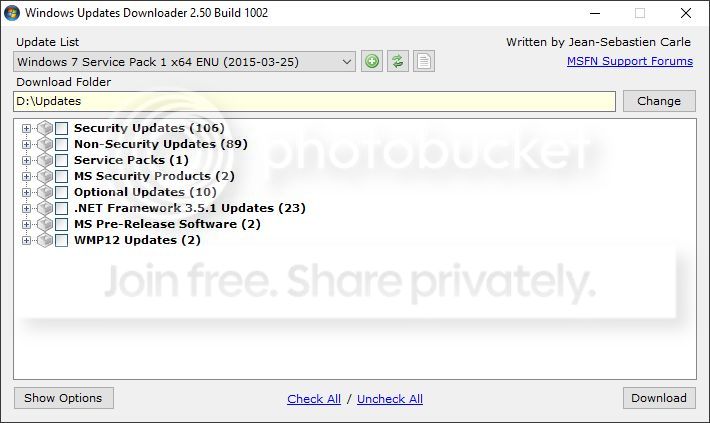
This was on Friday. 46538 updates...
 
In the Get Win10 app which I do not have I understand it runs a compatibility check of the current hardware/firmware/drivers, is that correct?
It's not perfect.

You should also run a full update/diagnostics scan from your PC manufacturer, for example several models of Dell PCs require a BIOS update to run Win10 smoothly but the MS compatibility update can't detect this. It also can't detect certain manufacturer specific drivers either. Find your PC manufacturers website, find the support pages and check for diagnostics or a specific note about Win10 compatibility.
 
It's not perfect.

You should also run a full update/diagnostics scan from your PC manufacturer, for example several models of Dell PCs require a BIOS update to run Win10 smoothly but the MS compatibility update can't detect this. It also can't detect certain manufacturer specific drivers either. Find your PC manufacturers website, find the support pages and check for diagnostics or a specific note about Win10 compatibility.

As mentioned this is a homebrew PC using a Gigabyte motherboard and nVidia GPU

I surmise the GPU will have or has suitable drivers as part of the W10 'set' though in the past W2K and W7 I have found the nVidia drivers best for robustness

I will have to double check what Gigabyte have to say as this board is few years old and the last F15 BIOS is equally so!
 
Try the old clearing of the software download folder trick (Google is your friend)
This was what worked for me and my sister's partner recently when we had the same problem.
 
This was on Friday. 46538 updates...
for what??

march last year there was about 200 for W7SP1 (unfortunately this app is no longer maintained so cant check now), cant see its rocketed up to 46.5k.

Clipboard01_zpsveztub2l.jpg
 
Last edited:
for what??

march last year there was about 200 for W7SP1 (unfortunately this app is no longer maintained so cant check now), cant see its rocketed up to 46.5k.

Clipboard01_zpsveztub2l.jpg

I've no idea.
 
I think microsoft should extend the 29th deadline, as some of their updates have had a bad impact on users, best thing is to delay it as microsoft know some of the updates are useless.
Delay? They've given everyone 12 months already. That is pretty generous from what I can see.

I've been happily using it for the last 12 months, if something isn't working or doesn't have a driver I'd look towards that peripheral manufacturer and reconsider my options.
 
Well.

I found suitable W10 driver for the nVidia GPU

But I asked Gigabyte whether the motherboard was OK and got this reply. NB the board is the P55A-UD4 (ver.2) with an i5 760 Quad Core

"Please understand that this motherboard was manufactured and released before Windows 10 ready in the market and chipset vender does not release Windows 10 driver for this model, some advanced Windows 10 features require optimized specifications may not work.

If you want to use Windows 10, you can try to see if inbox driver works. However, if you find any problem running Windows 10, please revert back to those operating system verified to support, for example Windows 7/Vista/XP"

So sounds like 'suck it and see' but how much of a risk, in practice, is a test installation likely to be should the need to roll back (after the 29th July?) be needed?
 
Last edited:
Well.

I found suitable W10 driver for the nVidia GPU

But I asked Gigabyte whether the motherboard was OK and got this reply. NB the board is the P55A-UD4 (ver.2) with an i5 760 Quad Core

"Please understand that this motherboard was manufactured and released before Windows 10 ready in the market and chipset vender does not release Windows 10 driver for this model, some advanced Windows 10 features require optimized specifications may not work.

If you want to use Windows 10, you can try to see if inbox driver works. However, if you find any problem running Windows 10, please revert back to those operating system verified to support, for example Windows 7/Vista/XP"

So sounds like 'suck it and see' but how much of a risk, in practice, is a test installation likely to be should the need to roll back (after the 29th July?) be needed?

I'd be surprised if it didn't work. If the compatibility testing says it's OK, it almost certainly will be. Rollback is easy as well.

Interesting licencing point: once a PC has had 10 installed and activated it will NEVER need a key for a clean install of 10 in future. The hardware fingerprint is stored and next time you do a clean install it will activate over there internet without need for a key.
So if you're thinking of trying 10, do it at least for a short time prior to the end of the month.
 
I'd be surprised if it didn't work. If the compatibility testing says it's OK, it almost certainly will be. Rollback is easy as well.

Interesting licencing point: once a PC has had 10 installed and activated it will NEVER need a key for a clean install of 10 in future. The hardware fingerprint is stored and next time you do a clean install it will activate over there internet without need for a key.
So if you're thinking of trying 10, do it at least for a short time prior to the end of the month.

Thanks for the insight :) I have not used the compatibility tester because that was in the W10 App (KB????) as I have been manually hiding the pesky KB's associated with W10

But as you say/infer there are lots older kit out there?

Do you know if there is standalone W10 compat tester?

Lastly, I have the ISO from MS TechBench page and made the DVD.................................can you recommend a checklist of things to do (if I do?) before I load it up :)

Edit ~ in regard to your last point.................if I were to later swap out the motherboard only i.e. keeping all the other parts except the m/b and processor how would that impact on the licensing? (NB as mentioned i have the nVidia GPU and FWIW 4 HDD's) As the only things I should need to do is be ready to update/replace all the m/b related drivers.
 
Last edited:
i suspect it may have been a UI bug.

I've seen this and I think it's more a case of, once the updates are being applied (following shutdown/boot) each change to a registry setting and each file touched counts as an update.
Might be wrong though....
 
Thanks for the insight :) I have not used the compatibility tester because that was in the W10 App (KB????) as I have been manually hiding the pesky KB's associated with W10

But as you say/infer there are lots older kit out there?

Do you know if there is standalone W10 compat tester?

Lastly, I have the ISO from MS TechBench page and made the DVD.................................can you recommend a checklist of things to do (if I do?) before I load it up :)

Edit ~ in regard to your last point.................if I were to later swap out the motherboard only i.e. keeping all the other parts except the m/b and processor how would that impact on the licensing? (NB as mentioned i have the nVidia GPU and FWIW 4 HDD's) As the only things I should need to do is be ready to update/replace all the m/b related drivers.


I've run 10 on some really crappy hardware and it's been fine. If it's not on yours then it should tell you prior to the install if you run the 10 setup.exe from within your existing OS.
Not really any checklist to do prior - I'd always back up data just in case, the 10 upgrade is very, very robust indeed but you're keeping backups already right? So take another :-)

With regards to the automatic activation based on hardware fingerprint - we don't publish the exact algorithm for obvious reasons. It's pretty tolerant of hardware change, although a complete motherboard swap might possibly trigger it. Although if it does, you can phone MS and explain that you've changed a mobo and they will activate it over the phone for you.

When you've got 10 installed I'd run a defrag. Once you're happy with 10 then you can remove the previous install of your last OS using disk cleanup and claim back some HDD space - if you do this, then again do a defrag afterwards.
 
I've run 10 on some really crappy hardware and it's been fine. If it's not on yours then it should tell you prior to the install if you run the 10 setup.exe from within your existing OS.
Not really any checklist to do prior - I'd always back up data just in case, the 10 upgrade is very, very robust indeed but you're keeping backups already right? So take another :)

With regards to the automatic activation based on hardware fingerprint - we don't publish the exact algorithm for obvious reasons. It's pretty tolerant of hardware change, although a complete motherboard swap might possibly trigger it. Although if it does, you can phone MS and explain that you've changed a mobo and they will activate it over the phone for you.

When you've got 10 installed I'd run a defrag. Once you're happy with 10 then you can remove the previous install of your last OS using disk cleanup and claim back some HDD space - if you do this, then again do a defrag afterwards.

Ah! So setup exe will do a compat check to ensure it can continue.

Ref backups - all data (image files and docs various) on non OS internal and in case of images external hdd's as well.

My outlook 2007 mail folder is also on the non OS HDD.

How is W10 with partioned drives? A throwback to my w2k days my OS c drive is a partition on of one drive and other partition E drive is where I have installed all my programes apart from a few where the default is not changeable.

On the backup front are you talking only of data or do you mean using say Macrium Refect to take a full W7 OS clone/backup to one of the other internal drives?
 
Last edited:
Ah! So setup exe will do a compat check to ensure it can continue.

Ref backups - all data (image files and docs various) on non OS internal and in case of images external hdd's as well.

My outlook 2007 mail folder is also on the non OS HDD.

How is W10 with partioned drives? A throwback to my w2k days my OS c drive is a partition on of one drive and other partition E drive is where I have installed all my programes apart from a few where the default is not changeable.

On the backup front are you talking only of data or do you mean using say Macrium Refect to take a full W7 OS clone/backup to one of the other internal drives?
Windows is Windows when it comes to partitioned drives. Backups are your choice, there should be negligible risk in an upgrade but I would always recommend backing anything up in case of user or system error...
 
Hey Ric, you should work in Platinum support so next time we log an MS case we can speak to you instead ;)
 
My OH is currently trying to upgrade to windows 10 from windows 8.1 but has given up trying to use the "upgrade" approach so is now doing a clean install from a windows 10 dvd i downloaded and burnt.

There is obviously no "key code" for a downloaded version of w10 and I'm hoping it will auto activate once it realises the pc had w8.1 on it before (but it might not with a clean install) - does anyone know how long w10 will work for before being activated?
 
Hi all

This is W7 Pro 64 bit

The last update was on 17th June which went fine was completed in under an hour in total and for the record I allow these by manually selecting as I have been keeping W10 at bay.

Well there was the usual first Tuesday of the month updates which I sorted through last night but Windows Update, which I have known to take say 30minutes to actually start the downloads was taking over an hour. So I stopped it.

This morning I thought I would try just one file and that also is in effect hanging Edit ~ about 3 hours and nothing 'happening' ! .................................. etc.

Seems to be a common problem. Try a Google search.

I have two PC's. Both have W7 64 bit professional OS and have exactly the same additional software.
One PC gets updates quickly and faultlessly, but the other hangs on "searching for updates" for hours and gets nowhere.

The difference between the two PC's is that the one that hangs has not been used for 6 months. Everything on it that needed updating did so without a hitch ........... just bloody windows updates (I have tried the MS advice/fix on how to cure the problem).

I only take the critical updates and most of these seem to be for IE.
 
Back
Top