Do you save RAW and JPeg? or just RAW?

.... In case you don't know, image files with 2048px as their longest side tend to work best on social media. For example, when 2048px they avoid Facebook applying their automatic algorithms to change your image size hence reducing image quality.

Although Instagram's official size grid is 1080 x 1080 px I find no problems with my 2048px JPEG images posted there. For convenience I output all my keepers at 2048px longest unless for Giclee printing or commercial purchase.
Thanks for that. I honestly don't understand what 2048px is or how to end up with it, but I'm sure I can soon learn.
 
Never bothered with low quality JPEGs (although raw shooters will argue that JPEGs are ALL low quality...), I've always gone for as large as possible with as little compression as possible to keep what quality IS there, there. I've tried raw and maybe it's my processing but a large majority of people have preferred the cameras' choices in processing to mine, as have I!


My reason (sorry I didn't make it clear) for low quality JPEGs was to to make it quicker to load and look at and choose what was worth keeping. I don't need higher quality to check focus, blur, bad composition etc etc.
And I did say I was changing for most outings, as I thought the camera did a good job with the JPEGs :)
 
...(although raw shooters will argue that JPEGs are ALL low quality...)
Live and let live.

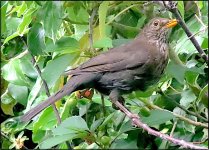
My little Powershot Zoom only gives .jpg output in any case and many forums (including this one) limit us to a maximum of 850 pixells on the long side, so there's no decision to make when grabbing snapshots. This Blackbird was grabbing wild cherries outside our kitchen window just now...

Blackbird and wild cherries PSZ IMG_0136.JPG
 
Thanks for that. I honestly don't understand what 2048px is or how to end up with it, but I'm sure I can soon learn.

When you open a picture in your processing software there's be an option somewhere to see and alter the image size.

The image size will depend on the camera. For example my Sony A7 gives 3:2 images which are 6000 x 4000. In my Adobe CS5 up at the top there are various option and one is "Image" and if I click on it I get a load of options one of which is "Image Size" and with this I can resize the image to make it smaller so I can email it to people or post it on forums :D

For example when I post pictures here they're resized to be 1,000 pixels on their longest side.
 
Last edited:
As others have said. There isn't a right answer. The camera manufacturers have realised that everyone has quite legitimate different requirements so rather than imposing their own opinion on what is correct, there are lots of options.
 
When you open a picture in your processing software there's be an option somewhere to see and alter the image size.

The image size will depend on the camera. For example my Sony A7 gives 3:2 images which are 6000 x 4000. In my Adobe CS5 up at the top there are various option and one is "Image" and if I click on it I get a load of options one of which is "Image Size" and with this I can resize the image to make it smaller so I can email it to people or post it on forums :D

For example when I post pictures here they're resized to be 1,000 pixels on their longest side.
Thanks Alan
 
I've set my cameras to shoot RAW only as that seems to be a good way to go (for me) as I process and then save as a jpeg, which I can do many times if i save the jpeg with a different name.
Also if I'm taking lots of shots, when I look at the card when I've downloaded to the pc, I've only half the amount of shots.
 
For work as a wedding photographer I shoot raw and back up card takes jpeg. on my personal camera I shoot jpeg 99% of the time and if a wall hanger of a shot presents itself I will change to raw for that shot .
 
RAW only .
 
I generally safe both. The JPEGs only as a backup until I transferred the raws from the camera. When make pictures in social events with friends and family, JPEGs are useful as many people then want to see pictures quickly, such as the next morning.
 
I shoot and save both. One feature I like is if I shoot a black and white in camera I have a BW jpeg and a full colour raw (if I change my mind later). Is it a deal breaker?, no. I can easily make a better BW in Photoshop or LR but it's handy to have full size BW to asess if it works before I play with the raw.
Personally I save EVERYTHING! even the dodgy shots as long as they at not OOF. Which is why I have dozens of hard drives and thousands ov dvds.... paranoid comes to mind :)
 
Never shoot JPGs. Mind you with a Nikon D850 the RAW files are so large its tempting use JPGs! No, I never use JPGs - too much work is done for you by the camera manufacturer, assumptions are made. Try it yourself, if those assumptions are always spot on then fine, but my personal opinion is that RAW files contain so much information which allows you to be creative. So, remember, hard disk space is a factor.
 
Exclusively RAW. A RAW file has captured approximately 5x the amount of data valuable for getting the most out of both your camera and image. It's a no-brainer IMO.
 
I accidentally shot a shed load of jpegs the other week and didn't realise until I came to pull back the highlights in a bright sky and there wasn't as much to retrieve as I expected. Apart from that they were fine to work on.

I managed for the best part of ten years without a raw option in a camera. I reckon I could do the same today. But as it's no more time consuming or costly to process a raw file than a jpeg I might as well have the greater freedom to correct exposure f*** ups that raw files offer
 
I shoot mostly RAW but save mostly Tiffs at full resolution. I can export what ever I need from them.
However I do have a dump of small Jpegs that I have used on the web..
 
I've just re-joined this forum and the replies to this topic have fascinated me! You have probably come to the conclusion that there is no right/wrong answer. A couple of things I don't think have been mentioned...

1) Remember the future. RAW can be converted to JPG. JPG can't be converted to RAW. In the future your photography might take off and you might wish you had the RAWs so that you can manipulate the photos in different ways. This is a lot more difficult with JPGs.

2) You need a specialist program to view RAW files. True all manufacturers provide these free but I have found the free ones are basic, but they work. All browsers can show JPGs and all paint programs can manipulate JPGs. I just depends on what you're going to do with your photos now, but also in the future. For me RAW 100%.

I'm going to sound like an old father giving advice to his children (sorry about that), but think of the future. I did JPGs once and regretted it. Who has the right answer? You do!
 
Both,
If I have the time and the image needs some work then I edit the RAW image. When the image is 'right' straight out of the camera and is needed ASAP then the JPEG will suffice (I always save the highest quality JPEG as sometimes, just to save space on my cards I turn off RAW I forget to reset my camera to save both files....).

There's no right or wrong way to be honest.
 
JPG can't be converted to RAW.

I think JPEGs can be converted to DNG using the Adobe Raw converter. Am I right? Long time since I used the programme to change NEFs to DNG (before I subscribed to Adobe CC) but I am sure you could also convert JPEGS. Pointless, I know.
 
I think JPEGs can be converted to DNG using the Adobe Raw converter. Am I right? Long time since I used the programme to change NEFs to DNG (before I subscribed to Adobe CC) but I am sure you could also convert JPEGS. Pointless, I know.
If they can be converted then you're not getting the RAW information back. When I said you can't convert back to RAW I should have said you can't reclaim the information that would be stored in the RAW file, sorry for the confusion.
 
Last edited:
I've just re-joined this forum and the replies to this topic have fascinated me! You have probably come to the conclusion that there is no right/wrong answer. A couple of things I don't think have been mentioned...

1) Remember the future. RAW can be converted to JPG. JPG can't be converted to RAW. In the future your photography might take off and you might wish you had the RAWs so that you can manipulate the photos in different ways. This is a lot more difficult with JPGs.

2) You need a specialist program to view RAW files. True all manufacturers provide these free but I have found the free ones are basic, but they work. All browsers can show JPGs and all paint programs can manipulate JPGs. I just depends on what you're going to do with your photos now, but also in the future. For me RAW 100%.

I'm going to sound like an old father giving advice to his children (sorry about that), but think of the future. I did JPGs once and regretted it. Who has the right answer? You do!


I wouldn't call IrfanView a specialist programme, but you can use it to view and make some adjustments to RAW files, and save them as JPEG

With programmes like Gimp and Affinity, there is a lot you can do with JPEGs as long as they are reasonably correctly exposed.

Most modern cameras do a good job with JPEGs, and many people will find that totally satisfactory.

Mine is probably 75% JPEG and 25% RAW, never regretted it, never going to make it my source of income, and never regretted what I chose at the time.

I don't see that those who use only JPEG are any poorer photographers, that is judged by the results THEY want, and that is subjective

For many, or maybe most, RAW means doing things they don't want to or don't need to
 
Must admit I've converted and saved JPEG's as raws when I didn't have or have lost an original raw just so I have a snapshot of the file which will not change. I know it's only got the data of the JPEG it was created from but at least it's now frozen in time and can be fiddled with to create different JPEG versions without degrading further.
 
Since starting the thread I have moved to saving in RAW in the camera and editing before saving a finished JPEG. Seems to be working well for me.
 
Since starting the thread I have moved to saving in RAW in the camera and editing before saving a finished JPEG. Seems to be working well for me.

That's what I do.

Sometimes blue skies can display banding. It's rare but I have seen it in jpegs and saying as a tiff avoids the issue. tiffs can be big though.
 
Last edited:
When I first got a DSLR I shot loads in jpg, but looking back I wish I'd shot them in RAW because I'd be able to process them better and improve the shadows and highlights, taking a rather average photo and making it a bit more reasonable. Particularly useful as those early shots were when my kids were little and they'll never be little again. My camera at the time wasn't great in low light, so having the maximum amount of data to process would make the end result better.

As for now, I shoot RAW all the time. I don't have the option of a second card, so just RAW files. There's no point saving RAW and JPG to one card as you'll just fill your buffer and card quicker and it's giving you nothing in terms of a backup.
If I want to upload directly to FB or Instagram then I transfer the files from camera to phone directly via Wifi and the Canon app does the RAW to jpg conversion.
At home I process the RAW files and then export a smaller jpg file for web uploads and the large jpg as a finished edit for keeping.
I keep all my files unless it's obviously out of focus or a failed shot, then it's deleted from Lightroom and the drive. I have found fairly regularly than I'll go back to a shoot from 6 months ago and look through the unprocessed shots and think "actually that one might interesting to process" and then give it a go.

I'm not shooting commercially so I don't have deadlines or requirements to fulfil, so I don't need a speedy workflow. I can do it at my own speed to my own needs.

It's true that some people are very happy with what comes out of their camera and indeed with phone cameras, they have even cleverer photo processing algorithms to make them look "better". But many current phones now have the option to shoot RAW and that means you can have all that extra data for processing. Phone manufacturers wouldn't bother putting it into phones if people didn't want it. It's an option that's there if you want it, but it's down to the user as to whether to use it or not.
 
Sometimes blue skies can display banding. It's rare but I have seen it in jpegs and saying as a tiff avoids the issue. tiffs can be big though.

If you're using Lightroom and Photoshop there is a trick that gets round this banding problem. If you export a photo from Lightroom as a JPG you can get the banding. However if you export the RAW as a DNG, then load the file into Photoshop using the RAW converter, and then save as a JPG you don't get the banding. Then dump the DNG as you don't need it anymore. I don't know what's wrong with Lightroom's JPG export, but this works for me. Might not work for everyone but does the job 100% every time for me.
 
Both - sometimes I want to quickly share even the worst snap - disc space & SD space is cheap.
 
If you're using Lightroom and Photoshop there is a trick that gets round this banding problem. If you export a photo from Lightroom as a JPG you can get the banding. However if you export the RAW as a DNG, then load the file into Photoshop using the RAW converter, and then save as a JPG you don't get the banding. Then dump the DNG as you don't need it anymore. I don't know what's wrong with Lightroom's JPG export, but this works for me. Might not work for everyone but does the job 100% every time for me.

I use CS5, it's not a common thing but I have seen it.
 
If you're using Lightroom and Photoshop there is a trick that gets round this banding problem. If you export a photo from Lightroom as a JPG you can get the banding. However if you export the RAW as a DNG, then load the file into Photoshop using the RAW converter, and then save as a JPG you don't get the banding. Then dump the DNG as you don't need it anymore. I don't know what's wrong with Lightroom's JPG export, but this works for me. Might not work for everyone but does the job 100% every time for me.

I process all my RAWS to Tiff in Photoshop ACR.
I only use light room to catalogue them.
I have never had banding on jpegs exported from the Tiff's in Lightroom.
 
I record raw and jpeg.

My reason is that I am lazy and only work on just some of the images in post.

On the other hand, having dumped the dross, I tend to load all the jpegs to google and amazon prime just so I can browse them easily.
 
Since starting the thread I have moved to saving in RAW in the camera and editing before saving a finished JPEG. Seems to be working well for me.

That's pretty much what I do. I always shoot in RAW. I tinker with them afterwards and often save as JPEG if I know I want to upload a photo here, or on something like FB.
 
When I first got a DSLR many years ago I was the opposite of jared polin and my T shirt would read 'I only Shoot Jpeg'
Reason being I had no editing software to process RAW files and I had smaller hard drive capacity did not help...

Now of course I save both formats as Jpeg load quicker and easy to view and rate.
 
I only shoot RAW, from when Adobe produced Adobe Camera Raw, and I realised the benefits of the RAW, in my case, Nikon NEF, files. I don't need to produce images quickly, and produce only images for myself. :) I would rather have the extra data available, as only a few are processed (into Jpegs) to be a 'final image'. If I want to show them somewhere of course. ;)

I say 'final image', because occasionally there have been big improvements in the RAW processing by Adobe over the years, and going back to some older RAW files can lead to better 'final images'.

Each to their own though, whatever works. :)
 
If they can be converted then you're not getting the RAW information back. When I said you can't convert back to RAW I should have said you can't reclaim the information that would be stored in the RAW file, sorry for the confusion.

No apology necessary. You are right though, you do start from what has been a file that has already been through some changes within the camera and/or computer and some information has been lost. I increasingly use the Camera Raw filter but usually on the TIFF files I export from Lightroom, rarely on JPEGS.
 
I only shoot RAW, from when Adobe produced Adobe Camera Raw, and I realised the benefits of the RAW, in my case, Nikon NEF, files. I don't need to produce images quickly, and produce only images for myself. :) I would rather have the extra data available, as only a few are processed (into Jpegs) to be a 'final image'. If I want to show them somewhere of course. ;)

I say 'final image', because occasionally there have been big improvements in the RAW processing by Adobe over the years, and going back to some older RAW files can lead to better 'final images'.

Each to their own though, whatever works. :)
Camera raw was first written by Thomas Knoll as a vacation project which he sold as a plug in for $100. It was soon acquired by Adobe and incorporated as a standard plug in, in Photoshop 7
It seems that Thomas Knoll still leads its development team, and it is still a plug in rather than fully incorporated. into photoshop. However it is more closely incorporated in Lightroom. In photoshop it is used both as a plug in and as a filter.

It still has its own update schedule. So in that sense only it is stand alone, as it can not be purchased separately
 
Back
Top