Denoising software reviews

myotis

Suspended / Banned
Messages
4,503
Name
Graham
Edit My Images
No
A couple of years ago I posted on here a fairly detailed review of denoising programs that for a while was made sticky. It took a lot of effort and although it quickly became outdated, I haven't found the enthusiasm to repeat it: even though I have continued with more casual comparisons.

However, Steve Perry and Terry MacDonald have recently made some detailed tests (much more detailed than mine), which largely mirror my current feelings.

Steve's video

View: https://www.youtube.com/watch?v=gx-EupHI7G4


Terry's blog
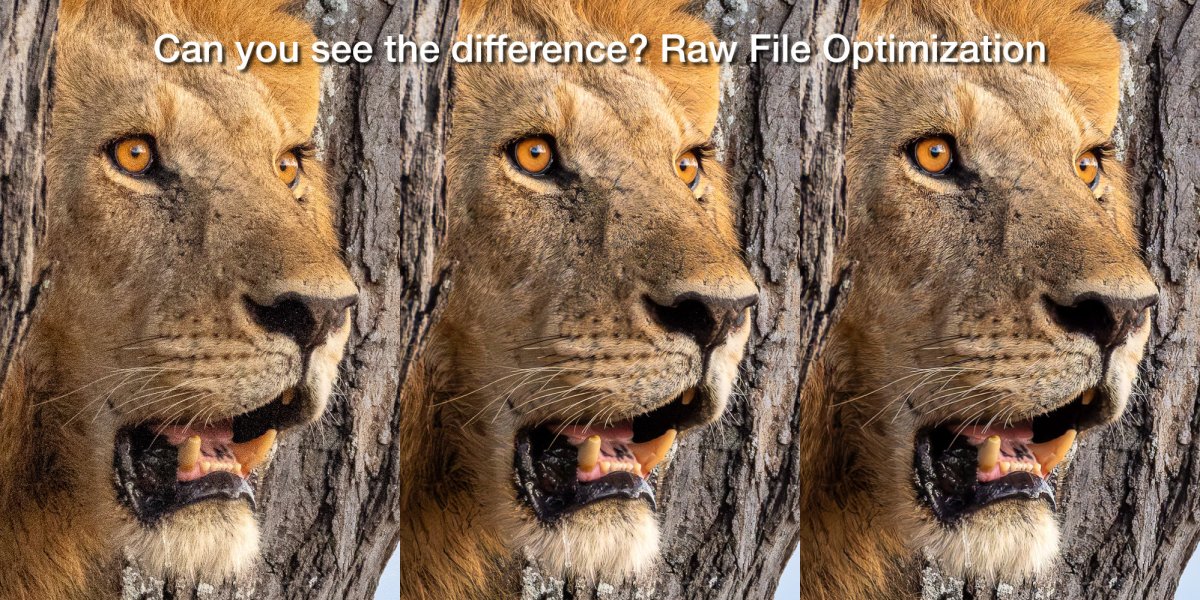


Not mentioned in either review is the effect that different AI denoise programs have on rendering straight lines e.g. window frames, where, for me Adobe AI DeNoise gives clearly better results than DXO or Topaz. Both the latter can add extra parallel lines or turn straight lines into zig-zag lines where there are geometric shapes.

Some may remember the problems I was having some time ago with weird patterns being created in Dragonflies eyes. Both DXO and Topaz were creating strong linear lines in the complex patterned eyes (which didn't exist) while Adobe was rendering the eye patterns correctly. This only happened occasionally (and other people had the same problem), and DXO still does it. Topaz, however, now seems to just smooth the pattern out. At the time of the discovering the issue, both DXO and Topaz asked for sample files to pass onto their development team.

"Apparently" the underlying approach used by Adobe is to analyse for the "noise", where as DXO and Topaz analyse for the "detail", which gives the different end results .

I now generally prefer Adobe AI Denoise ( I round trip from C1 via Bridge into ACR) which seems to give, to my eyes, the most pleasing and natural results. DXO and Topaz still seem capable of finding more detail, but this seems to mean accepting a less natural look to the photograph. With very noisy files DXO and Topaz seem better at "rescuing" an image than Adobe can.

I am still working out, when and how, they should be used, because each program has its strengths and weaknesses, with different levels of effort needed to get the best results. For example, I have started to switch off the sharpening tools entirely in DXO, which I have always done in Topaz, leaving the sharpening to be done in C1 or PS, and this seems to improve the "overall look" with little, sacrifice in detail But, it adds to the time involved.

And, as I'm using C1, it's easier to round trip to DXO or Topaz than round tripping to Bridge/ACR/DeNose, and DXO also offers excellent lens corrections, so it's not just about denoising when it comes to deciding on denoising software.

My "best" approach for noisy images, so far, is to still to use Adobe or DXO to create a DNG with low levels of noise correction, then selectively refine the noise and sharpness in C1 (using masks), Or if C1 isn't up to the job, round trip to Photoshop and use PS layers and Topaz PhotoAI. Doing the noise reduction in steps seems to minimise artifacting, but Adobe seems to now give the best starting point for most files.

In my original comparsion I included ON1 NoNoise, but I found the updated version impossible to get good results from, and even though it had a proper plugin for C1, I haven't tried it again.
 
I have also found that Adobe AI Denoise has become my go to for tricky noise issues. I do a lot of drone photography at night and Adobe AI Denoise works particularly well on those images.

Andrew HATFIELD | Architectural and Interior Photographer
Unfortunately, for me, I can't see how it's possible to save as DNGs with the latest incarnation. Which I haven't yet installed, but it isn't obvious from the reviews I've looked at.

I know that most people will be pleased to get rid of the DNG and just use the settings stored in the XMP, but it's a big problem for me.
 
I remember you posting about the effects of DXO and Topaz on dragonfly eyes under certain conditions, it was certainly an issue
I am now using DXO 8, will be interesting to see what DXO 8 is like for them in the spring when they start emerging
At the moment I’m mainly photographing big cats at the zoo routinely at ISO 3200 (to get a high shutter speed for moving subjects) with good results
 
I remember you posting about the effects of DXO and Topaz on dragonfly eyes under certain conditions, it was certainly an issue
I am now using DXO 8, will be interesting to see what DXO 8 is like for them in the spring when they start emerging
At the moment I’m mainly photographing big cats at the zoo routinely at ISO 3200 (to get a high shutter speed for moving subjects) with good results
Under DXOs instructions, i downloaded the trial of Pure Raw 4, (I was and, still am, using PL6) suggesting this might fix the problem, but it didn't,

However, that was before PL8 came out, so I am assuming the denoising in both, will now be better than it was.
 
Unfortunately, for me, I can't see how it's possible to save as DNGs with the latest incarnation. Which I haven't yet installed, but it isn't obvious from the reviews I've looked at.

I know that most people will be pleased to get rid of the DNG and just use the settings stored in the XMP, but it's a big problem for me.
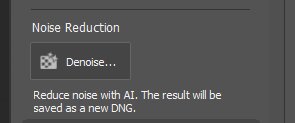
I don't know if this helps or not but in Photoshop version 26.3.0 the AI denoise apparently gets saved as a new DNG.

The snip below is from within Adobe Camera Raw

Untitled-1.jpg
 
I don't know if this helps or not but in Photoshop version 26.3.0 the AI denoise apparently gets saved as a new DNG.

The snip below is from within Adobe Camera Raw

View attachment 446034
Thanks, that’s, interesting,

To get the denoise info saved to an XMP, rather than saving to a DNG, you need to go into th preferences and activate a Denoise "New technology" feature.

I worded my comment very badly, as I'm not sure whether the "new technology" is just the save to XMP, or whether it also has some improvement to the actual denoise process.

I was hoping to find an option to "save to XMP" or "save to DNG" which isn't obviously an option. Having only a single option of activating "new technology" leaves me wondering what that means in terms of continuing to save to DNG.

After extensive searching I couldn't find any explanation, and was a bit frustrated when I posted.

I hope that makes sense.
 
Thanks, that’s, interesting,

To get the denoise info saved to an XMP, rather than saving to a DNG, you need to go into th preferences and activate a Denoise "New technology" feature.

I worded my comment very badly, as I'm not sure whether the "new technology" is just the save to XMP, or whether it also has some improvement to the actual denoise process.

I was hoping to find an option to "save to XMP" or "save to DNG" which isn't obviously an option. Having only a single option of activating "new technology" leaves me wondering what that means in terms of continuing to save to DNG.

After extensive searching I couldn't find any explanation, and was a bit frustrated when I posted.

I hope that makes sense.
Although I'm not fully up to speed on the process your description makes sense yeah.
 
I enjoyed his video, and basically agree with what he is saying, and seeing the comparisons of the software was very useful.

Quite often on here you do see the comment about not worrying about noise because they have de-noise software :)

A while ago, some were questioning DPREVIEW's method of testing with different ISOs by varying camera settings and not varying the light, I guess those people may raise the same question here, but as with DPREVIEW I think it enables valid comparisons.

With any noise reduction (until AI reaches acceptable levels) there will be a trade-off between noise and detail, there are situations where one or the other is less important or noticeable, and I like Affinity Photo's results, I turn jpeg noise reduction off in the cameras and do it manually, (same with sharpening) and very happy with it. On RAWs it also works very well
 
I enjoyed his video, and basically agree with what he is saying, and seeing the comparisons of the software was very useful.

Quite often on here you do see the comment about not worrying about noise because they have de-noise software :)

A while ago, some were questioning DPREVIEW's method of testing with different ISOs by varying camera settings and not varying the light, I guess those people may raise the same question here, but as with DPREVIEW I think it enables valid comparisons.

With any noise reduction (until AI reaches acceptable levels) there will be a trade-off between noise and detail, there are situations where one or the other is less important or noticeable, and I like Affinity Photo's results, I turn jpeg noise reduction off in the cameras and do it manually, (same with sharpening) and very happy with it. On RAWs it also works very well
Yes, Steve Perry's stuff is always useful.
 
I have also found that Adobe AI Denoise has become my go to for tricky noise issues. I do a lot of drone photography at night and Adobe AI Denoise works particularly well on those images.

Andrew HATFIELD | Architectural and Interior Photographer
Adobe thing works really well for most moderately noisy images out of my system cameras. A particularly bad example wants a second pass with Topaz denoise AI (not photo AI which I hate). I keep settings under 20% in both wherever I can, or loss of detail becomes really apparent.

DJI MINI 4 drone however really doesn't play nicely with Adobe thing. I'm talking about full resolution DNG, not 12MP which is too small after cropping to deliver to clients. That quad pixel senor is quite a nightmare to denoise. It comes loaded with artifacts and denoising just amplifies that to insanity. Since I don't expect or need 50MP output my best workflow to date is zero sharpening, open in Photoshop, scale down to like 20MP, Topaz Denoise AI and finish it there. This gives a file that is somewhat controlled, and is overall a bit better than 12MP 3/4 output. It is a real pain in the butt though
 
I remember you posting about the effects of DXO and Topaz on dragonfly eyes under certain conditions, it was certainly an issue
I am now using DXO 8, will be interesting to see what DXO 8 is like for them in the spring when they start emerging
At the moment I’m mainly photographing big cats at the zoo routinely at ISO 3200 (to get a high shutter speed for moving subjects) with good results
DXO Pure Raw 5 is due out soon.
Might be worth a try ;)
 
DXO Pure Raw 5 is due out soon.
Might be worth a try ;)
The Pure Raw new denoising is meant to come as a free upgrade to PL8, and as i was me who originally raised the issue with DXO, which was still there in PR4, I'm looking forward to trying it when it comes to PL8.

I'm also glad they are making it a free upgrade with PL8, and not holding it back to PL9,
 
20% seems quite low. My default is set to 50% but I do vary the amount.

What do others use?
My process is a bit complicated (summarised in the OP), and I'm no longer using Topaz Denoise , but Topaz PhotoAI, However, as a generalisation, with Topaz PhotoAI, DXO and Adobe AIdenoise, I find that reducing the defaults by 50% to 80% gives the best results. e.g. I often switch the sharpening off entirly wih DXO

Normally I combine more than one denoising programs, as I find using a single program at values close to the defaults dramatically increases the risk of artefacts..
 
DXO Pure Raw 5 is due out soon.
Might be worth a try ;)

The Pure Raw new denoising is meant to come as a free upgrade to PL8, and as i was me who originally raised the issue with DXO, which was still there in PR4, I'm looking forward to trying it when it comes to PL8.

I'm also glad they are making it a free upgrade with PL8, and not holding it back to PL9,

Thanks its good news that they are going to make it a free upgrade to PL8, I did think about DXO Pure raw , if I understand it correctly it doesn’t have all of the adjustments that DXO photolab Elite has, I do find the adjustments useful for example I turn down the sharpening a lot
 
Thanks its good news that they are going to make it a free upgrade to PL8, I did think about DXO Pure raw , if I understand it correctly it doesn’t have all of the adjustments that DXO photolab Elite has, I do find the adjustments useful for example I turn down the sharpening a lot
Of course they don't state what the PL8 upgrade will come with. I suspect it may well be the denoising engine only (Fuji XT support and new processing), but possibly not the masking, This would be a big new feature that they may keep for PL9 because it would potentially change the way that PL works.
 
Of course they don't state what the PL8 upgrade will come with. I suspect it may well be the denoising engine only (Fuji XT support and new processing), but possibly not the masking, This would be a big new feature that they may keep for PL9 because it would potentially change the way that PL works.
I’ve just had a look on the DXO forum and as you said there is a new version of Deep Prime, 3 and will be a free update with DXO 8
Thats great news thanks for the heads up :)
 
Back
Top