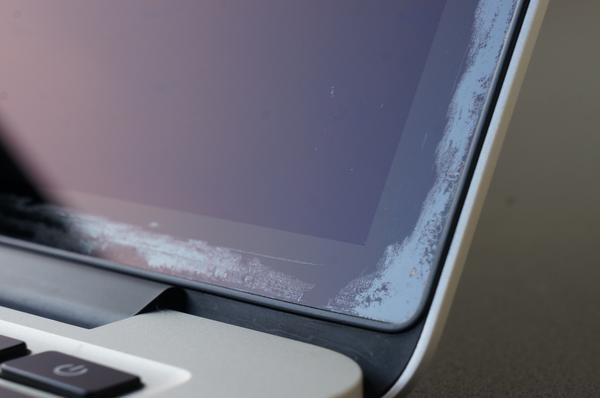
Deep cleaning of MBP screen...

ChrisR

I'm a well known grump...
Suspended / Banned
Messages
11,730
Name
Chris
Edit My Images
Yes
I feel a bit nervous posting this, it's like confessing some personal hygiene problem... so, ahem, my friend has a 2014 MBP 15", which over the years has developed some marks on the screen surface. Some are impressions of the keyboard, a problem for all MBPs I've ever had. But around the edge of the screen there's a distinct marked area, around an inch or so wide, with irregular edges. If you gently scratch it with a fingernail, you can see that some has been removed. I would assume it's finger grease from opening and closing the laptop, but it also occurs in exactly the same way on the part of the screen adjacent to the hinge, where it's doubtful any finger has ever touched. He tells me the screen has been cleaned by gently wiping with a damp sponge approximately weekly, but he's never used anything stronger.

It looks like the kind of mark that, if it was on a basin, I'd advise Cif or some similar abrasive cleanser on, but I'd be a bit worried about the possible effects of any such products on a Mac screen.

Any suggestions how I can advise him?
 
I clean my screens from time to time with washing up liquid on a well wrung out damp cloth. I avoid letting it get down the edges where it might cause problems. then I polish with a large microfiber cloth. done it for years. It is just a matter of taking care.
 
I find that alcohol based swabs are the least dangerous to both the screen itself and the electronics. I wouldn't use a spray anywhere that it might penetrate onto contacts or exposed conductors in case it caused a short circuit.
 
I use TV screen wipes and a microfibre cloth, never had a problem,.
 
Is it a victim of 'staingate', ie. delamination of the anti-reflective coating?
If so, unfortunately Apple only performs warranty repairs up to 4 years from purchase date and the 2014 model is no longer eligible.

An example...
(Or google image search 'MacBook Pro staingate)
MacBook-Pro-anti-reflective-wearing-off.jpg


Here's a recent article on MacRumors.
 
Don't know about Macbooks specifically but I've been using wet wipes, the kitchen type on all kinds of displays for years and never had a problem. It's better to do it with the screen off because even LCDs get a bit warm and the moisture tends to evaporate quickly leaving streaks. Wipe it over then go over with a dry clean cloth.
This sort of thing
https://www.dettol.co.uk/products/see-all-products/dettol-surface-cleanser-wipes-126s/

And a hell of a lot cheaper than the same thing sold as a "screen wipe".
 
Thank you for all the suggestions, everyone. That's very helpful.

Tony, I'd never heard of it, but I do suspect I'm a Staingate victim, as the damage I'm seeing at the edge of the screen looks very much like the picture you posted, only worse. I did try to get some phone pics, but it's not easy to get a good image.

As you say, I may be out of date with that particular programme, but I'm wondering if I can use consumer legislation to get them to fix it... I'll need to check but ISTR something about 6 years there.

OTOH, this Mac is a replacement for a 2011 MBP that suffered from the overheating BSOD problem, I don't know how that would affect my chances, since I bought its predecessor over 8 years ago!
 
Thank you for all the suggestions, everyone. That's very helpful.

Tony, I'd never heard of it, but I do suspect I'm a Staingate victim, as the damage I'm seeing at the edge of the screen looks very much like the picture you posted, only worse. I did try to get some phone pics, but it's not easy to get a good image.

As you say, I may be out of date with that particular programme, but I'm wondering if I can use consumer legislation to get them to fix it... I'll need to check but ISTR something about 6 years there.

OTOH, this Mac is a replacement for a 2011 MBP that suffered from the overheating BSOD problem, I don't know how that would affect my chances, since I bought its predecessor over 8 years ago!
Apple have a remarkably extensive and AFAIK accurate description of U.K. consumer law relating to warranties etc on their web site last time I looked.

Edit: there you go https://www.apple.com/uk/legal/statutory-warranty/
Remember your contract is with the seller so not Apple unless you bought it from them.
 
Last edited:
I've cleaned a very messy TV screen (I blame the removal men) with isopropynol alcohol. It should be the least likely thing to cause damage.
 
I've cleaned a very messy TV screen (I blame the removal men) with isopropynol alcohol. It should be the least likely thing to cause damage.
IPA is a very mild solvent, and won't cause damage to materials that are safe with water.
 
I'd be tempted to just stick with a high quality lens clothes? I use the one that comes wit my MacBook Pro (every MacBook gets one I think) and it works great.
 
Apple MacBook advice: “Dampen a soft, lint-free cloth with water only, then use it to clean the computer's screen.”
 
Back
Top