Davidh6781 - Themed 52 - Week 27 - Art Page 12

:clap: :clap: :clap:

Such a simple idea for post, but it works absolutely BRILLIANTLY!!!!
Not something I would ever have thought of, but I like this a lot.

Is it just me or do those black dots between the stickers keep disappearing and jumping around? :thinking:

Hi Sarah, thank you, I looked around my post room and there was a fair few ideas but this one struck me,

What black dots???? only joking i can seem them jumping about between the stickers. good optical illusion.
 
Excellent shot David - the sort of thing you'd see in a glossy brochure.
 
Certainly needs a larger viewing to appretiate the detail.

Clever use of selective colouring and chosing a sticker on one of the thirds has made the composition.
 
Excellent shot David - the sort of thing you'd see in a glossy brochure.

cool thank you.

Certainly needs a larger viewing to appretiate the detail.

Clever use of selective colouring and chosing a sticker on one of the thirds has made the composition.

again thank you, i didn't want to go with the middle sticker for the selective colouring as that was boring and with the line being symetrical wouldn't of looked right. so by the sounds of things the theme Post has been a good one for me.

cheers all
 
Week 24 - metal.

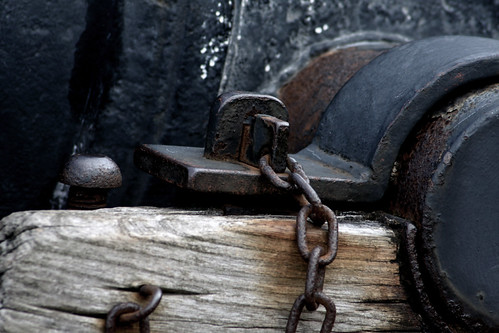
While out with my son this morning i came accross a cannon.

heres my metal shot
4717936937_f3182a301b.jpg
 
I like this little detail of the cannon. I feel a crop at the top could improve it & I'd have been tempted to fiddle with the colours slightly - not exactly sepia, but increase saturation on the reds and desaturate overall to bring out the rust.

Phil
 
thank you i will have a dabble with the reds and see how it comes out. when you say crop the top, do you mean to the top of the pivot area? cheers Phill
 
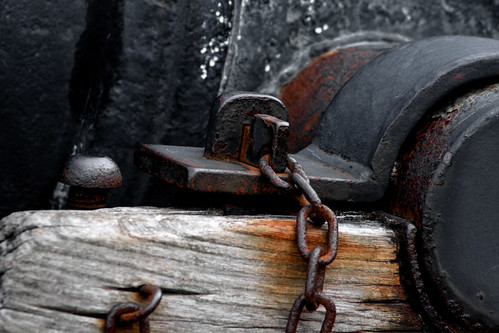
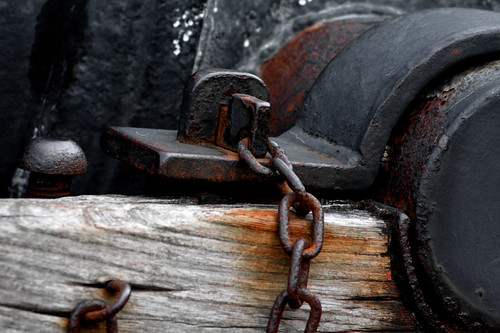
here we have the amended version and original to compare.

Original.
4717936937_f3182a301b.jpg


Just saturation adjustments. No crop
4719984129_dffdde9e43.jpg


Crop and Saturation adjustments
4720622950_be6963e0fa.jpg
 
Last edited:
Only viewing on an iPhone but I like the cropped and saturated version!

Phil
 
:thumbs: for the final version! An interesting composition that fits the theme and you've managed the lighting well too, with enough separation of all the black tones. The PP has brought out the rust nicely - maybe a little OTT but I like the effect. :clap:
 
Only viewing on an iPhone but I like the cropped and saturated version!

Phil

Thanks Phil

:thumbs: for the final version! An interesting composition that fits the theme and you've managed the lighting well too, with enough separation of all the black tones. The PP has brought out the rust nicely - maybe a little OTT but I like the effect. :clap:

Thank you, it came out well considering the dull morning, lol, heres a shot of the whole Cannon which was on my short list for metal theme, http://farm2.static.flickr.com/1147/4720824932_161617ea66_b.jpg

thanks
 
While out with my son this morning i came accross a cannon.

I love the way you just casually dropped that into conversation, as if you come across cannons all the time :lol: :lol: :lol:

Another vote here for the final cropped and saturated version. It's given it that extra bit of punch.
The DoF has worked well in this one too - really got that 3D feel to it.

I also like the other shot with the whole cannon in it. Lovely composition in that one and I think with a bit of PP you could really bring out a bit more drama in the sky.
 
Works very well for the theme David, and I think the edits suggested have really made it pop. Good details :thumbs:
 
I love the way you just casually dropped that into conversation, as if you come across cannons all the time :lol: :lol: :lol:

Another vote here for the final cropped and saturated version. It's given it that extra bit of punch.
The DoF has worked well in this one too - really got that 3D feel to it.

I also like the other shot with the whole cannon in it. Lovely composition in that one and I think with a bit of PP you could really bring out a bit more drama in the sky.

Thanks Sarah, lol well there is a fair few war time things round near me, Fort Paull for one, although you have to pay. I do have to admit i don't come accross cannons that often lol.

thank you from the suggestion the cropped n popped version is the winner.


Works very well for the theme David, and I think the edits suggested have really made it pop. Good details :thumbs:

thank you. :)
 
Thanks Paul. :)

Any way bit of a crowbar really, for one reason, my Camera is going up forsale later on as i will be obtaining an upgrade body. :)

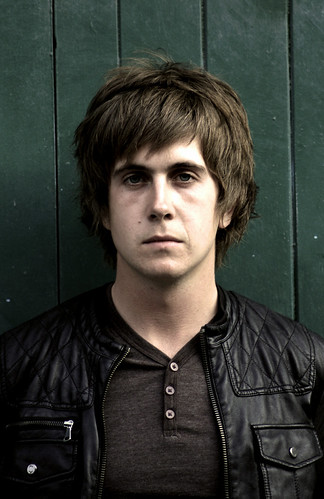
This was from a band shoot i did, i know them all well so good practicing ground.
as i say bit of a crowbar but i may reshoot this when my upgrade arrives.

4729935621_251d6b2bb9.jpg

Large Version
 
Bit of a grungy look to him, and the colours have a grungy feel... maybe a slight crowbar, but I like the shot. Only thing... the boards behind... the angle is jarring slightly... I can't work out why or the best option for dealing with them... as he looks straight...
 
Now you mention the background i am going to look at correcting that. I didn;t actually notice lol.

As you say a little bit of a a crowbar but this week has had a few changes, i was upgrading camera but now i am upgrading glass instead lol.

cheers
 
I'm guessing that it was a grunge band ???? :shrug: ;)

I like this. It's a good, moody portrait.
The desaturated colours work well and I really like the amount of texture that you've caught in his hair. The area around his eyes is a bit on the dark side, but I think that actually works and adds to the feel of this image.

Only one niggle and John's beaten me to it again with his comment this week . . . the angle of the boards in the b/g is slightly disorientating.
 
Off the theme slightly, but a very strong portrait with only (as others have said) the wonky boards detracting.

Phil
 
I'm guessing that it was a grunge band ???? :shrug: ;)

I like this. It's a good, moody portrait.
The desaturated colours work well and I really like the amount of texture that you've caught in his hair. The area around his eyes is a bit on the dark side, but I think that actually works and adds to the feel of this image.

Only one niggle and John's beaten me to it again with his comment this week . . . the angle of the boards in the b/g is slightly disorientating.

Hi Sarah, yes it was a band shoot i did, I know them well. I do agree now its been pointed out the, the bg is off putting somewhat

Off the theme slightly, but a very strong portrait with only (as others have said) the wonky boards detracting.

Phil

Hi Phil i will have to have a dabble in CS4 and see if i can straighten them, fingers crossed.

cheers
 
An excellent portrait and I like the treatment you have given it - very moody.
 
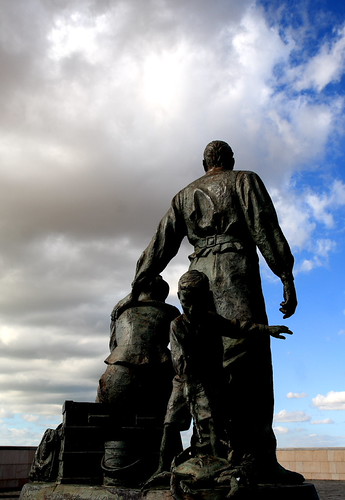
Out again with the young one on Hull Marina and came across traveling family.

Reverse view of the Artist Neil Hadlock's sculpture, depicting a family having arrived from Northern Europe by ship, before travelling onwards to America. Viewed at Hull Marina, Kingston Upon Hull, East Yorkshire, UK Britain


4783718219_962322a9dc.jpg

Large Version
 
Good colours and composition - I like the way the curve of the left outline of the sculpture is echoed in the cloud. There is rather too much shadow detail lost for my taste, but I suspect that is my monitor.
 
:agree:... the composition works well, the sky fits in nicely with the statue. The only thing is I have to agree on the loss of shadow detail too... I think it needs just that bit extra light in there. I don't know if you shot in raw (and I'll probably be shouted at for even suggesting it, I know how well this sort of thing goes down :D), but if so, you could try a gentle 3 shot HDR... it might pull back the clouds a bit too.
 
Hi John yes it was shot in Raw just been dabbling with raw and like the control its fair better.

For HDR what would i use for that, never done HDR.
 
I'm with John and Tracer on this one.

What editing software do you use?
Photoshop has some HDR functionality built in, but I've found it to be a bit rubbish when I've played around with it.

I've also had a look at the free demo from this site :

http://www.mediachance.com/hdri/index.html

TBH all I've done is dabble, so I haven't invested in the full product.
It's quite intuitive though, and the demo gives you a feel for how the image would look. Just comes out with a small watermark across the bottom. Worth downloading and having a play with, if you want to try it.
 
Hi Sarah it depends where i am home it would be CS3 and work its CS4. I will take a look at the link and have a play.

I do have to agree with the too Dark Shadows.

thank you
 
Dave, load the raw in ACR, set the exposure to +2 and save the image. Set the exposure to -2 and save the image. Then, probably easiest is to download the Photomatix demo and have a play with that. You load all three images in, and let it do it's stuff, play with the sliders (it's very, very easy to go way OTT) and see how it works out. It's not true HDR, but it does help.
 
Good image, wants more detail in shadow areas as has been mentioned.

Phil
 
Nice image .. just need to see a bit more detail especially on the boy facing towards us
 
yes i will get the details sorted the raw file has the full detail i just over did it.

I am laggin behind at the min. work commitments
 
Hi David. I agree with the others about the detail but good composition. I use the software Sarah has mentioned. It's very easy - I just play around until I get something I like.
 
Back
Top