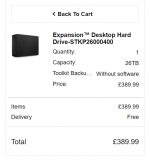
Current Hard Drive Prices ..... Ouch

Nikon f1.8

Suspended / Banned
Messages
1,724
Name
Paul
Edit My Images
Yes
Well I have just noticed that my Nas is 75% full, so it is time to add another drive into it. 4 Bay drive with three populated in a raid 5 array.
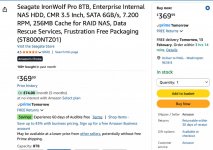
Went online to get the same drive to add in and I could not believe the price today. it is exactly 13 month since I bought the last ones and the current price is for want of a better word unbelievable.
see images below for what I paid and the current price, can you believe it ?
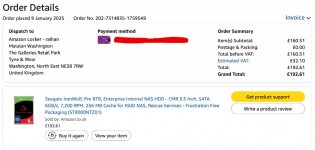
Screenshot 2026-02-12 at 20.45.11.jpg

Screenshot 2026-02-12 at 20.45.26.jpg
 
Yes I bought a couple of portable ones recently were more expensive than I expected
 
Surprised it's the good old technology that is getting expensive - I would've thought it was RAM and/or SDDs that would've risen in price. I looked recently for small 1TB WD portables (storing JPEGS) and surprised how much they were.
 
You can blame AI vendors buying up all the available storage

Higher-capacity HDDs are used for cold and nearline data in AI applications, but also AI-led demand has pushed up the prices of SSDs and that has diverted other, more general demand into lower capacity HDDs, so it's across the board.
 
Last edited:
I knew RAM had gone stupidly expensive, but surprised at the cost of HDDs now.
 
Crazy; don't forget GPU too. Nvidia cancelled ti refresh, 60 series pushed back a year or two, and higher ram models phased out.

If you can sit out next year or two - do so. The manufacturers should really ramp up production at this point, and eventually prices should level out
 
Yes, a 4TB WD Blue SN5000 NVME that I bought in July last year for £188 is now £440

Glad I got it when I did

Last year I bought

2 x 2tb nvme SSD
1 x 4tb nvme SSD
2 x 512G nvme SSD
2 x 1tb nvme SSD
1 x 10TB HDD

Imagine needing double the money....and then some
 
Just checked the current prices of the two NVMe SSDs I bought towards the end of 2023. Over 300% increase.
 
How could try importing from the USA. Even allowing for taxes and delivery they seem to be cheaper.
 
Not sure I would trust a 28tb drive. If it fails that is a great deal of data to lose. I would prefer to spread over lower capacity drives if possible.
 
Not sure I would trust a 28tb drive. If it fails that is a great deal of data to lose. I would prefer to spread over lower capacity drives if possible.
28tb is not a problem as long as there are 2 more of them running in parallel

Im not sure if there is an easy way to mirror consumer grade externals, and they might be on of those with proprietary connectors on the drives
 
28tb is not a problem as long as there are 2 more of them running in parallel

Im not sure if there is an easy way to mirror consumer grade externals, and they might be on of those with proprietary connectors on the drives

I have about 4 X 4TB Mybook drives sat beside each other that get used for occasional backup plus a 12TB internal drive that I used to pool ALL the various backups that I have going back to my first 5GB Maxtor in 1997.
 
Buy 2 and mirror. ;)

I have about 4 X 4TB Mybook drives sat beside each other that get used for occasional backup plus a 12TB internal drive that I used to pool ALL the various backups that I have going back to my first 5GB Maxtor in 1997.

I will bow to your superior knowledge.

Buying 2 28tb hard drives seems excessive. I have a basic NAS but only use in for some files. I tend to rely on cloud storage and cloud backup, but I do not 27TH of data.
 
I will bow to your superior knowledge.

Buying 2 28tb hard drives seems excessive. I have a basic NAS but only use in for some files. I tend to rely on cloud storage and cloud backup, but I do not 27TH of data.

No need to bow at all. TBH I think 28TB is excessive for most of us, but the OP was talking about adding a 5th 8TB drive (to make 40TB) so a 28TB drive seemed quite reasonable to sit alongside.

I don't back up tremndously often, maybe a couple of times a year for photos/non-critical stuff. Most of the time my hard drives sit switched off, which should give them a reasonably long life provided I don't forget to plug them in and spin them up occasionally.

Internal storage in my editing computer is:
2TB Western Digital Black NVME drive (system drive)
2TB Seagate laptop HDD
6TB Western HDD (main storage).

External drives
12TB Seagate enterprise drive (used as a data pooling area) in an external case.
4 X 4TB Western Mybook drives
2TB Western external drive
1TB Toshiba drive (used as a Time Machine backup drive for my old Macbook, 2009).

A few years back I binned a bunch of IDE drives, left over from when that was a current format.
 
Not sure I would trust a 28tb drive. If it fails that is a great deal of data to lose. I would prefer to spread over lower capacity drives if possible.
You should never have important data on a single drive no matter the size and an advantage of a drive this size is it makes it much easier to backup multiple devices, multiple times. I have a 10TB and 12TB data drives in my PC which backup to a single 20TB drive and a 24TB drive the latter which also backups the phones and laptops in the house so with just four drives I have three copies of all my own data plus a backup of other devices. Keeping the drive count low keeps it very easy to manage the backups since each drive contains all the files. The 28TB drive deal is tempting given hard drives are growing rarer as less people use them and prices have been crazy, I could retire the 20TB to cold storage only and have capacity to cover me for a few more years.
 
The point of such large HDD as back up is that it is a back up, in case your OTHER copy is lost of destroyed. So essentially you are taking a risk of 2 simultaneous failures which is very small.
 
When I started in the computer business, 5 megabytes was considered huge and our office hard drive, with 1 fixed and 1 removable 14 inch hard drives, was thought to be overkill.

It's a distant relation to Parkinson's Law - data expands to fill the storage available. ;)
 
You should never have important data on a single drive no matter the size and an advantage of a drive this size is it makes it much easier to backup multiple devices, multiple times. I have a 10TB and 12TB data drives in my PC which backup to a single 20TB drive and a 24TB drive the latter which also backups the phones and laptops in the house so with just four drives I have three copies of all my own data plus a backup of other devices. Keeping the drive count low keeps it very easy to manage the backups since each drive contains all the files. The 28TB drive deal is tempting given hard drives are growing rarer as less people use them and prices have been crazy, I could retire the 20TB to cold storage only and have capacity to cover me for a few more years.

The point of such large HDD as back up is that it is a back up, in case your OTHER copy is lost of destroyed. So essentially you are taking a risk of 2 simultaneous failures which is very small.

I am aware of all these points. However I would not want to use a 28TB for primary or backup storage. Personal preference and possibly out of date. I use Timemachine for local backup and Backblaze for remote backup. The amount of my data is much less than 28TB, which is probably a factor.
 
I am aware of all these points. However I would not want to use a 28TB for primary or backup storage. Personal preference and possibly out of date. I use Timemachine for local backup and Backblaze for remote backup. The amount of my data is much less than 28TB, which is probably a factor.
You say you do local backups but you wouldn't want to use a 28TB drive so what would you want then if you needed to back up 28TB of data? Multiple drives are more difficult to manage especially if you want to have multiple backups and if the drive fails, it is only a backup so there is no data loss.
 
You say you do local backups but you wouldn't want to use a 28TB drive so what would you want then if you needed to back up 28TB of data? Multiple drives are more difficult to manage especially if you want to have multiple backups and if the drive fails, it is only a backup so there is no data loss.

I am nowhere near 28 TB of data. If I was I would probably place more reliance on cloud storage and split my local backups between say photos, music and other. I will exit this part of the thread as it is off topic.
 
I am nowhere near 28 TB of data. If I was I would probably place more reliance on cloud storage and split my local backups between say photos, music and other. I will exit this part of the thread as it is off topic.
It's not off topic on a topic on hard drives. You've still not explained what the problem with using a single large drive is? As you've said yourself in your case, it's one of three copies of the data so its failure means no data loss and it means it's much easier to manage the backups so where is the issue with a single drive?
 
Last edited:
It's not off topic on a topic on hard drives. You've still not explained what the problem with using a single large drive is? As you've said yourself in your case, it's one of three copies of the data so its failure means no data loss and it means it's much easier to manage the backups so where is the issue with a single drive?
The topic header is the cost of hard drives, not how they should be used for backups.

In answer to your question, I prefer to spread my risk rather than rely on a single drive.
 
Problem with one of anything is that all of your eggs are in one basket. If it's a big basket you lose more.

Keep multiple copies (on different drives) because it's unlikely both will fail simultaneously... Unless it's a manufacturing defect in that lot of discs.... Then you might find they do die simultaneously.

(I was caught out by Seagate developing a "revolutionary drive lubricant" in the early 90s - by 1995 it had turned into something approaching glue so if your discs were powered off for more than a few hours, the heads settled into the glue layer and stuck themselves to the drive platters but the drive motors were insufficient to free the heads without a sharp tap at exactly the right time in the power up process (hitting hard discs with a hammer - even a small rubber one has never been a recommended course of action)- data rescue was possible but led to a few twitching sphincter moments in the process - those drives were tens of megabytes in size, now I'm looking at multiple terabytes - factor of 10000 larger)

It's why techniques like drive mirroring & RAID5 were developed to protect data.
 
Back
Top