
and the site receives a small commission
You are using an out of date browser. It may not display this or other websites correctly.
You should upgrade or use an alternative browser.
You should upgrade or use an alternative browser.
CS5 reviews on the fly ......everybody contribute.
- Thread starter tiler65
- Start date

Peter_Hartland
Suspended / Banned
- Messages
- 2,102
- Name
- Peter Hartland
- Edit My Images
- Yes
Installed my early this morning, as the Mac is now 64 bit the speed is blistering compared to CS4. Installed without problem but need to make sure my few plug-ins are re-installed & work (NIK & OnOne). More later

psenior1
Suspended / Banned
- Messages
- 2,038
- Name
- Phil
- Edit My Images
- No
just posted this in the other thread but I'm so impressed I'll post it again. So far seems like a worthwhile upgrade from CS3.
I was very scepetical but content aware fill actually works!
spot the difference, and I'm not saying the two changes are perfect but took less than 10 seconds from start to finish.

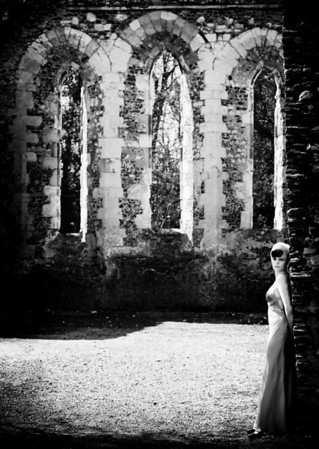
I was very scepetical but content aware fill actually works!
spot the difference, and I'm not saying the two changes are perfect but took less than 10 seconds from start to finish.


just posted this in the other thread but I'm so impressed I'll post it again. So far seems like a worthwhile upgrade from CS3.
I was very scepetical but content aware fill actually works!
spot the difference, and I'm not saying the two changes are perfect but took less than 10 seconds from start to finish.
Shadows on the ground, middle left, your watermark. Top left corner, wall altered.


Dman
Suspended / Banned
- Messages
- 3,656
- Name
- Dave
- Edit My Images
- No
Content aware is going to be what everyone wants to see in action, here's a few I tried, not blown away by any means by it but this was only a relatively quick effort. The beach scene with my daughter was horrendous and took quite a while and still looks crap, the one with my son wasn't too bad for a quick once over, but you can clearly see where he once stood.


menthel
Suspended / Banned
- Messages
- 6,732
- Name
- Jim
- Edit My Images
- Yes
Intersting posts people. Its good to see that content aware does work but there are just some situations it can't handle. In most of the examples you can tell where it has cloned from. Looks good as a first implementation by adobe though.
Simon, have you noticed how there is less contrast where the balustrades used to be.
I know it is sampling the scene but we may have to mask back in some contrast too.
Nice work.
Have you tried this shot in colour.......... I suspect it doesn't work as well.
I know it is sampling the scene but we may have to mask back in some contrast too.
Nice work.
Have you tried this shot in colour.......... I suspect it doesn't work as well.
The demo of it that I watched was fabulous and the areas it seems to work best on are those on the edges of the frame.
I've not tried it yet but those who have tried it, is it better to select smaller areas of similar tones or is it best to just do a big lump no matter what the content?
I'm looking at the one of the little boy and wondering if that was done in one lump or smaller ones? Would it be better to do the sky section, the water's edge and the sand as three different sections?
Hmmmmm, have checked out the upgrade price and looks like it might be worth it.
I've not tried it yet but those who have tried it, is it better to select smaller areas of similar tones or is it best to just do a big lump no matter what the content?
I'm looking at the one of the little boy and wondering if that was done in one lump or smaller ones? Would it be better to do the sky section, the water's edge and the sand as three different sections?
Hmmmmm, have checked out the upgrade price and looks like it might be worth it.

spxxxx
Suspended / Banned
- Messages
- 2,961
- Name
- Simon
- Edit My Images
- No
Simon, have you noticed how there is less contrast where the balustrades used to be.
I know it is sampling the scene but we may have to mask back in some contrast too.
Nice work.
Have you tried this shot in colour.......... I suspect it doesn't work as well.
TBH Tom I haven't and remember that a client will not see the before ...
I did it in colour and it worked fine but then saved over the top with the B+W :bonk:
Put it another way - In my view it has transformed a picture I liked to one I love - and I would never have attempted it myself as the time would have been prohibitive.
spxxxx
Suspended / Banned
- Messages
- 2,961
- Name
- Simon
- Edit My Images
- No
The demo of it that I watched was fabulous and the areas it seems to work best on are those on the edges of the frame.
I've not tried it yet but those who have tried it, is it better to select smaller areas of similar tones or is it best to just do a big lump no matter what the content?
I'm looking at the one of the little boy and wondering if that was done in one lump or smaller ones? Would it be better to do the sky section, the water's edge and the sand as three different sections?
Hmmmmm, have checked out the upgrade price and looks like it might be worth it.
You need to use a combination of the healing brush and selection tools ...
I selected the railings in parts and did them using the lasso smart thingy
But it didn't like doing the dress shadows the same way - so tried the healing spot brush and it worked great.
I did have to zoom in to tidy a few edges - but hey - not complaining

Dman
Suspended / Banned
- Messages
- 3,656
- Name
- Dave
- Edit My Images
- No
Ali, it was one lump with some smaller touching up after. I didn't have time to try it properly and these were the only images I had on my laptop, dragged from the trash!
Love what Simon's done there, without seeing the original there's no way in my mind a client would tell that it's been edited other than remembering it was there from when it was actually shot!
Love what Simon's done there, without seeing the original there's no way in my mind a client would tell that it's been edited other than remembering it was there from when it was actually shot!

JasonRS
Suspended / Banned
- Messages
- 1,781
- Edit My Images
- No
Love what Simon's done there, without seeing the original there's no way in my mind a client would tell that it's been edited other than remembering it was there from when it was actually shot!
Don't forget that with CAF you can repeat it if the results aren't quite what you were expecting first time round, or if it needs tidying up.

- Messages
- 12,095
- Name
- Tom
- Edit My Images
- Yes
These are great..
But isn't anyone else bugged by the title of the OP.??
(leaving the shift key depressed were we?)
Yup - have corrected it


DiddyDave
Suspended / Banned
- Messages
- 9,521
- Edit My Images
- Yes
Colour version - again very quick as I had to start from scratch

Awesome Simon
Oh and I mean the pic not the fancy railing removal - which is very clever of course, but the pic is a perfect 'moment'
DD
- Messages
- 12,095
- Name
- Tom
- Edit My Images
- Yes
Is content aware fill any quicker than the clone tool though?

That took 4 and half mins, would look better working on the full res image obviously. So far I am only finding CAF to be more useful when removing small bits, bits on grass etc but for big things the clone tool seems easier and quicker, for me at least.
That took 4 and half mins, would look better working on the full res image obviously. So far I am only finding CAF to be more useful when removing small bits, bits on grass etc but for big things the clone tool seems easier and quicker, for me at least.
- Messages
- 12,095
- Name
- Tom
- Edit My Images
- Yes
Tom it looks too repetitive IMHO
Think it was because I was using the 800 pixel version, would be more detail to clone and avoid repeating with full res.
Yup - have corrected it
What did l write?
- Messages
- 12,095
- Name
- Tom
- Edit My Images
- Yes
What did l write?
CS%
- Messages
- 12,095
- Name
- Tom
- Edit My Images
- Yes
Thinking about it, I am sure on some of the videos I saw demo'ing CAF I am sure they used a brush, anyone worked out how to do that? I have been selecting areas and using edit > fill or if it is a background layer you can hit delete it seems.....can imagine a brush would be really useful.

spxxxx
Suspended / Banned
- Messages
- 2,961
- Name
- Simon
- Edit My Images
- No
Thinking about it, I am sure on some of the videos I saw demo'ing CAF I am sure they used a brush, anyone worked out how to do that? I have been selecting areas and using edit > fill or if it is a background layer you can hit delete it seems.....can imagine a brush would be really useful.
spot heal brush
spxxxx
Suspended / Banned
- Messages
- 2,961
- Name
- Simon
- Edit My Images
- No
Ill be interested to see the new cs5, but most of the content aware examples ive seen so far could be achieved with a simple copy and past and level adjustment in any other version of PS.
Really .... I couldn't have done the edit with that method
Try finding an image where you need to extend a background. Say a studio shot with the background stands in it. (That kind of thing or some other kind of unsuitable background that crept into the frame) Getting rid of it is so much easier with CAF than cloning especially where patterns are involved. Brickwork is amazing!
I am sorry, this typing with two fingers is tricky.
Posted from my Android
Peter_Hartland
Suspended / Banned
- Messages
- 2,102
- Name
- Peter Hartland
- Edit My Images
- Yes
I am sorry, this typing with two fingers is tricky.
Posted from my Android
Sorry I thought that was a nose problem not fingers:nuts:

- Messages
- 19,708
- Name
- Darren
- Edit My Images
- Yes
The problem with the content aware fill etc is that now anyone can do it and those of us that spent hours using the clone tools etc are now out of a job 
It looks really good and I would have been ordering it but my new car is ready next week and I am saving for my Lencarta studio order at the end of May! So I will just have to wait till June.
It looks really good and I would have been ordering it but my new car is ready next week and I am saving for my Lencarta studio order at the end of May! So I will just have to wait till June.
