Corrupted Files.

Eamonn

Suspended / Banned
Messages
30
Edit My Images
Yes
Hello,

I was transferring Photo files onto a external hard drive so as to put them onto a new computer and they have became corrupted. Most images are fine, (from first looks) but some are messed up.

What should/can be done to fix this? I really hope something can be done to fix this.

I tried to add screenshot but was told it's too big. 1.18MB in size is too big?

Thanks.
 
When you say "transferring", do you mean that the originals are still on the old drive ... or did you delete them?
 
I tried to add screenshot but was told it's too big. 1.18MB in size is too big?
The limit is 500KB per image.

Most images are fine, (from first looks) but some are messed up.
What type of files are you transfering (i.e. what extension do they have) and what software are you using to transfer them?
 
When you say "transferring", do you mean that the originals are still on the old drive ... or did you delete them?
Like the "Rocket Surgeon" I am, I deleted them. A few weeks ago I copied them onto my external hard drive. Left them there and then a week later, without thinking deleted them from my old PC to free up space... 280gbt. Then this weekend when coping other files to the external hard drive, my computer "Glitched out" and everything on the EHD got messed up.
 
The limit is 500KB per image.


What type of files are you transferring (i.e. what extension do they have) and what software are you using to transfer them?
RAW image files, 280gb worth. 10,000 images.

"what extension do they have". I don't know what this means. Can you post an image example?

I transferred them by just copying them from my PC to external hard drive. They where already on the drive, (as stated above) it was other files being transferred onto the the drive they where on that messed everything up.
 
I have RescuePRO Deluxe software I got with an SD card. Is that any good?
 
"what extension do they have". I don't know what this means.
The "extension" of a file is the 3 or 4 letters at the end of a file name starting with a "." (dot)

As you've now said that the files are RAW, I'd expect the extension to be the same. It would also help if you told us...
  1. The operating system you're using.
  2. The format you used on the external hard disk.
  3. Exactly how did you perform the copy? (drag and drop on a desktop or some other method)
  4. What software you've used to open the files that appear to corrupted.
  5. Is that the same software you used to open those particular files before the copy?
 
Well, one thing I'd do immediately, is take a clone of the external disk that you have transferred the images to. You can never have too many backups, and if the new drive is suspect, a copy of it may protect you from further damage to those files.
 
Like the "Rocket Surgeon" I am, I deleted them. A few weeks ago I copied them onto my external hard drive. Left them there and then a week later, without thinking deleted them from my old PC to free up space... 280gbt. Then this weekend when coping other files to the external hard drive, my computer "Glitched out" and everything on the EHD got messed up.
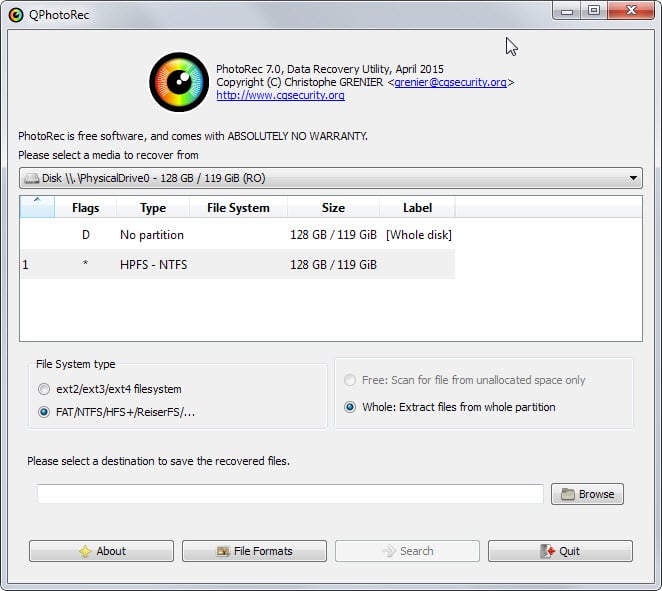
You may still be able to recover at least some of the deleted files from your old PC using PhotoRec:
Meanwhile, you need to avoid writing files to that PC's disk as far as possible (every time a file is written, you risk writing over a deleted file you might otherwise be able to recover). You definitely need to set PhotoRec to recover any files it finds to another disk, such as a working external hard disk.

If the disk that had the files on it is the old PC's system drive, then ideally you'd take this disk and put it in another PC or an external caddy so you don't have to run Windows from it during the recovery process (because Windows writes files to its system disk all the time). If you are experienced with Linux you could boot the old PC from a Linux USB stick and run PhotoRec from that. Otherwise, just avoid writing files to the old disk as much as you can.
 
Thanks all,

can I just say the images were not deleted. They were corrupted. They are still there on the drive. Some can't be opened and some are all weird colors some look to be just fine.
 
Thanks all,

can I just say the images were not deleted. They were corrupted. They are still there on the drive. Some can't be opened and some are all weird colors some look to be just fine.
People are talking about the files you deleted from the original disk. The new ones are already corrupted so it's the originals you need to try and recover.

Also 2nd the advice to backup your external drive asap incase it dies and you lose everything.

And 3rd set up a robust backup system for your whole system in case this happens again in the future.

Anyway, sorry to hear this happened to you...good luck recovering the files!
 
People are talking about the files you deleted from the original disk. The new ones are already corrupted so it's the originals you need to try and recover.

Also 2nd the advice to backup your external drive asap incase it dies and you lose everything.

And 3rd set up a robust backup system for your whole system in case this happens again in the future.

Anyway, sorry to hear this happened to you...good luck recovering the files!
Oh got it. I understand now. I'm running PhotoRec now, (but on the External hard drive). I will run it on the PC's drive once it's finished.

The positive from all this is that I will learn how to recover images/files that are deleted/corrupted. So any "corrupted" images on the external hard drive can't be uncorrupted? Is there software for doing this?

I'll reply to the other posts later once I scan all with PhotoRec.

Thanks.
 
I had one set of RAW files show some files corruption. Nikon D7100, Apple Aperture.

The corruption was coloured blocks across the image, with some faint image details. It was my Olympics files, so pretty critical. I backed up the originals again, and locked them all, and only used those. I never got to the bottom of what caused the RAW corruption, but it was pretty scary to thing thatI might have lost all my Olympics files. Never seen it again.
 
It depends on how its corrupted. Why not post an example of a corrupted file somewhere, so we could download a copy and see if its corrupted on other peoples machines.
Ok, How do I post an example? I tried to upload a screensaver of what I'm looking at but that was too big. How do you make a RAW image small enough to get on here?
 
You may still be able to recover at least some of the deleted files from your old PC using PhotoRec:
Meanwhile, you need to avoid writing files to that PC's disk as far as possible (every time a file is written, you risk writing over a deleted file you might otherwise be able to recover). You definitely need to set PhotoRec to recover any files it finds to another disk, such as a working external hard disk.

If the disk that had the files on it is the old PC's system drive, then ideally you'd take this disk and put it in another PC or an external caddy so you don't have to run Windows from it during the recovery process (because Windows writes files to its system disk all the time). If you are experienced with Linux you could boot the old PC from a Linux USB stick and run PhotoRec from that. Otherwise, just avoid writing files to the old disk as much as you can.
I've run PhotoRec. Can I ask what type of files should I select on it to find? All types? I only ask because I set it to the two different types of RAW file I saw on the list and it found nothing. Prehapes these are not the correct ones?
 
Upload a raw to Google Drive / Dropbox or Microsoft’s equivalent and post the share link. Someone can download it and see if it’s corrupted on their computer.
Will do, might be the weekend though we I get it done,

Thanks.
 
I've run PhotoRec. Can I ask what type of files should I select on it to find? All types? I only ask because I set it to the two different types of RAW file I saw on the list and it found nothing. Prehapes these are not the correct ones?
When I've run this in the past, I've been able to recover specific file types. Trying all files might be worth a try. But perhaps the deleted files have already been overwritten, especially if there's limited free space on the disk and you deleted them some time ago.
 
I know this may be 'teaching you to suck eggs' but when you deleted the files from your PC, did you then empty the wastebasket?

It's just like having an actual desk in the house. you remove files from your desktop and put them in your office bin. until you physically remover them from there, then that's where they sit.

That said, I assume you would have had to, because it sounds like it's too large to go in in one hit.

But sometimes if I've accidentally deleted my RAWs during the processing stage, I can still just recover them from the Recycle Bin.
 
Last edited:
When I've run this in the past, I've been able to recover specific file types. Trying all files might be worth a try. But perhaps the deleted files have already been overwritten, especially if there's limited free space on the disk and you deleted them some time ago.
Yeah, when I run it for all files, with only 1% complete it had found 100,000 files. OMG! The things that are still on the computer but at least now I will be able to find anything that's deleted.
 
I know this may be 'teaching you to suck eggs' but when you deleted the files from your PC, did you then empty the wastebasket?

It's just like having an actual desk in the house. you remove files from your desktop and put them in your office bin. until you physically remover them from there, then that's where they sit.

That said, I assume you would have had to, because it sounds like it's too large to go in in one hit.

But sometimes if I've accidentally deleted my RAWs during the processing stage, I can still just recover them from the Recycle Bin.
Thanks, yes I deleted the bin. The photos were on the external hard drive a few weeks before the corruption happened so the bin was emptied before then.
 
First of all can you make another copy, in case these get screwed up? Then run a test with the file recovery software you have. Also run a chkdsk on the hard drive to pick up errors.
 
Your CR2 files are very badly damaged, but...
Your CR2 files have embedded 6000x4000 JPEG images, but...
These embedded JPEG images are also very badly damaged, but...
It is possible to repair these embedded JPEG images with using specialized software, but...
Eamonn.jpg
These embedded JPEG images have a lot of damages that create empty areas, but...
These empty areas can be filled with Content Aware Fill instrument, and...

And as a result - good images: drive_google_com drive/folders/1OrP9mmwshtVQ3ODpP8sKEbPUefUqlnYH (I can't post links, so convert it to normal yourself)
Not ideal, but better than nothing.
 
Your CR2 files are very badly damaged, but...
Your CR2 files have embedded 6000x4000 JPEG images, but...
These embedded JPEG images are also very badly damaged, but...
It is possible to repair these embedded JPEG images with using specialized software, but...
Eamonn.jpg
These embedded JPEG images have a lot of damages that create empty areas, but...
These empty areas can be filled with Content Aware Fill instrument, and...

And as a result - good images: drive_google_com drive/folders/1OrP9mmwshtVQ3ODpP8sKEbPUefUqlnYH (I can't post links, so convert it to normal yourself)
Not ideal, but better than nothing.
"specialized software"?

Sorry but how do I use this "drive_google_com drive/folders/1OrP9mmwshtVQ3ODpP8sKEbPUefUqlnYH"?
 
Wow! That's cool. What a wonderful modern age we live in.

What is this specialized software and this "Content Aware Fill instrument"?
 
What is this specialized software
JpegMedic

"Content Aware Fill instrument"
Photoshop has this instrument. Paint.Net has a third party plugin that implements this functionality.

I want to say that the repair process is not so simple. Restoring a single photo with such damage as in your case can take several hours, especially if you do not have such experience.
 
"I want to say that the repair process is not so simple. Restoring a single photo with such damage as in your case can take several hours, especially if you do not have such experience."

Ok, can you bullet point the different steps of the repair process? e.g.

(1)...
(2)...
(3)...

The images aren't of any value but as a beginner photographer, this will come in handy I'm sure.
 
Back
Top