

Copy Me Lighting Thread 2

Michael Sewell

Suspended / Banned
Messages
1,689
Name
Michael A. Sewell
Edit My Images
No
Basically posted to refresh the "Follow me lighting technique" thread, as I believe it's a valuable resource :)

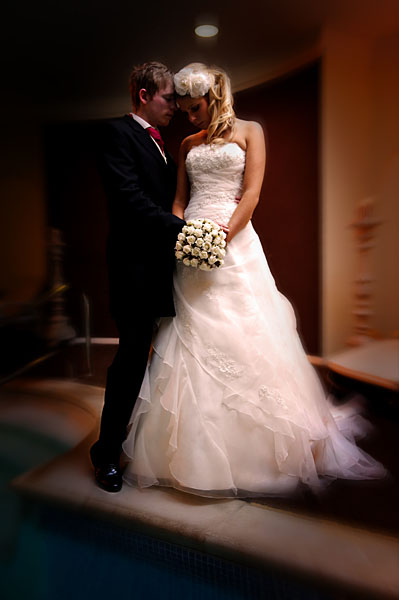
A mix of ambient and flash lighting. The camera was set on aperture priority at 1/60th sec, f2.8 and ISO800

OK, why an ISO of 800? Because the flash was going to have to travel a fair bit and I also wanted to ensure I picked up enough of the ambient light in the background to provide some interest. (More than is evident in final shot, as I had the post process in mind when making the shot).

Why f2.8 and 1/60th sec? 1/60th is the standard "go to" synch speed when a speedlight or SU-800 is attached, but is ideal for the technique I employed here.
I then set the exposure value to -3.0EV, basically underexposing the shot by three stops (causing the actual shutter speed to be 1/500th sec). The flash exposure value was set to +2.0EV to compensate and increase the exposure of any flash lit area (in this case, the bride and groom).
Yep, I can hear you now, "why not set the flash exposure value to +3.0EV, and match the offset?". Because it's not exactly straight forward as that if making use of iTTL/CLS. The camera still has a tendency to stick an oar in as it meters for the shot. A little practice gives you a feel for an expected outcome.

The flash (SB-800) was mounted on an extended monopod with a stofen type diffuser and held camera right, angled down towards the couple, with a 45 degree light path. It was also Gel'd with a CTO to match the ambient light, which was all over the ruddy place! The majority of the ambient light was tungsten, but there was some tungsten in there that was generating an even stronger orange cast, and there was also some lovely green fluorescent stuff about. Nice!
SU-800 to trigger.

Not as hard to replicate as it reads, and it was post processed to augment the atmosphere of the venue.
Post processed with DxO Pro V6 and then Photoshop. Used Stuart Little's free workflow essential actions, followed by the vignette actions (Oval 170px).
Location: Brooklands Retreat, Garstang.
4117710399_1424527031_o.jpg
 
Thanks for picking this up Michael :)

Folks - although the set-up seems a bit of fannying about - some underexposure dialed in in-camera and some plus exposure on the flash, honestly it's not - have a go and post some replies

Thanks again to MS :thumbs:

DD
 
hasn't this been done before?
If you mean the main thread to keep them all together, then no, this is a contributing thread to the main one.
If you mean this particular post, then no, I only shot it on the 12th November.
If you mean this type of lighting, I assume you mean it may be a duplicate of Diddy Dave's post, then no, because this deals with fudging the exposure to gain more control over the ambient light etc (and I'm pretty sure I'd have gotten short shrift from Dave!)
If you mean something else, not really sure :shrug:
 
I mean the thread :)

Now I see. Understandable why you should think it was possibly a duplicate, although this is in support of that thread. The original thread is basically intended as an anchor point so all subsequent "Copy Me..." threads can be tracked from one place. Especially useful as they get older.
Dave's original thread is now some 4 months old.

Hope this clears any confusion
 
Now I see. Understandable why you should think it was possibly a duplicate, although this is in support of that thread. The original thread is basically intended as an anchor point so all subsequent "Copy Me..." threads can be tracked from one place. Especially useful as they get older.
Dave's original thread is now some 4 months old.

Hope this clears any confusion

Yup :)

although I'm confuzled as to how to duplicate the above lighting lol [nooby +1]
 
Maybe I'm missing something, but isn't this just a matter of balancing flash and ambient light levels, as you would normally do with +/- compensation controls? Basically fairly extreme fill-in flash technique.

Maybe it would have been easier to have done the whole thing in manual rather than i-TTL as most of the adjustment seems to be about circumnavigating the auto exposure settings.

I don't understand why it was necessary to use high ISO or bother with HSS either, especially if you were concerned about flash range.
 
Yes, as with any type of exposure, you can do it manually. Which is easier to learn if your new to off camera flash?
a) manual setting of shutter speed/ISO etc and taking into account distance from flash
b) fudging the auto side and manipulation of iTTL etc

Also, the high ISO means it takes in more of the light for a given exposure setting. If, for example, you use a setting of 1/60th f4 @ ISO100 and flash, your subject is lit correctly, but the background is a blackhole. Increasing the ISO to 800 increases the sensitivity and therefore allows more of the ambient light to register on the image. Using this minor adjustment means a closer balance between the ambient light and the flash.
Dragging the shutter is another technique, but doesn't work well for moving subjects, unless the blur is intentional and adds to the image.
I'll post another image/copy me thread which used a low ISO to specifically kill the ambient light in a few weeks.
The higher ISO also means the flash has to work less to light the subject, or in this case, can travel further. The light here was bounced from the ceiling to give a 45 degree downward direction, giving the impression of being ceiling lit.
The intention was to create an image that appears lit by ambient light, maintaining the strong atmosphere of the venue.
What I didn't mention was the fact we had a couple of minutes to walk into the room, set up for this shot take it, and then move on. Using manual would have taken a couple of goes to get it right, plus using auto and the CLS system means the background exposure is taken into account, giving a completely different look to an image than can be achieved with a manual exposure.
I look forward to seeing your own examples. Try the manual method first, and then the auto method. I'd expect you'll be able to get similar results from each, given enough time. However, during a wedding or a very tight deadline, time is everything.
 
Yes, as with any type of exposure, you can do it manually. Which is easier to learn if your new to off camera flash?
a) manual setting of shutter speed/ISO etc and taking into account distance from flash
b) fudging the auto side and manipulation of iTTL etc

Auto or manual? Fair point. I'm a big fan of auto-TTL flash but sometimes I use manual, or flash on E-TTL (Canon) with the camera on manual exposure settings is a another good combination. Depends. Full manual is good for learning as with iTTL/E-TTL you usually have no idea what power the flash is actually working at.

Also, the high ISO means it takes in more of the light for a given exposure setting. If, for example, you use a setting of 1/60th f4 @ ISO100 and flash, your subject is lit correctly, but the background is a blackhole. Increasing the ISO to 800 increases the sensitivity and therefore allows more of the ambient light to register on the image. Using this minor adjustment means a closer balance between the ambient light and the flash.

Well yes, but I think you'd have got a better result by dropping the ISO to 400 which would then have dropped the shutter speed to 1/250sec which gets the flash working normally and out of HSS mode. This gives much more power and range.

Dragging the shutter is another technique, but doesn't work well for moving subjects, unless the blur is intentional and adds to the image.
I'll post another image/copy me thread which used a low ISO to specifically kill the ambient light in a few weeks.

Dragging the shutter, slow-sync flash, high speed sync - these are all variations on the same fill-in flash technique of balancing the flash and ambient light.

The higher ISO also means the flash has to work less to light the subject, or in this case, can travel further. The light here was bounced from the ceiling to give a 45 degree downward direction, giving the impression of being ceiling lit.
The intention was to create an image that appears lit by ambient light, maintaining the strong atmosphere of the venue.

In this situation raising the ISO has the opposite effect of making the flash work less, because it's pushed it into HSS mode which works it very hard and reduces range. Plus lower ISO gives better quality, even on a D3.

What I didn't mention was the fact we had a couple of minutes to walk into the room, set up for this shot take it, and then move on. Using manual would have taken a couple of goes to get it right, plus using auto and the CLS system means the background exposure is taken into account, giving a completely different look to an image than can be achieved with a manual exposure.
I look forward to seeing your own examples. Try the manual method first, and then the auto method. I'd expect you'll be able to get similar results from each, given enough time. However, during a wedding or a very tight deadline, time is everything.

Sorry to be picky ;) It's a lovely shot whichever way you make it, and that's what matters :thumbs:
 
All fair comments Hoppy, I'm jsut used to working quickly, and fudging auto is certainly quick :D
I promise my next "Copy Me" thread will be low ISO and manually set.
The idea of these threads is to broaden folks' perception of possible techniques, and encourage experimentation.
Thanks for your final comment too, much appreciated
 
All fair comments Hoppy, I'm jsut used to working quickly, and fudging auto is certainly quick :D
I promise my next "Copy Me" thread will be low ISO and manually set.
The idea of these threads is to broaden folks' perception of possible techniques, and encourage experimentation.
Thanks for your final comment too, much appreciated

And at the end of the day Michael, you made a great capture, in unusual circumstances, in the time available, and got the shot in the bag in a way that worked for you. It actually doesn't get any better than that.

You can shoot most things in various ways with different camera/flash settings and modes, and come out with much the same result. It's all good learning :thumbs:
 
I've enjoyed reading this thread and the various views expressed. I'll try and give the technique a go but if I don't get the time, I still feel I've learnt something.


Cheers
:thumbs:
 
As I am learning these techniques at the moment and have a weding to shoot in one month I find this incredibly helpfull. Many thanks for posting.
PS hoppyuk - we dont all have flash sync at 1/250th, my pentax only syncs to 1/180th so the HSS option is welcome !
 
As I am learning these techniques at the moment and have a weding to shoot in one month I find this incredibly helpfull. Many thanks for posting.
PS hoppyuk - we dont all have flash sync at 1/250th, my pentax only syncs to 1/180th so the HSS option is welcome !

I think you maybe misunderstand the point. In this case, you could get 1/180sec by dropping the ISO still further, and better image quality.

High speed sync is a fantastically useful feature, but the drawback with it is you lose lots of power - like two stops just by switching it on, more likely three stops or more at the higher shutter speeds you're probably going to use it at.

Which is fine at close distance, but at anything over say 3-4m or so (or when bouncing) there's a danger that you'll run out of flash power. So if you don't actually need it, keeping the shutter speed in the normal x-sync range increases your options. Horses for course and all that, and either way in this case the OP got the shot :)
 
Back
Top