Content Aware PS

oblivion

Suspended / Banned
Messages
235
Name
Richard
Edit My Images
Yes
I'm new to PS and have just started making use of the Content Aware tool with some very good effects. A true godsend I must say.

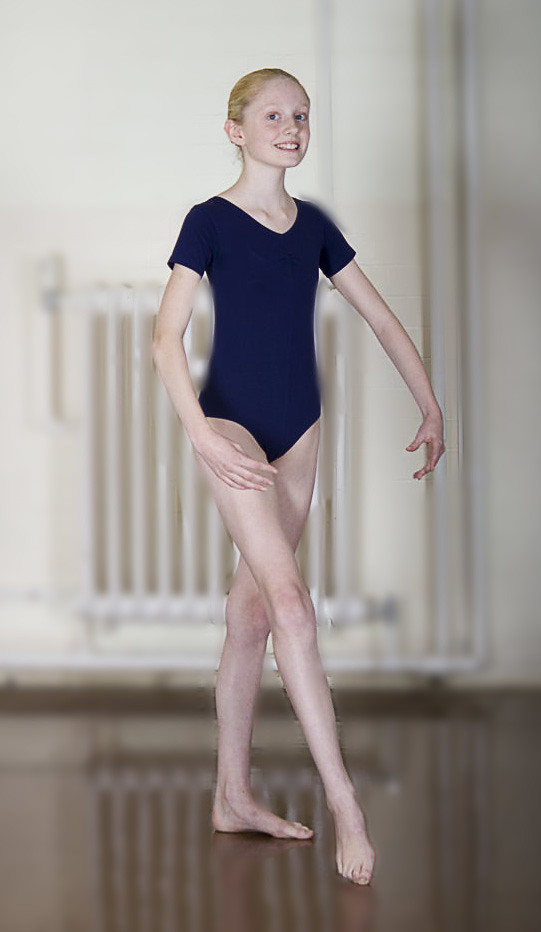
However I am struggling with one picture where I am trying to remove a radiator from behind a ballet dancer on a wooden floor. Each time it keeps filling the selection with a blended copy of the dancer rather than the clear white wall above her head (which is what I'm after). I thought there may be an option similar to Lightroom 4 when using Spot Removal and you could choose the area.

I see when I press the delete key and having chosen Content Aware there is a huge drop down menu with various options. I have played around but running out of patience now. Anyone with any ideas?
 
You probably need to post the image, then we can see exactly what you are trying to achieve.

Neil.
 
Picture is not edited at all yet but as you will see I need the radiator completely gone, pipes too. If I can achieve this then I can concentrate on removing the radiator shadow off the floor. Ideally I need the wall to look plain and still like the original wall.

8057668925_3409d83961.jpg
[/url] 1-IMG_7136 by oblivion204, on Flickr[/IMG]
 
Although content aware is good it does have it's limitations...you need to try to select such a file that has sufficient space around so that Photoshop can detect the surroundings of the object you are going to remove.

Being that the girl is right next to the area you want to fill won't probably work with the content aware fill.
You have set yourself a hard task trying to remove this to make it look like the wall is natural and then to try and remove the reflection so it looks natural as well.
There will definitely be people better then me on here on this type of work....hopefully you will get a reply from them....the problem you have is that the wall and floor have gradient lighting....sorry I could not help you further.

Neil.
 
I see your point. It may be easier just to re take the pictures rather than spend the next week trying to manipulate. I was going to cut her completely from the shot and position on another picture or just plain background but it just looked wrong
 
I don't think there is an 'impossible!' task in Photoshop, but that one must come pretty close!

Re-shoot.
 
You need to use the clone tool instead for this, however your source area to cover with is quite limited.
 
if you use rectangular marquee tool to cut out part of wall,
then
ctrl/j to make new layer,
then
if you use rectangular marquee tool to cut out part of floor,
then ctrl/j


then use transform tool to resize,
then quick selection tool on ballet dancer,
ctrl/j for new layer,

dump BG copy,
and merge layers you are left with,
10 - 15 minutes
different option to content aware
 
I think you should use the content aware patch tool but to be honest its not going to make the shot any better I think I would try a blur on it as youll never get it perfect with cloning, it may have paid off to think about it at the time of the shoot and have her move to a better bg, and maybe not as close to the BG as well would help
 
Last edited:
I think you're asking too much with that one.

Think backgrounds before you take a shot, saves heaps of time pp'ing later on :)
 
I know its a good idea hard to pull off though, I had a quick go oo isolate and copy the ballerina not easy

10min job dave, if you paint a mask over dancer, switch between selection and mask for fine tuning, then when happy, make sure you inverse then ctrl/j, to take dancer from BG
then copy and paste into place,

was hoping op would give it a go
 
Back
Top