
Confused with blur... Please help.

PJwebbs

Suspended / Banned
Messages
198
Name
Paul
Edit My Images
Yes
Long story short I can't afford a car rig yet so i'm trying my hand at photoshop for rig shots. I'm having a cheeky go at this using a I just can't get the radial blur to work. What am I doing wrong? I have highlighted the wheel and transformed it so it is square and then when I apply the radial filter it just does this.....
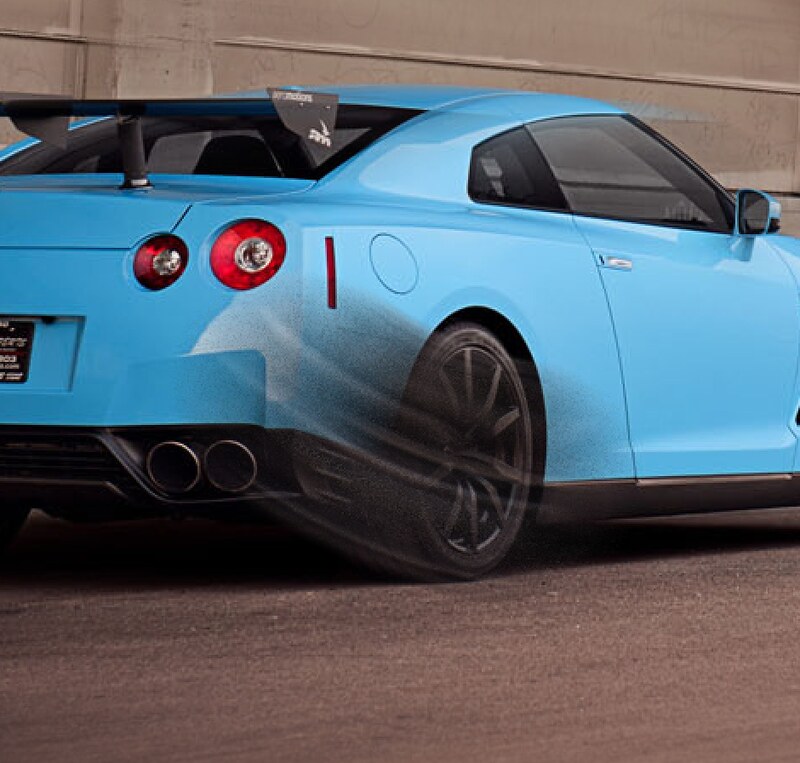

Screen Shot 2014-01-02 at 22.06.48
by pjwebbs, on Flickr

Any ideas people?

Thanks!
 
I don't think it's gonna work. You could try virtual rig but it's spendy...
 
Mask off the rim and tyre... then radial blur it. Why you making a square mask?


It still won't work well though, as the wheel from this direction is not round.... it's oval.

Virtual Rig would work, but even the rubbish Lite version is around £200 I think... the full version being a couple of grand. It's designed primarily as post for CGI in games though.... it would actually be cheaper to buy a rig LOL

If it's blur on the wheels that is causing you an issue... take a separate shot of the wheel from head on... radial blur it, then transform it and put it back in the main shot
 
Oops a little more explain action needed, I ment stretched the oval wheel to a circle, which makes the transform box square, in doing this you get a more 'realistic' wheel blur apparently but I wouldn't know as I can't get radial blur to work!!!

Also, I don't think you can wheel blur in virtual rig do this is still a technique I need to be able to do.
 
I'm pretty certain you can blur wheels in it.... but at that price, it's irrelevant.

Cut out wheel..... transform wheel.. paste into it's own transparent later with hub positioned dead centre.... radial blur.... paste back into original shot as a layer... position and transform. Done.
 
Last edited:
It looks like the blur centre is wrong. It appears to be off the top right of your picture. Set it at the centre of the wheel.
In Gimp the default centre of radial blur is in the centre of the selection. No spending needed.
 
Last edited:
He's not using GIMP.. he's using Photoshop.
 
So what?

I don't have Photoshop. Do you? Does Photoshop not need a centre of rotation? Don't you think my suggestion might have helped? Take a look again at the black smudge on his picture and combine it with his comment "I can't get radial blur to work!!!"
 
Last edited:
From my quick look this morning, PS does (of course) need a centre of rotation, it appears to be taken as the centre of the layer, unless a specific selection is made, in which case the centre of rotation becomes the centre of the selection.

David's method of "paste into it's own transparent layer with hub positioned dead centre", will work, as will first making an elliptical / circular selection round the wheel (regardless of it's position witihn the layer)..

Presume OP also needs to introduce motion blur to the background otherwise they will end up with a stationary car with spinning wheels!

Paul - why not post up the full file and see if anyone fancies a go? :)
 
Doing the rest is fairly easy once you mask off the car, and again, radial blur is the the main tool for the job (set to zoom this time), but depends on exact angles of travel. Sometimes a mix of radial and motion blur can be useful, as can discreet airbrushing. It's the quality of the masking that usually lets the side down.
 
Back
Top