Computer Questions, Game related

redhed17

Suspended / Banned
Messages
7,316
Edit My Images
Yes
Until recently I have only played video games on consoles, (Playstation and XBox) but I have started playing a game on my PC for the first time, and I'm concerned over how much the game is pushing my system. :oops: :$

The game I'm playing is Cities - Skylines.

My PC has an i5 processor.
500Gb SSD
16Gb RAM
Radeon 550.

What's concerning is that the processor and the graphics card seem to be running at maximum whilst I'm playing the game. Does anybody know what is the safe temperatures to run these at, or will they stop working or throttle before they get too hot to protect themselves?

This may become more of a problem as the ambient temperature rises. I have no idea about PC gaming really as you may have guessed. :thinking: ;)

I should add that none of the components were bought with gaming in mind, just day 2 day use including PS and LR. ;)

I do not have any money at the moment to make any changes, just trying to find out if I am doing any potential long or short term damage really. :)
 
As long as you haven’t messed about with bios settings, then it’s unlikely you’ll do any damage, the game will visually scale up and down along with temps Etc.

CS is a very cpu intensive game, although it might not feel like it, and i5 is a very broad term. Which one is it exactly?

Short term, there a bunch of detail settings you can lower (along with Res, which I’m guessing you know) that will reduce a lot of load.

Next low cost thing would be to re paste the cpu with good quality paste, it’s fairly easy/quick and can make a big difference to cooling. Also look into your fan/vents and space for air to vent away.
 
Thanks for replying Matt. :)

The processor is a i5-4690. I built the PC and I think I used thermal paste that I had from previous computer builds. I think. :thinking: ;) It was about 5 years ago. I have just surprised myself by checking. :oops: :$ :LOL:

No messing about with the Bios from me. :) Good to know that I prbably won't do any damage.

The monitor I'm using has a native max resolution of 2560 x 1440. I think the game is running at 1600 x 900, so I'm not pushing it to the max of what I could, but it is good enough. Any other graphics settings are at default, which I think the resolution may be too.

Cooling could be something I may have to look into as it gets warmer, and may be the most cost effective way to make changes.
 
The chips would thermal throttle before anything too bad happened. Amd gpus do tend to run very hot. I like to see my cpu below 60 with my water-cooled chip. But have had it up at 80 with air cooked and overclocking.
 
Your build meets the recommended requirements of the game.

Really need to know if your case has enough airflow.

Whats the case?
What CPU cooler?
How many fans? What size?
 
This is probably very obvious but just to eliminate; when running the game, you have all other applications closed? LR/PS in particular, also I think Chrome uses a tonne of RAM even in the background. Have you checked task manager when the game is running [if you play windowed] to see what other processes are using memory in the BG?

Have you toned down settings in game to see if you get any performance improvement?
 
Last edited:
It's not unusual to have cpu and gpu running at 100% anyway on an aging system. I mean the game will take us as many resources as available.
 
I mean that gpu is only 2gb which will really struggle with newer games
 
Thanks for all of the replies. :)

I only ever have the game playing. Best not to give it too much to do when it seems to be running flat out. ;) I think the CPU fan is the one that came with the CPU, because I can't find a separate one I have bought. The fan(s) (see later ;)) are the bog standard case fans What are they, 120mm!

I bought a computer here about 12 years ago in the classifieds, and then replaced the innards about 5 years ago with the specs I mentioned earlier. There are also a 500Gb, 1Tb and 2Tb HDDs which will not be helping with the heat. :rolleyes: :LOL: The case, is a large case, and just looking on the internet it looks like a Lian Li PC60. It seems a poor case for ventilation by modern standards.

I've just seen a pic on the internet of the inside of the case which showed a fan on the front, before the enclosure that holds the HDDs, which I didn't think was there as looking at the various monitor programs over the years, and only one fan has shown as running, and so I assumed that was the single extractor fan was the only other fan running bar the PSU and graphics card fans. :thinking: I've just looked and there is a fan there drawing air in. :oops: :$ :LOL: As I said, the ventilation is woeful compared to modern PCs but up until now it has never been a problem.

Atm the moment I have no money to spare for anything. My work has stopped a week or two before half term, and because of the current situation, may not start again until September, and I have my doubts about that. :thinking: I also can't receive mail atm too, :rolleyes: as I live above a shop that is closed for the forceable future, so can't get much delivered anyway. So the way it is is the way it will stay.

As long as there is something in place on the processor to protect itself from being cooked and ruined, as I would struggle to replace it, I'm happy enough atm to carry on. If things get too hot over the summer I can take the side off and point a large fan at the inside. ;)

Again, thanks for taking the time to comment. :)
 
Thanks for all of the replies. :)

I only ever have the game playing. Best not to give it too much to do when it seems to be running flat out. ;) I think the CPU fan is the one that came with the CPU, because I can't find a separate one I have bought. The fan(s) (see later ;)) are the bog standard case fans What are they, 120mm!

I bought a computer here about 12 years ago in the classifieds, and then replaced the innards about 5 years ago with the specs I mentioned earlier. There are also a 500Gb, 1Tb and 2Tb HDDs which will not be helping with the heat. :rolleyes: :LOL: The case, is a large case, and just looking on the internet it looks like a Lian Li PC60. It seems a poor case for ventilation by modern standards.

I've just seen a pic on the internet of the inside of the case which showed a fan on the front, before the enclosure that holds the HDDs, which I didn't think was there as looking at the various monitor programs over the years, and only one fan has shown as running, and so I assumed that was the single extractor fan was the only other fan running bar the PSU and graphics card fans. :thinking: I've just looked and there is a fan there drawing air in. :oops: :$ :LOL: As I said, the ventilation is woeful compared to modern PCs but up until now it has never been a problem.

Atm the moment I have no money to spare for anything. My work has stopped a week or two before half term, and because of the current situation, may not start again until September, and I have my doubts about that. :thinking: I also can't receive mail atm too, :rolleyes: as I live above a shop that is closed for the forceable future, so can't get much delivered anyway. So the way it is is the way it will stay.

As long as there is something in place on the processor to protect itself from being cooked and ruined, as I would struggle to replace it, I'm happy enough atm to carry on. If things get too hot over the summer I can take the side off and point a large fan at the inside. ;)

Again, thanks for taking the time to comment. :)


For a start run at 1080p.

Take a pic of the case with the side panel off (side on or slight angle to see cooling) and front, looks like it could be easily modded, Im guessing you have one inlet and one exhaust. The inlets blocked by hard drives so your air flow is terrible for that setup.

Shame about the post, I have some spare 120mm I could send you. Just one more on the inlet could help a lot.

Also, looking at that case, you could take out the drive covers / bays as theres a crap load and mesh it as a temporary measure instead of side panel off.
 
Last edited:
Hi Twist, I am already running the game at 1600x900, and that is good enough for me. :)

Oh, and the graphics card has 4Gb, rather than 2Gb nige87. :) I have no intention of playing any other games though.

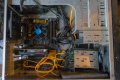
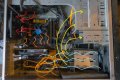
Below is a pic of the computer with the side panel off, as you may have guessed. ;) :LOL: The computer 'lives' on its side on a frame, and I think that has been good for keeping it as dust free as it is. Thankfully. :) I'm not saying it is sparkling btw, but for 5 years it looks pretty good imho. :LOL:

Thanks for the offer of the fan. (y) :)

redhed17 PC.jpg
 
Hi Twist, I am already running the game at 1600x900, and that is good enough for me. :)

Oh, and the graphics card has 4Gb, rather than 2Gb nige87. :) I have no intention of playing any other games though.

Below is a pic of the computer with the side panel off, as you may have guessed. ;) :LOL: The computer 'lives' on its side on a frame, and I think that has been good for keeping it as dust free as it is. Thankfully. :) I'm not saying it is sparkling btw, but for 5 years it looks pretty good imho. :LOL:

Thanks for the offer of the fan. (y) :)

View attachment 275538

Your PC is definitely capable enough for that game, the issue here is case design/the cooling.

The front fan will be pulling cool air in, the back will force what has become hot air out.

The case isnt ideal for airflow, theres no top, side or bottom grill, PSU is at top, single fan at front.

To do:
Best keeping the PC the right way up, hot air rises.
Front fan is completely blocked by drives. You could move them into the upper CD/DVD slots. See suggestion.
Top half, front of case has no ventilation, Ideally you want to have two fans, one above the other pulling cool air in on the front panel.

Its a difficult one because you cant have anything delivered. I think a free solution like this could work/help.

Original

FB5EB66104A10C2DC4A28BAE595C7AC93443AB73_large.jpg

Modified, using fine mesh material like stocking.

lian.jpg

HDDs in empty bays, remove DVD drive if you dont use it, same for any unused hard drives.

redhed17 PC.jpg
 
Last edited:
@redhed17

I was going to suggest you clean the inside of your computer, but I see from your photo, the inside is already clean. That is a good thing you're doing. A lot of people don't clean the inside of their computers, even my mother once moaned that her computer is slow and sluggish. I found out the inside was so dusty, I spent an hour cleaning it, afterwards (including after deleting as much junk files, uninstalling unused programs, defrag the hard drive, and stuff like that), my mother was impressed with a better start up time (loads Windows in less time than before).

Dust inside the computer is like a blanket for us, it gets the computer so hot. Hot computer = sluggish computer.

I have to agree with @twist about moving a few of those drives at the bottom, into spare empty bays above, so that with them out of the way, you have strong airflow, as shown in twist's drawing on your photo. I would also suggest an additional idea, try to tie those orange cables in a neat and tidy fashion, using cable ties.

You have spare slots, maybe upgrade your graphic card if you can?

Also, since I have no idea what the side panel is like, the one you need to cover that computer, I'm guessing it does not have any holes? Maybe either customise it yourself (more likely), or if possible, find a replacement panel (less likely).

Drill small holes in it for more air ventilation, add a fine mesh to stop dust, and add one large fan or two (or four) smaller fans to it, to suck out hot air (or blow in more cool air).

Something like...

IMG_9147.PNG

I got this same tower model. See those holes on the side? I attached a 120mm fan (or you could attach two smaller fans side by side) to it, to suck in cooler airflow (or you could have the fan installed the other way round, so it blows out the hot air) .

You should also consider the position of your computer. Is it sitting on a carpet? If so, take it off and place it on a flat hard surface. Is it too close to a radiator? Move it away. Is the computer trapped in a corner of your room? Too close to walls or furniture? Move it so it have more airflow around it. Stuff like that.

Trying to keep your computer clean, plenty of airflow around it, away from heat, moving some drives to spare bays, tidy up cables, try to improve airflow inside the computer, all of it is a lot cheaper than buying and upgrading hardware inside it, which should be as a last restore.

Also suggest you close some of the application software running in the background (expect for anti-virus software which should be left to run), in order to lighten the workload for the processor.

If it helped a little bit, great. But if it is still not enough, then your other option is to think about upgrading some parts of it.
 
Thank you twist and Major Eazy for taking the time to think about this, and also taking the time to reply in such detail. :clap: :)

The PC will need to stay on its side, even if that is not optimum. It's just the way it fits into my environment. The addition of a front fan below the CD/DVD (which is used occasionally) is possible, and as its on its side, an opening in the side (now the top ;)) in some way could be good with a (extractor) fan too taking away the hottest layer. The HDD's get surprisingly hot, so I'll think they have to stay next to a fan. Maybe if I got the fan at the top (below CD/DVD) drawing air in, the fan near the HHD's could be reversed to draw their heat out, rather than pushing their heat into the case. Something to think about and try anyway. :)

For various reasons mentioned earlier I am not in a position to make many changes atm, and everything is working as it should thankfully. This thread was just to try and make changes for the anticipated rise in temperatures over the summer.

Again, thanks for your suggestions, they have certainly given me things to think about when I am able to make changes. (y) :)

Your avatar gave me 2000AD flashbacks 'Major Eazy', even if the name initially didn't. ;) :LOL:


As an aside, the thing I had been planning for quite awhile coming up to this Easter break was buying another SSD to start with a fresh installation of Win 10, as I am now on Win 7 on the current PC. Apart from Win 7 now being out of date, I am happy with everything else. All the various programs I have accumulated over the years work perfectly (Cities Skylines maxing out aside ;) :LOL:) and have just been putting it off for years. Yes, I know you can technically upgrade Win 7 to Win 10, but I wanted no chance of that messing up, and wanted a fresh install. That was the plan over the Easter break anyway. :rolleyes: Another thing put on hold. :LOL:
 
Thank you twist and Major Eazy for taking the time to think about this, and also taking the time to reply in such detail. :clap: :)

The PC will need to stay on its side, even if that is not optimum. It's just the way it fits into my environment.

For various reasons mentioned earlier I am not in a position to make many changes atm, and everything is working as it should thankfully.


Your avatar gave me 2000AD flashbacks 'Major Eazy', even if the name initially didn't. ;) :LOL:

If your PC tower had to be put on its side to fit into your workspace. I would think it is a good idea to drill holes in the side panel, fit a mesh to stop dust getting in, and fit a fan, make sure airflow goes out, blow the heat out, not suck fresh air in. It may help. My computer have a fan on the side and front to suck air in, fan at the back and two fans at the top to blow it out, it is useful for me having two fans at the top blowing the wasted heat out, since heat rise away from computer. Yours could act like this as long as it is on its side.

I can see that you can't do anything at the moment, it is not a suggestion to do it now, it could be an idea for you to plan for. Better make plans, since plans can be refined to improve it. When the time comes, you never know, with the lockdown finally lifted, and maybe when you got suitable budget, you could consider if you want to put your plans into action.


As for my avatar. This one was from a war themed comic called Battle, not the science fiction themed comic which is what 2000AD is, but the artist who drew Major Eazy is the same artist who did draw (and co-created) Judge Dredd in 2000AD comic. He worked for both comics. I was lucky enough to meet him, got his autograph, and he personally made a quick sketch of Major Eazy in a hardback book I have, before he passed away in October 2018.

When I was thinking of a username, it was the only thing I could think of, so I ended up using Major Eazy as a username.
 
The guys know a lot more than I about all of this and are giving great advice, twist has been helping me figure out how to build up a PC too, knows what he's talking about and I've learned a lot! But outside of the more technical aspect, when is the last time you gave your system a good clean up? As in, software, temp files, empty the cache etc? It can improve performance a good deal if it's jammed with all sorts. If you are going to format the drives and do a fresh win 10 install, I think this will improve things greatly for you - Win 10 is much better optimized for gaming, or at least that's what we're told, and I found this to be true when I upgraded from Win 7 to 10 - I did it at the time they were offering the upgrade free, not sure if that's still the case? But even the simpler games I would play like Hearthstone, Gwent, used to play world of tanks and a few others, improved quite a bit just from going to Win 10 and doing a regular system clean up. My laptop has a much crappier Gpu than you have and I even managed to get the likes of the Witcher 2 to run on it [albeit at very low settings]
 
Last edited:
If your PC tower had to be put on its side to fit into your workspace. I would think it is a good idea to drill holes in the side panel, fit a mesh to stop dust getting in, and fit a fan, make sure airflow goes out, blow the heat out, not suck fresh air in. It may help. My computer have a fan on the side and front to suck air in, fan at the back and two fans at the top to blow it out, it is useful for me having two fans at the top blowing the wasted heat out, since heat rise away from computer. Yours could act like this as long as it is on its side.

I can see that you can't do anything at the moment, it is not a suggestion to do it now, it could be an idea for you to plan for. Better make plans, since plans can be refined to improve it. When the time comes, you never know, with the lockdown finally lifted, and maybe when you got suitable budget, you could consider if you want to put your plans into action.
Thanks Major Eazy. The idea in my head at the moment is to maybe add two fans, one to the front, and one on the side, which the top in my system. ;) The side/top would be an exhaust of the warm air. The additional front fan would draw in. The bottom from may stay as drawing air in, or depending on testing, may change to exhaust too. When I get round to that I have no idea atm. But thanks to twist and yourself for giving me the ideas and urge to try it when possible. :)


As for my avatar. This one was from a war themed comic called Battle, not the science fiction themed comic which is what 2000AD is, but the artist who drew Major Eazy is the same artist who did draw (and co-created) Judge Dredd in 2000AD comic. He worked for both comics. I was lucky enough to meet him, got his autograph, and he personally made a quick sketch of Major Eazy in a hardback book I have, before he passed away in October 2018.

When I was thinking of a username, it was the only thing I could think of, so I ended up using Major Eazy as a username.
I got confused when I checked up on the character earlier. The name rang a bell, but the design of the character more, and that is where I knew to look.

As as you say, Carlos Ezquerra was the artist responsible for the design/drawing of that character, and many others, Judge Dredd as you say, and another character based on James Coburn, as Major Eazy was, in also Stainless Steel Rat in 2000AD. Weird, I'd seen his name throughout my childhood, drawing many characters in a lot of the comics I read, but only saw a picture of him earlier, when I also found out that he had died too. :( Extremely influential, and left a huge legacy. Well done you for meeting him, and him kindly doing a drawing for you. :)

I think I bought, or had bought for me, ;) Battle, as well as Victor and Wizard. I also got the more Sci-Fi 2000AD, and later Starlord. I had/have a very generous Mum. :)
 
The guys know a lot more than I about all of this and are giving great advice, twist has been helping me figure out how to build up a PC too, knows what he's talking about and I've learned a lot! But outside of the more technical aspect, when is the last time you gave your system a good clean up? As in, software, temp files, empty the cache etc? It can improve performance a good deal if it's jammed with all sorts. If you are going to format the drives and do a fresh win 10 install, I think this will improve things greatly for you - Win 10 is much better optimized for gaming, or at least that's what we're told, and I found this to be true when I upgraded from Win 7 to 10 - I did it at the time they were offering the upgrade free, not sure if that's still the case? But even the simpler games I would play like Hearthstone, Gwent, used to play world of tanks and a few others, improved quite a bit just from going to Win 10 and doing a regular system clean up. My laptop has a much crappier Gpu than you have and I even managed to get the likes of the Witcher 2 to run on it [albeit at very low settings]
Hi Cagey, thanks for taking the time post.

I clear the Temp files every night with CCleaner, and sometimes throughout the day too depending on what I have been doing.

Win 7 has, and does work well for me, but we use Win 10 in work, and although I have Win 10 on a laptop, that is hardly used. Win 10 will be more secure from now on, and as you say, should work better with games, and the other programs in general. It is always nice to have a nice fast clean install every so often too. ;)
 
Back
Top