

Colours incorrect on Acer monitor [help]

manda

Suspended / Banned
Messages
777
Name
Amanda Herbert
Edit My Images
No
Hi all,

I calibrate my monitor everyday [in desperation] and have checked the colour space for LR / photoshop etc. However, my monitor is now showing day glow red for all colours in that spectrum.

Old photographs processed with perfect skin tone are great once uploaded on the web, but are ridiculous when I view them as jpegs or png on the monitor.

Google throws up other people having this problem, but I've not found a solution at the mo.

Do I need a new monitor [it is 2 years old] or has anyone a neat solution for me? Fingers crossed, Mandy

Example:
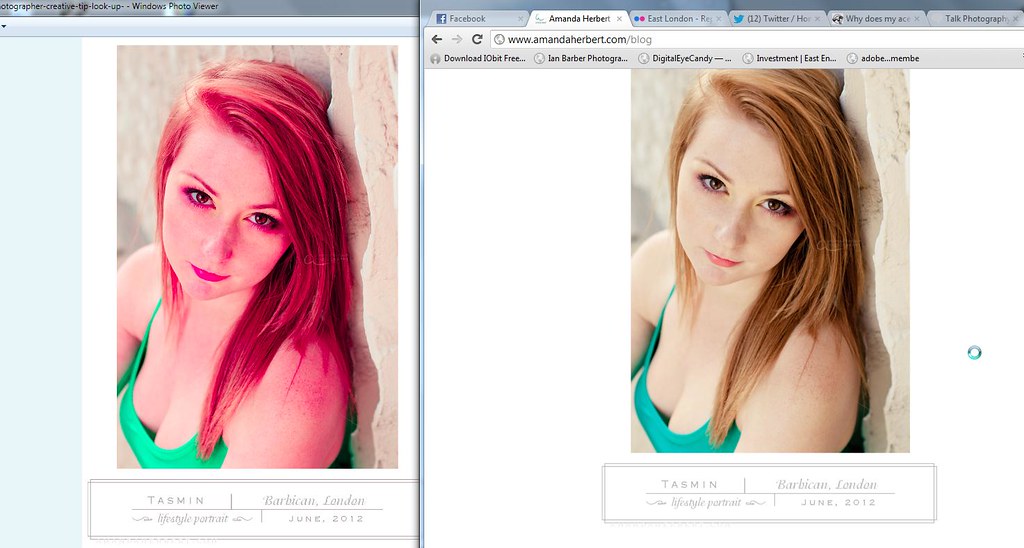
I'm having monitor problems - any ideas? by M@ndy, on Flickr
 
Can you plug the monitor into another computer to see if the problem stays or goes? Maybe as an external monitor for a laptop just to test it?

At least then you would know if there is a hardware fault with the monitor before working on the more likely problem of something being wrong in your windows install.
 
RobertP said:
Can you plug the monitor into another computer to see if the problem stays or goes? Maybe as an external monitor for a laptop just to test it?

At least then you would know if there is a hardware fault with the monitor before working on the more likely problem of something being wrong in your windows install.

Thanks for this Robert - I was going to try an old monitor at the weekend, I hadn't thought of putting the monitor on a laptop! Will let you know how I get on, Mandy
 
neil_g said:
right but what colour profile are you saving as out of lightroom/ps? sRGB? adobeRGB? CMYK?

Hi Neil, images saved for web are srgb. However, my issue is with all formats displayed by the monitor irregardless of file type or software. At the mo I can process an image with tango orange & then have to view it on the web to see if the colours are correct! Let me know if you have any tricks I can try, Mandy
 
:eek: NOOOOOO....oh that brings back horrible memories! Had exactly the same problem on a Windows XP machine 3 or 4 yrs ago, with a Dell monitor. Posted here and tried absolutely everything suggested to get colour back to normal but nothing would work. IN the end I formatted the machine, re-installed windows, photoshop and bridge [as I used then] and bingo, all was well again. Never did figure out what had caused it and the machine & monitor still work perfectly to this day :thinking:
 
Yv said:
:eek: NOOOOOO....oh that brings back horrible memories! Had exactly the same problem on a Windows XP machine 3 or 4 yrs ago, with a Dell monitor. Posted here and tried absolutely everything suggested to get colour back to normal but nothing would work. IN the end I formatted the machine, re-installed windows, photoshop and bridge [as I used then] and bingo, all was well again. Never did figure out what had caused it and the machine & monitor still work perfectly to this day :thinking:

Yikes - I've just had my IT guy reformat computer & I reinstalled everything! Maybe a further reinstall! *groan*
 
Hi Neil, images saved for web are srgb. However, my issue is with all formats displayed by the monitor irregardless of file type or software. At the mo I can process an image with tango orange & then have to view it on the web to see if the colours are correct! Let me know if you have any tricks I can try, Mandy

thats got to be some sort of colour profile issue that is getting loaded on the computer
 
Right ho -

- I've restarted the computer back to an install point.
- I've also reinstalled CS3 and LR4.
- I've tried a different monitor.

But the issues remain.

If any one could guess what the problem is, I would be very grateful, I'm at a complete loss!

Thanks Mandy
 
Last edited:
Old photographs processed with perfect skin tone are great once uploaded on the web, but are ridiculous when I view them as jpegs or png on the monitor.

So, let me understand this. You have a .jpeg on your computer and it has day-glo colours, but when you upload the photo to the web (without changing or resaving it) the colours are right. Is that correct?
 
(without changing or resaving it) the colours are right. Is that correct?

Any image - whether I see it in -

  • LR as RAW or DNG
  • or photoshop [tiff or psd]
  • or jpeg / png via windows viewer

is now day glow.

Images that have been processed a year ago successfully via print or web are now viewed as day glow on my monitor. This means, images I know are 'colour correct' are viewed as orange on my monitor. Once upload on the web they are 'correct'.

I've not changed the images, but I have resaved them via an export via PS or LR - again - I've defaulted to my 'saved workspace'. Which means I've used the same colour profile [I've checked I'm using the same colour workspace between PS & LR & my camera].

Interestingly, if I open the images via 'microsoft image manager' the colours are accurate.

I can only assume it is human error on the computer side, but what, I've no idea!
 
Can you upload one of the images that are day-glo without resaving and also upload the same photo after saving and provide a couple of links to them please.
 
Can you upload one of the images that are day-glo without resaving and also upload the same photo after saving and provide a couple of links to them please.

Hi, I wasn't sure what you meant - but to rule out user error in PS or LR. I've used this commercial clipart from 'the ink next' design company. Even with a commercial png I am viewing the same issues. The image used was upload straight from my desktop with no editing.

I'm so confused, it anyone could guess at the problem, I'd be eternally grateful. Mandy

Straight upload onto flickr:

flower by M@ndy, on Flickr


Screen grab of how the colours are interpreted by my computer:

ScreenShot002 by M@ndy, on Flickr
 
Hi all - SOLUTION FOUND - my calibration software wasn't installed properly, once I deleted it - all the colours jumped back into place! [doh]

Thanks to everyone for trying to help!

Mandy
 
Back
Top