

ST Colin
Suspended / Banned
- Messages
- 252
- Edit My Images
- Yes
Hi all,
I have been having colour issues for months now. My workflow constantly involves having to manually set my correct colour for every photo. It all started randomly, I opened a photo as normal in the RAW editor and the photos had a red/orange colour cast to them. However, when photos are viewed in Canon DPP for example, the colours are correct on my monitor. I prefer the CS3 RAW editor, simple as that, it's a quicker workflow for me, with many more options than DPP, but it's useless because it always opens photos now with a colour cast. Here are my current setting for CS3:
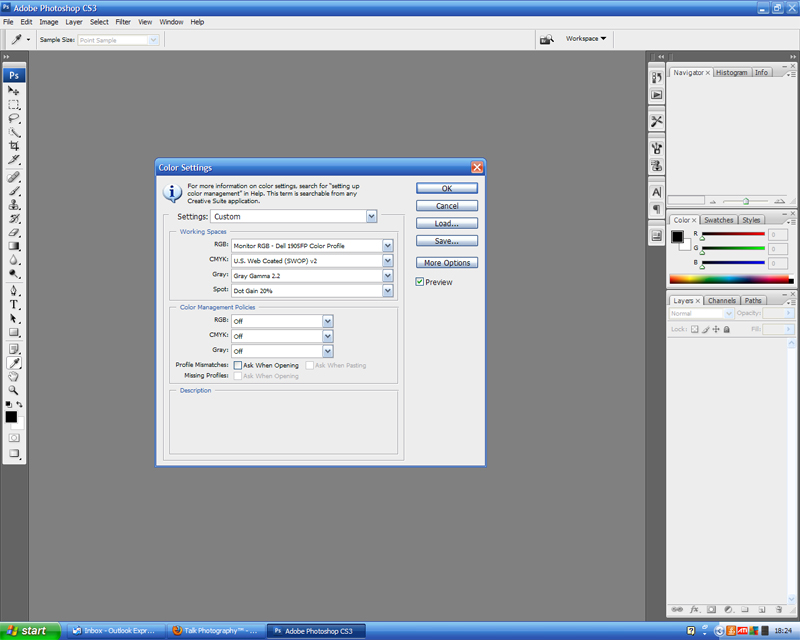
Colour Settings by colinsphotos26, on Flickr
Now, when the RAW editor is opened, the colour space is sRGB, with no option to select my monitor profile. Even if I set my colour space to sRGB in the screen above, thus matching the colour spaces, the colour cast still remains.
It's driving me crazy, can anyone help me? Another down side is that all my photos open in 16bit mode, can I default it 8bit mode? 16bit mode seems to block a lot of functions in CS3.
Thanks in advance,
Colin
I have been having colour issues for months now. My workflow constantly involves having to manually set my correct colour for every photo. It all started randomly, I opened a photo as normal in the RAW editor and the photos had a red/orange colour cast to them. However, when photos are viewed in Canon DPP for example, the colours are correct on my monitor. I prefer the CS3 RAW editor, simple as that, it's a quicker workflow for me, with many more options than DPP, but it's useless because it always opens photos now with a colour cast. Here are my current setting for CS3:
Colour Settings by colinsphotos26, on Flickr
Now, when the RAW editor is opened, the colour space is sRGB, with no option to select my monitor profile. Even if I set my colour space to sRGB in the screen above, thus matching the colour spaces, the colour cast still remains.
It's driving me crazy, can anyone help me? Another down side is that all my photos open in 16bit mode, can I default it 8bit mode? 16bit mode seems to block a lot of functions in CS3.
Thanks in advance,
Colin


