Colour problem

Derek.Laurence

Suspended / Banned
Messages
231
Name
Derek
Edit My Images
Yes
I recently put a picture up for C&C in the critique section and commented that the colours had looked odd on my uncalibrated laptop screen.

I took my images along to the local supermarket for printing (they are only going in a photo frame in the house)

When I got the images the colour was indeed off on them. They were both essentially headshot portraits and looked grey and bleached (not the nice colours I had got whilst editing)

Ive just edited another picture and got the same problem.

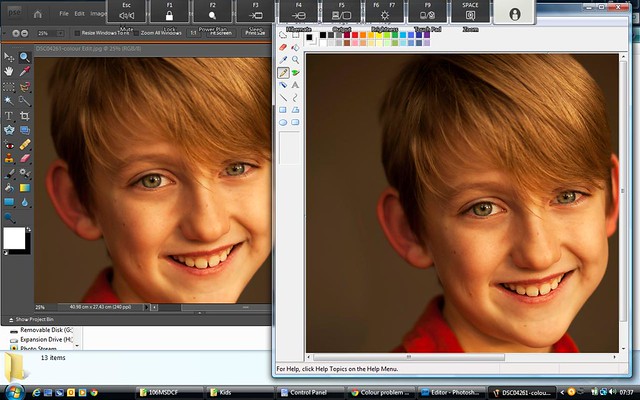
I initially thought it was my editing technique but when I view the picture in PS Elements 7 or Lightroom it looks a completely different colour to viewing it on anything else. When Printing it comes out the alternate colour.

Ive taken a screenshot to show that Im not going mad or blind.

Can anyone enlighten me as to why my colours are nice in PSE7 and Lightroom, but horrid on anything else and in printing?

colour problem
by dereklaurence, on Flickr
 
First point is your Uncalibrated Screen. If you've made any corrections in LR or Elements you could well be adjusting for a screen problem rather than an image problem. Calibrating and Profiling your screen is a must and there is only one way to do this and that's buy a hardware calibrator - an i1 Display Pro, Spyder or whatever. Even so I'm not a fan of using laptops for this type of task since viewing angles can seriously change the image appearance - this does vary from laptop to laptop though.

Second point is LR and Elements are both colour managed programs and as long as your image has a profile this will be honoured by these programs (provided its turned on in Elements) so they should look the same. Other programs that are not colour managed can produce strange results.

Its possible for LR to create images that are in the ProphotoRGB or AdobeRGB colour space and some print shops don't handle these, expecting sRGB instead.

So, I'd certainly calibrate and profile your display and think about producing sRGB images if you're getting them done in a supermarket.

Colin
 
First point is your Uncalibrated Screen. If you've made any corrections in LR or Elements you could well be adjusting for a screen problem rather than an image problem. Calibrating and Profiling your screen is a must and there is only one way to do this and that's buy a hardware calibrator - an i1 Display Pro, Spyder or whatever. Even so I'm not a fan of using laptops for this type of task since viewing angles can seriously change the image appearance - this does vary from laptop to laptop though.

Second point is LR and Elements are both colour managed programs and as long as your image has a profile this will be honoured by these programs (provided its turned on in Elements) so they should look the same. Other programs that are not colour managed can produce strange results.

Its possible for LR to create images that are in the ProphotoRGB or AdobeRGB colour space and some print shops don't handle these, expecting sRGB instead.

So, I'd certainly calibrate and profile your display and think about producing sRGB images if you're getting them done in a supermarket.

Colin
surely no one prints using srgb its a monitor display ........:cuckoo:
 
sRGB is not a monitor display, its a device independent colour profile. Monitors have there own unique color profile, some of which will be close to that defined by sRGB but that's not always true. This is why displays should be calibrated and profiled if your serious about colour reproduction.

Images can be created and tagged with any colour space you like but you need a colour managed process to ensure accurate rendering or printing. A number of print shops don't do colour management but make the assumption that the images are sRGB because this is the lowest common denominator, if you like, of the colour spaces. Virtually all cameras and phones will produce images in the sRGB space ( if we exclude raw or anyone who has deliberately chosen AdobeRGB)

Colin
 
Thanks for the replies... Although I've got to be honest and say your kinda going over my head.
I appreciate what your saying re calibration but surely I wouldn't have two programs with different colours at the same time as per image above
because of this?

I never had this issue before but seem to remember mucking about with some colour setting and seem to remember turning srgb on ( now that I think about it). Could this be the issue?
 
I appreciate what your saying re calibration but surely I wouldn't have two programs with different colours at the same time as per image above
because of this?

Not because you haven't calibrated your screen but because you've used two different programs - Elements and Paint. Elements is a colour managed program, Paint isn't. Colours are represented by numbers and different colour spaces use different numbers to represent the same colour. The program has to know what numbering scheme the image used - this is defined by the colour profile in the image. If a program is colour managed e.g Elements, it can read the profile information and know that specific numbers mean specific colours. If the program is not colour managed e.g Paint, it knows nothing about the profile and just assumes the numbers are those used by your monitor profile, which is not the same as the image used.

I've attached three screen shots of an image which is in the Prophoto colour space - which is quite often what people export from Lightroom without realising.

One shot is Elements rendering correct colours - its colour managed.
Other shot is Paint rendering incorrect colours - its not colour managed.
Last shot is an sRGB image in Paint - not colour managed but because my screen profile is similar to sRGB the colours look reasonable.

Colin
 
Images can be created and tagged with any colour space you like but you need a colour managed process to ensure accurate rendering or printing. A number of print shops don't do colour management but make the assumption that the images are sRGB because this is the lowest common denominator, if you like, of the colour spaces. Virtually all cameras and phones will produce images in the sRGB space ( if we exclude raw or anyone who has deliberately chosen AdobeRGB)

Yes, sRGB is the relatively safe option, especially when you're using high street printers as the vast majority of their clientele will be providing sRGB files.

Ideal world might be for your printer to supply a calibrated output profile for their particular equipment so you can judge which colours are going to be out of gamut for the target device before exporting the file, but I suspect the staff behind the counter at Asda or Snappy Snaps would look at you blankly if you requested such a thing.
 
Ok. Im slowly getting there. I understand why the two programs are showing different colours on my screen now.

Ive found colour managment on my control panel which says the laptop is using sRGB

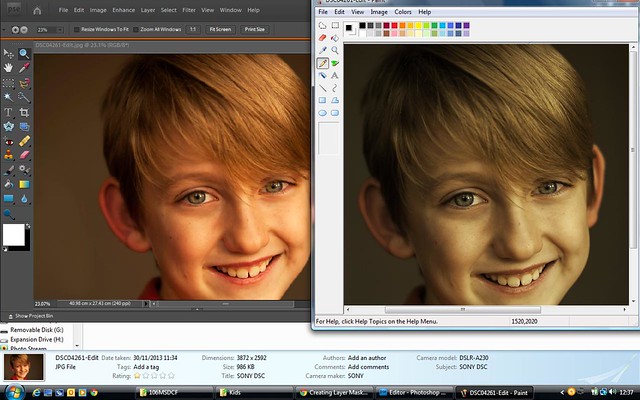
aha!!!!! In PSE in the Image tab ive found convert colour profile. I applied sRGB, saved the image and now when I open up both images they look the same!

So, now that ive saved with an sRGB profile, if I go to a generic Supermarket printer ( like I said its only for pictures for the wall) then the pictures shown on screen (ignoring monitor calibration) should be more or less the same colour as those printed?

I love you guys!

I love this forum!

Such an absolute wealth of knowledge and everyones there to help!

Thank you guys.

p.s I only had paint open because I couldnt get my normal Fastone Viewer to show anything other than full screen images


colour profile
by dereklaurence, on Flickr
 
Glad to see you've made some progress, Derek.

I'd seriously consider investing in a hardware calibrator. It can save a lot of angst and money in the long run. Also just use Colour Managed programs.

Colin
 
Back
Top