

stu_the_flat
Suspended / Banned
- Messages
- 2,443
- Name
- Stuart
- Edit My Images
- Yes
Hi guys I have posted this problem before but nobody could solve it.
I have a huey pro monitor calibrator. I keep my monitor calibrated.
I have a copy of a program called Corel paintshop Pro that I edit my JPGs on, Its quite good.
I have a copy of light room that some how changes the colours of my photos on import and export,
I downed a trail copy of Nikon NX2 if I load in the jpg that I exported from light room it looks that same as in light room.
Why is it that if I view my jpgs in anything other than lightroom or NX2 they look remarkably different? Even though I have a calibrated monitor? What is the point of edit images if they are going to look crappy in anything that isnt lightroom?
Here is a link to a screen shot so you can see what I mean; its actually depressing me as I just cant see the point of editing images when I can get a descent reference point.
Ive had this problem for ages, I paid a professional editing company to edit my images. But they came back with the same problem, they look good in light room but the skin tones only look acceptable if you are in the cartoon the Simpsons in any other program
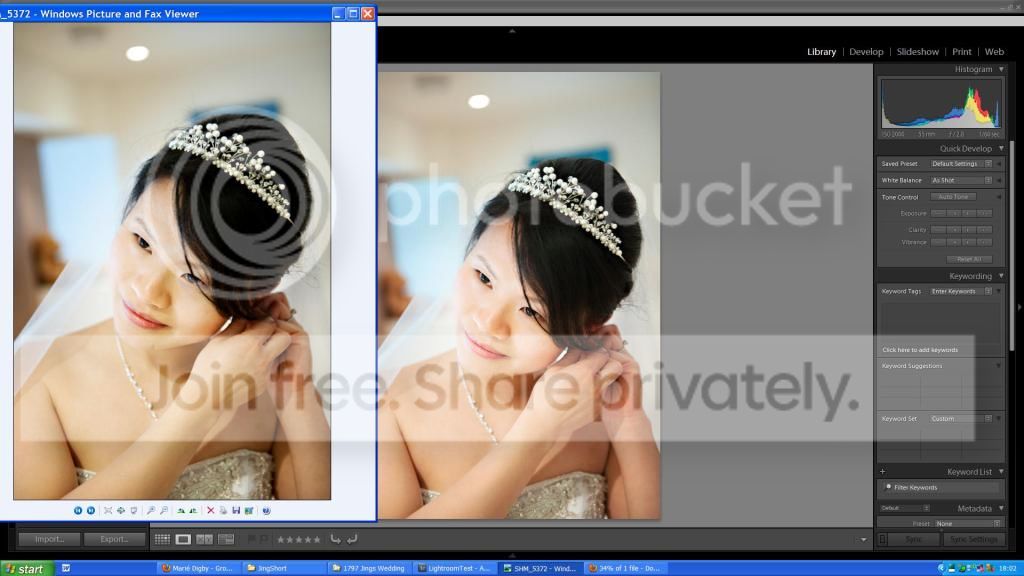
Here is the image as it came back from the editing company

Ive tried reinstalling light room, I am only talking about jpgs at the minute, I dont have a proofing option. Ive tried SRGB and AdobeRGB, and Tiff. No other options are checked in the export menu.
Cheers Stuart
I have a huey pro monitor calibrator. I keep my monitor calibrated.
I have a copy of a program called Corel paintshop Pro that I edit my JPGs on, Its quite good.
I have a copy of light room that some how changes the colours of my photos on import and export,
I downed a trail copy of Nikon NX2 if I load in the jpg that I exported from light room it looks that same as in light room.
Why is it that if I view my jpgs in anything other than lightroom or NX2 they look remarkably different? Even though I have a calibrated monitor? What is the point of edit images if they are going to look crappy in anything that isnt lightroom?
Here is a link to a screen shot so you can see what I mean; its actually depressing me as I just cant see the point of editing images when I can get a descent reference point.
Ive had this problem for ages, I paid a professional editing company to edit my images. But they came back with the same problem, they look good in light room but the skin tones only look acceptable if you are in the cartoon the Simpsons in any other program
Here is the image as it came back from the editing company
Ive tried reinstalling light room, I am only talking about jpgs at the minute, I dont have a proofing option. Ive tried SRGB and AdobeRGB, and Tiff. No other options are checked in the export menu.
Cheers Stuart

