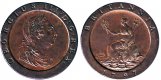
Coin editing advice please

silure130

Suspended / Banned
Messages
869
Name
Rick
Edit My Images
No
image.jpg image.jpg
Hi
Looking for some advice please. I have to photograph my coins both front and back so take 2 images. What I'd like to do is to get both sides on one scale side by side, what software would I need for this please. I'd also need a good book to show me how to do it. I currently only have Lightroom,
Thanks for any advice
 
Hi Rick.
I would assume you need software that allows layers. I use pshop but I think Gimp uses layers.Also think that program is free and there must be tutorials online of how to use. you will soon get the hang of it.
Hope this helps.

Gaz
 
I would assume you need software that allows layers…

+1

If you are on Mac as well, I use Affinity Photo!
 
Yes Gimp has layers and tons of online help. Including on YouTube.
You can also do what you want with the simpler Paint.net on Windows or Pinta on Linux. All are free.

Typically:
1. Open both front and back images.
2. Make a square selection around one coin. (Just big enough to fit the coin.)
3. Go Copy
4. Change to the window with the other image.
5. Go "Paste as new layer"
6. Use the Transform tool to push the pasted coin to a nice position.
7. Save as new jpeg.

Presuming the 2 images are at the same scale, the coins will be the same size.
You might want to use a round or magic wand selection instead of square.
You might want to adjust the brightness and contrast to bring out the contours on the coin face.
 
Last edited:
Yes Gimp has layers and tons of online help. Including on YouTube.
You can also do what you want with the simpler Paint.net on Windows or Pinta on Linux. All are free.

Typically:
1. Open both front and back images.
2. Make a square selection around one coin. (Just big enough to fit the coin.)
3. Go Copy
4. Change to the window with the other image.
5. Go "Paste as new layer"
6. Use the Transform tool to push the pasted coin to a nice position.
7. Save as new jpeg.

Presuming the 2 images are at the same scale, the coins will be the same size.
You might want to use a round or magic wand selection instead of square.
You might want to adjust the brightness and contrast to bring out the contours on the coin face.

Thanks mate, I've just tried this in Paint and it worked. Just got to get the white balance correct in both photos to get it 100% how I want it. Much appreciated
 
Just found my first hammered at the weekend and would love to know how you got such a nice photo to begin with, any tips?
I have a d3200 with 18-55 and do possess a tripod but the images are never that good
 
Two scans joined using Adobe Elements, but any layer-based software would do it.

1797 2d obv:rev.jpg
 
Back
Top