Cloud Storage / Backup recommendations?

Donnie

Suspended / Banned
Messages
7,027
Name
Paul
Edit My Images
No
So, I've been thinking about this for a while and now I seem to have sussed out my external drive which I can access from laptop and main computer I feel like I want a little extra reassurance for my photos.

Now, I already use apple cloud storage (50GB for £0.79 a month) where I keep important documents etc etc and work stuff so as im in the apple ecosytem it's very handy and seamless. Next step up is 2TB so Im looking around for that sort of level of storage for my photos specifically and with apple this is £6.99 per month.

I can't see anything around that beats that price except Knowhow which is Currys/PCworld at £40 a year for 4TB which seems pretty good value for money.

Now don't get me wrong, Im not a professional photographer and no I don't have another drive stored somewhere in case the house burns down, though I may do that at some point. At this point Im thinking cloud.

The only other possibility I thought of is Amazon which does free photo storage if you're a prime member, which the wife is. However the UI is rubbish, as far as I can see you need to upload all your photos first then create an album and then track down the photos I want to add to that album? Unless I've missed something?
 
Try Backblaze. It’ll completely mirror your drive (unless you exclude folders). Relatively low cost for a complete backup solution.
 
Try Backblaze. It’ll completely mirror your drive (unless you exclude folders). Relatively low cost for a complete backup solution.

Interesting, I'd found Backblaze being recommended on here in some of the older threads but ruled it out given it seemed very expensive but looks like I stumbled on the business backups side of things and now it appears Ive found the personal backup section its only 7 dollars a month for unlimited? I cant find a UK backblaze or UK pricing so Im assuming its US based?
 
If you have Amazon Prime then you already have unlimited cloud storage. Of course, Prime it too expensive if all you want to do is have storage :)
 
If you have Amazon Prime then you already have unlimited cloud storage. Of course, Prime it too expensive if all you want to do is have storage :)

I mentioned in the original post that Ive already ruled out amazon due to the way it works, you cant upload folders of images ie you cannot create a folder and then add images or heaven forbid drag and drop a complete folder, you have to upload images, then create the folder then move the images.
 
I mentioned in the original post that Ive already ruled out amazon due to the way it works, you cant upload folders of images ie you cannot create a folder and then add images or heaven forbid drag and drop a complete folder, you have to upload images, then create the folder then move the images.
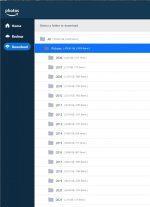
Not sure how you're doing this Paul (or whether I didn't understand your misgivings)... I use Amazon Prime as an offsite/disconnected backup and update every 6 months. This post prompted me to do my (forgotten...) 2021 backup and I was able to add the folder alongside my other foldered backups from 2006 onwards...

Just click "Backup", then pick the folder you want to backup, and pick the folder you want to put it in on Amazon. Then go watch paint dry...

Screenshot 2021-11-19 221508.jpg

If you're using the web GUI, my advice is don't. And I agree that the interface isn't the best... But this page (https://www.amazon.co.uk/b?ie=UTF8&node=13065362031) has an app you download onto your device where you can backup folders relatively easily (see above). Each year, I just add a new folder and away I go. This method maintains my folder structures under the year so I could find images here easily if I wanted to.

Upload speed is pants (for me anyway), and the UI isn't the greatest, but I'm rarely interfacing with it because it's an 'offsite' backup. I have my images on my HD which are backed up to an external drive in the house as well as my NAS which pretty much covers me for drive failure and "normal" issues. Amazon is only there to restore in the event of a major disaster (house fire) or a nasty virus that locks everything connected to my PC up.

Hope that helps!
 
Ahhhhhhhhhhh, I didn't realise there's an app! I'll download it and have a play with that tomorrow. :exit:
I was going to come back and say you can deal with folders ... but Ian beat me to it. I drag and drop folders into Amazon Drive all the time and don't even use the app. In fact I don't like the app very much so log into my Amazon account, select "Your Amazon Drive" and just drag and drop into a folder called "Backup" that I created. I've got a list of year folders like Ian, with loads of sub-folders in each year for specific dates.
 
Hi all. I'm looking at a cloud backup to complement my physical drive backup.

Does amazon back up raw files? Looking at the cost of backblaze, amazon looks like a good investment given the extras it offers. (Such as Star Trek - Picard!)

Anyone restored anything from the amazon backup?
 
I use Amazon for jpg and find it easy to find anything, it is unlimited storage. It isn't for RAW files though and there is a limit on video files which isn't very large. I am one of the few people that use Lightroom cc which I use for raw files as it's easy to go through. I have been trying to cull files though as I don't see the point in keeping lots that I will never need again.

I would also recommend printing your best photos, you can print for really cheaply and know that you have a copy if online storage goes awry
 
I use Amazon for jpg and find it easy to find anything, it is unlimited storage. It isn't for RAW files though and there is a limit on video files which isn't very large. I am one of the few people that use Lightroom cc which I use for raw files as it's easy to go through. I have been trying to cull files though as I don't see the point in keeping lots that I will never need again.

I would also recommend printing your best photos, you can print for really cheaply and know that you have a copy if online storage goes awry

So will amazon not accept uploads of RAW files?
 
i use idrive and find it very good
i think its £50 a year for 10tb but i only use about 2tb max
 
i use idrive and find it very good
i think its £50 a year for 10tb but i only use about 2tb max

Thanks Pal. How quick do you find it to upload/download please?
 
i use idrive and find it very good
i think its £50 a year for 10tb but i only use about 2tb max
I use idrive as well, it's quick to backup, keeps a good log of backups, will back up open files and will do incremental backups, has a phone and desktop app and a tidy function, which I haven't used yet and will ghost a drive and mirror one
 
Amazon for me along with TV and delivery, it's a fantastic deal.
 
You specify the file types you want to upload.
RAW (at least canon & Fuji RAWs) are counted as photos, and thus unlimited.
I think that sidecar files count against the 5GB of 'other' storage, but are tiny anyway.

If they allow DNGs in the unlimited upload, it would be a win win for me.
 
If they allow DNGs in the unlimited upload, it would be a win win for me.
They do.
RAW File Types

(This is not a definitive list)

Nikon (NEF files)
Canon (CR2 Files)
ARW (Sony)
CRW (Canon RAW CIFF image)
ORF (Olympus) files
DNG files
 
They do.
RAW File Types

(This is not a definitive list)

Nikon (NEF files)
Canon (CR2 Files)
ARW (Sony)
CRW (Canon RAW CIFF image)
ORF (Olympus) files
DNG files

Right, I'll be signing up after payday then ! :banana:
 
Right, I'll be signing up after payday then ! :banana:
£79 a year for me gives me free delivery, photo backup, free Morrisons delivery, TV, and a free book to read each month, you can also get free deliveroo or Uber eats I forget which one. Don't forget you can share it all with family members as well.
 
Thanks Pal. How quick do you find it to upload/download please?

i cant say i realyl notice as my file storage is on a super low power NUC termainl which runs 24/7 and idrive runs on that as a scheduled job it just works.
if i put a lot of stuff on my backup share then i press the backup now button and it just does it
 
I have subscribed to prime, but it would seem that Amazon just dumps all photo uploads into a single folder. Is there any way to sync my folder structure on my hard disk when uploading?
 
£79 a year for me gives me free delivery, photo backup, free Morrisons delivery, TV, and a free book to read each month, you can also get free deliveroo or Uber eats I forget which one. Don't forget you can share it all with family members as well.
As a side note, if you do use the 'free' e-book, and want to ensure the author gets paid, please make sure you click through every page - they get paid per page clicked.
Same applies to e-books downloaded using the general Kindle Unlimited option.
 
Back
Top