Clone tool stopped working

rhonddaboy

Suspended / Banned
Messages
1,354
Name
Alan
Edit My Images
Yes
Hello
As in title the clone tool in CS5 has stopped working all I get now is a Grey patch where I want to clone into, anyone have any idea's

Thanks
Alan
 
Have you selected the pattern stamp tool in error?
 
No definatly not just checked and tried it again, uploaded a photo of a Blue Subaru into cs5 selected the clone tool and tried to clone some grass onto the car, the area that I was trying to clone into went a sort of Sepia colour, like as if I was trying to do selective colouring!
 
have you got the right layer selected ? - the usual cause of a non working clone tool is having an adjustment layer on top of the main one, and having that selected in error.
 
I'd guess that in the foreground & background colours panel (btm lhs) you have grey set, rather than pure black or white. It's a common mistake when masking layers as well.
 
Hello
I have only opened 1 photo I have not created another layer, and I have checked the foreground and background colours and they are Black and White.
Still won't work and its doing my head now !!!!
 
Hi

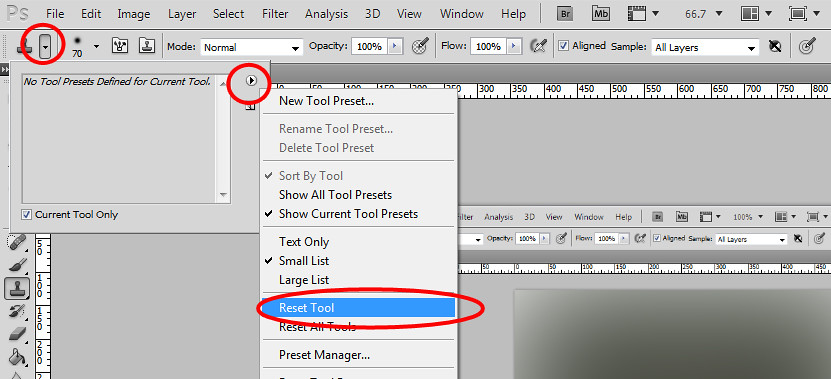
Select the clone tool, make sure the Mode is set to as below and reset tool, all will be well :thumbs: or should be

7094714771_fab8dd68ff_b.jpg
 
Back
Top