Change camera owner information Canon 5D

Connect camera to PC
Start EOS utility
There should be another window pop up..........half way down there is Owners name
 
If the 2nd window doesn't pop up click 'Camera settings/Remote shooting.

Full instructions are in the manual :D
 
Is the camera on..............not in standby?
 
I have version 2.9.0.0
 
I was able to set the owner info on mine without any issues. I'm running windows 7 64bit. I know its a different body but it shouldn't make any difference
 
Last edited:
I was able to set the owner info on mine without any issues. I'm running windows 7 64bit.

Ed,
Could you tell me what you did? Im really struggling, windows wont even see the camera when I put the connection type as "pc connect"

Thanks

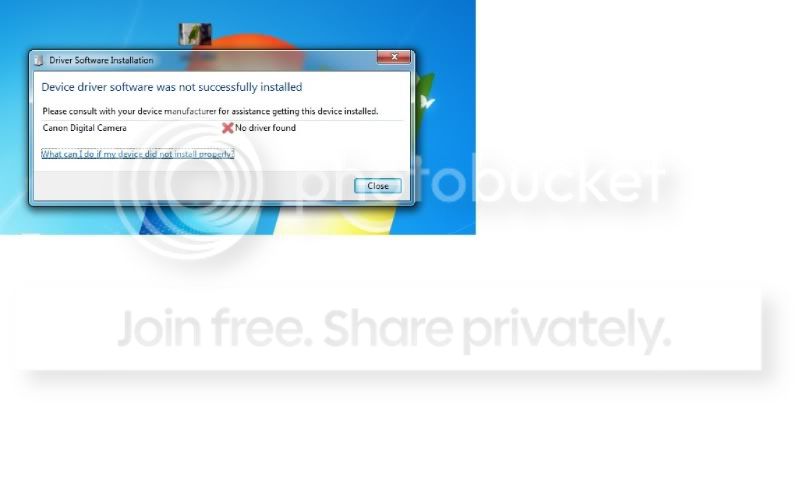
This is what I get when I plug it into the PC
error-1.jpg
 
Last edited:
I gave up with 64 bit it's a pita, tried everything. Used an old xp laptop, works instantly. My advice, find someone with xp.
 
It's looking like the drivers for the camera are not installed on the PC?
 
Hi

Is it the 5D (not mark II) I've just had a quick look on Canon Software's site and it doesn't list the 5D EOS under Win 7

I had the same issue with my old 300D which wouldn't work on the laptop which was running Vista, no issues at all with XP, but not Vista compatable. I'm just wondering if it's not compatable with Win 7 ???
 
Last edited:
Nothing to do with W7 (64)

I gave up with 64 bit it's a pita, tried everything. Used an old xp laptop, works instantly. My advice, find someone with xp.
 
He has a 5D II listed in his sig
 
He has a 5D II listed in his sig

Yes, was just going of the title really.

Have you tried a complete unistall of Canon software ?

When you have it connected, have you gone to Device Manager and see if there is an exclamation mark next to the USB connection for the camera - can you re-install the drivers here ?
 
Last edited:
Guys
Sorry for any confusion, I am talking about the 5D Mk1 (classic) I am going to try and clear the information using my work laptop which is XP 32bit as I've given up on doing it under Win7 64bit! The problem isn't the Eos Utility (that works fine) its that Windows doesn't install drivers for the camera automatically when you plug it in, and there aren't any available to download.
Thank yOu for the help :)
 
Sorry must of missed the post about you have access to a laptop with xp on that. That's the easy way lol
 
Nick, just keep at it. It is possible to change the name as I did it with my 5D MK1. Don't ask me how though as it was some time ago and I can't remember. I don't remember it being a big problem though.
 
Doh! Ive come into work with the intention of sorting this problem out in the morning, and cant for the life of me find EOS Utility on the web to download! I forgot to copy the exe files from my home PC :(

Edit - now fixed the software problem, just going to try and remove the camera owner info!
 
Last edited:
Whoops! Dont worry, XP will work. Next time try remember EOS utility :bonk:
 
Back
Top