Case Airflow Solution?

gman

Suspended / Banned
Messages
11,100
Name
Graham
Edit My Images
Yes
Following on from my build, I'm looking at the best airflow solution with the current fans that I have. I originally thought I had good airflow but after having a look this morning I've noticed that the graphics card is pretty much cutting the case in half and preventing all that nice air from the bottom getting up to the exhaust fans (image 1). The air just behind the hard drives is very cool but it's shooting straight under the graphics card and probably out of the vent in front of the PSU. The PSU exhaust fan doesn't come into the equation but i thought I'd indicate where it is anyway.

Also, all input fans have filters.

Case_Airflow_1.jpg


So I've changed things about a little to create separate airflows for top and bottom (image 2).

Case_Airflow_2.jpg


Any thoughts on this or does anyone fancy having a stab at a better solution?

Here's a link to the original image.

http://www.talkphotography.co.uk/gallery/data/500/Case_Original.jpg
 
id stick with #1 personally. the intake fan on the side panel will be supplying enough cold air to the CPU looking at it.

#2 isnt going to help much, the air coming in from the top is just going to go straight back out again.
 
Last edited:
looking at your other thread with the better pics there is sufficient gap between the GFX for the cool air to get through, just tidy up the cables a bit.

have you got 1 or 2 fans in the front of the case? (edit - ah takes 1)
 
There's not much more I can do with the cables but it does look worse than what it is! lol It just crossed my mind that I could do the first option but stick another fan in the side above the current one? This would get plenty of flow over the CPU and Ram. What do you reckon? Only takes two secs to drill the holes!
 
What temps are you trying to reduce? It's not like perishable food you know - you don't have to get them sub 4 deg C ;) My systems idle at 30+ deg C - the graphics card is currently idle and at 47 deg C....
 
At idle I'm getting 35C for the CPU Socket, 28C for the GPU and 25C for the case. But I've now got the exhaust fans all connected directly to the PSU via the molex and only using the fan connectors on the motherboard for readings (single cable).

It's a noise machine now :(

I used a fan controller many moons ago and it worked well, I think I'll stick one in so I can tune down the noise when necessary.


Scrub that, turns out is was just the new fan being loud at 100% which is 2,000rpm. All the other fans are quiet even at 100% so I've just plugged this new fan into the MB fan connector and harmony has been restored. That's me, I've had enough. Time to start enjoying it!
 
Last edited:
I was just going to say you are getting hung up on all these case fans too!

My setup has a fan at the front inputting air to the hard drives and another extraction fan at the top of the case, where yours are.

That's it nothing else except my Bequiet cooler.

Everything nice and serene with CPU at an idle temperature of 17 C.

By the way, are you sure your PSU is the right way up?
 
CPU cooler will probably be the next thing on my list but not for a while. There is another vent at the base of the case for the PSU fan (second one) so definitely the right way around. Thanks for the trouser moment though!
 
Gman, apologies for hijacking your thread - awesome looking computer Btw - but can someone tell me whether the CPU fan should be blowing cool air into the heat sink or sucking hot air out. Does it matter?
 
I was always troubled by this fact with large cards messing airflow. So My latest ase is the

Silverstone Raven 03

http://www.overclockers.co.uk/showproduct.php?prodid=CA-075-SV

With the motherboard rotated 90 degrees, all the cards are vertical. The psu is separated from the main compartment as well..

Roomy spacious tidy case.
 
Gman, apologies for hijacking your thread - awesome looking computer Btw - but can someone tell me whether the CPU fan should be blowing cool air into the heat sink or sucking hot air out. Does it matter?

Only plugs in one way, I think it usually inputs to the CPU though.


This is my computer inside. incase anyone is thinking about building their own. The case came with USB3 ports as well as USB2 with direct air flow from front to back

It has 2 fans at the front (Ethermax 140mm) pushing the air in, one in the middle ( Gelid Tranquillo CPU cooler sitting on top of an Intel Core I7 processor) and one to extract (sythe). My son who built it fed as many cables as he could behind the panel that holds the memory board and the outside casing. Other cables strapped away from the fans which again were balanced to the same RPM speed. The case fans were replaced and upgraded for more air flow.
other parts
Motherboard =Asus P8Z77-V
RAM 16 GIG
Graphics card=MSI GTX560Ti
1 TB WD hard Drive
Corsair 750w power unit
Asus Xonar DX PCI-E sound card
DVR-219 24x DVD r/rw disc
Creative Inspire T10 2.0 speakers
Plus cables etc

Realspeed
 
Last edited:
Gman, apologies for hijacking your thread - awesome looking computer Btw - but can someone tell me whether the CPU fan should be blowing cool air into the heat sink or sucking hot air out. Does it matter?

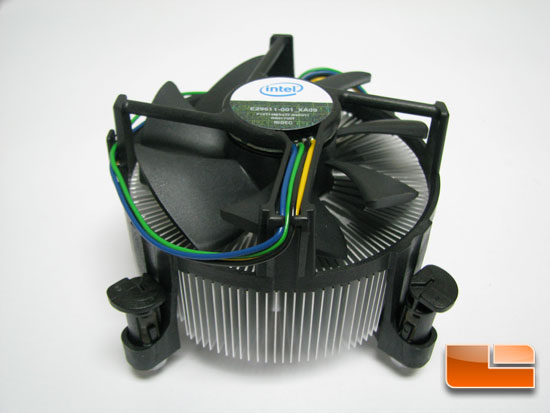
I would have thought you'd want to suck the heat that the heatsink has absorbed away from it? My stock CPU Heatsink and Fan pulls air way, you can tell from the side that the wires are on:

i7_roundup-025.jpg


This is my computer inside. incase anyone is thinking about building their own. The case came with USB3 ports as well as USB2 with direct air flow from front to back

It has 2 fans at the front (Ethermax 140mm) pushing the air in, one in the middle ( Gelid Tranquillo CPU cooler sitting on top of an Intel Core I7 processor) and one to extract (sythe). My son who built it fed as many cables as he could behind the panel that holds the memory board and the outside casing. Other cables strapped away from the fans which again were balanced to the same RPM speed. The case fans were replaced and upgraded for more air flow. Realspeed

Would this not be causing positive pressure? There's a good article here which I've just started reading.


I forgot to mention, with the new airflow setup I'm using the temps are (with video running in the background):

GPU 31C
Processor 36C
Case 25C
 
Last edited:
Gman

My thoughts were to have a continuous airflow throughout the computer in a direct line as case doesn't have side vents..

Sucking heat or blowing surely depends on how the computer is built and on the case. For those with side vents your version may be better. At the end of the day the main thing is keeping a computer cool. There are so many combinations of computer build I don't think one can actually say this is better than that.

What did suprise me was the amount of research, in conjunction with my son I hasten to add, before selecting the components. It took weeks choosing one part then changing thoughts on it and selecting another.That was on almost every item and as the built cost was flexible it opened up choices so much more.

My son did the actual build as he had built computers before, the main thing was impressing on him it was for photographic work as the main priority and not a "general" computer. For example after reading up I decided on the Intel core I7 processor as it is supposed to be that bit better for video work than the I5 version as well as stills. it didn't stop just at the computer but choice of monitor as well, which is another story.

Just checked CPU temp and its 28c according to data readout I can access

Realspeed
 
Last edited:
Looking at these the power supplies seem to be at the bottom, the last pc's I pulled apart ( a while ago now admitedly) the power supplies were at the top, any reason why they're at the bottom now?

Just to satisfy my own curiosity more than anything.
 
If it keeps it cool then that's all that matters! lol

My Dell XPS had the PSU on top and I was surprised at them being on the bottom as well due to dust.
 
My other 2 computers the power supply is at the top as well .They may now be at the bottom for better support and overall balance, thats all I can think of. As for dust the rocket blower does a good job in that department especially for the cooling fins.

Realspeed
 
Last edited:
PSU at the bottom is to allow better CPU cooling. As warm air rises, having the PSU above the CPU means the CPU warms the PSU nicely - which generates heat itself. Given many PSU fans are temperature controlled, you're just making fans spin at higher speeds because the way the computer is built.

Plus you can put fans above the CPU to vent the warmer air coming off it.
 
Just a thought, but will your components not last longer if they are kept cooler?
 
Just a thought, but will your components not last longer if they are kept cooler?
Yes, but not by a lot....

Let me put it this way. I work for a silicon manufacturer. We make chips for set-top boxes. Our latest chips use a reasonable amount of power (nothing like Intel CPUs, but 5-10W). I had a customer ask me about heatsinking as the top of his heatsink was too hot to put his hand on. I referred it back to our product engineering who said that the temp was fine as we guarantee our chips running at 125 deg C for 3+ years.
 
arad85 said:
Yes, but not by a lot....

Let me put it this way. I work for a silicon manufacturer. We make chips for set-top boxes. Our latest chips use a reasonable amount of power (nothing like Intel CPUs, but 5-10W). I had a customer ask me about heatsinking as the top of his heatsink was too hot to put his hand on. I referred it back to our product engineering who said that the temp was fine as we guarantee our chips running at 125 deg C for 3+ years.

That's good, my wdtv runs warm all the time
 
Is all this Military grade components that MSI, ASUS etc claim just marketing nonsense or do you reckon there is some benefit behind it all?
 
Is all this Military grade components that MSI, ASUS etc claim just marketing nonsense or do you reckon there is some benefit behind it all?
No idea... You'd need to do a large comparison of the same boards with different component failure rates to know.

It probably adds $1 to the cost of the board, but allows Asus etc.. to charge us an extra $10....
 
dsc7669t.jpg


Typical shop bought computer with cables just thrown in (one of my other ones, its my backup work one)
 
Last edited:
Sorry Neil can't remember when I bought it but it must be 3/4 years old or more, I got it built by a local computer shop

Realspeed
 
Back
Top