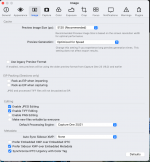
The preview resolution should match your screen resolution. The idea is that when you want to view at 100% C1 doesn't need to render a 1:1 image from the raw file, but can simply enlarge the preview.
However, as the tool panels use up part of the screen, some people find a smaller than screen resolution works fine for them. ie one down from screen resolution.
When you change the preview size, you need to select all your existing previews and rebuild them at the new size.
I just use the default that C1 chooses. Over recent years C1 has dramatically improved the speed of preview generation, but I think this has partly been down to the way C1 uses the CPU and GPU, and you may be suffering from the lack of a more modern Mac. The most recent versions of C1 are optimised for M1 macs. It could be that C1, for rapid preview generation is just pushing everything to the max with the specs of your machine. The M1 macs are a totally different world (in terms of speed) to the Intel Macs, and C1 is using Rosetta to. run on them.
Have you read the hardware specs page