CAPTURE1 taking 8 minutes to create previews

mrk123

Suspended / Banned
Messages
290
Name
kane
Edit My Images
No
I am uploading 100 CR2 files to C1..
It insists on taking 8 mins to create previews, my cpu temps go up to 100.. I have to set the fans on full blast.
Have I got some setitng which generates max previrew? Any way to bring this down?
 
What is your settings for images ?

It all depends on your screen resolution as well as speed.

I imported over 300 images yesterday and it took about 1 minute for the previews to appear, that was from a USB-C CFExpress card reader.

Are you importing direct from the Camera ???

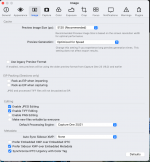
Screenshot 2025-03-17 at 13.14.42.png
 
I am uploading 100 CR2 files to C1..
It insists on taking 8 mins to create previews, my cpu temps go up to 100.. I have to set the fans on full blast.
Have I got some setitng which generates max previrew? Any way to bring this down?
I can't help with this, as I don't really know how long my set up takes to import files and others have mentioned the obvious things to look at..

While not solving your problem it's worth knowing that you don't need to wait for C1 to build the previews before starting work. It just carries on in the background and prioritises building the preview for the file you have selected.
 
What is your settings for images ?

It all depends on your screen resolution as well as speed.

I imported over 300 images yesterday and it took about 1 minute for the previews to appear, that was from a USB-C CFExpress card reader.

Are you importing direct from the Camera ???

View attachment 448357
It is 5120 yes... I guess that may be why.
It's a 2012 mac 15 inch - but upgraded to 16gb Ram and 1tb SSD.

Is your drive full to capacity?

I have 750gb free on my 1tb.

I can't help with this, as I don't really know how long my set up takes to import files and others have mentioned the obvious things to look at..

While not solving your problem it's worth knowing that you don't need to wait for C1 to build the previews before starting work. It just carries on in the background and prioritises building the preview for the file you have selected.

Thanks, it was more a case of it blowing my mac to high hell, CPUs running at 100c. I use fan control and activity monitor to see what programs are cooking.

My mac can handle a lot despite age, I can have photoshop, indesign and illustrator all open and working fine.

I am running open core patcher and latest OS Sonoma.

Should I take that preview size down a bit??
 
Yes I'd reduce the preview size and see what happens.

2012 is quite old now, it may be time to update if this is a big issue for you. With more modern Apple silicon generating previews for 100 images in Capture One is something that takes seconds.
 
It is 5120 yes... I guess that may be why.
It's a 2012 mac 15 inch - but upgraded to 16gb Ram and 1tb SSD.


I have 750gb free on my 1tb.


Thanks, it was more a case of it blowing my mac to high hell, CPUs running at 100c. I use fan control and activity monitor to see what programs are cooking.

My mac can handle a lot despite age, I can have photoshop, indesign and illustrator all open and working fine.

I am running open core patcher and latest OS Sonoma.

Should I take that preview size down a bit??
The preview resolution should match your screen resolution. The idea is that when you want to view at 100% C1 doesn't need to render a 1:1 image from the raw file, but can simply enlarge the preview.

However, as the tool panels use up part of the screen, some people find a smaller than screen resolution works fine for them. ie one down from screen resolution.

When you change the preview size, you need to select all your existing previews and rebuild them at the new size.

I just use the default that C1 chooses. Over recent years C1 has dramatically improved the speed of preview generation, but I think this has partly been down to the way C1 uses the CPU and GPU, and you may be suffering from the lack of a more modern Mac. The most recent versions of C1 are optimised for M1 macs. It could be that C1, for rapid preview generation is just pushing everything to the max with the specs of your machine. The M1 macs are a totally different world (in terms of speed) to the Intel Macs, and C1 is using Rosetta to. run on them.

Have you read the hardware specs page

 
The preview resolution should match your screen resolution. The idea is that when you want to view at 100% C1 doesn't need to render a 1:1 image from the raw file, but can simply enlarge the preview.

However, as the tool panels use up part of the screen, some people find a smaller than screen resolution works fine for them. ie one down from screen resolution.

When you change the preview size, you need to select all your existing previews and rebuild them at the new size.

I just use the default that C1 chooses. Over recent years C1 has dramatically improved the speed of preview generation, but I think this has partly been down to the way C1 uses the CPU and GPU, and you may be suffering from the lack of a more modern Mac. The most recent versions of C1 are optimised for M1 macs. It could be that C1, for rapid preview generation is just pushing everything to the max with the specs of your machine. The M1 macs are a totally different world (in terms of speed) to the Intel Macs, and C1 is using Rosetta to. run on them.

Have you read the hardware specs page

Thnkas, I have now set it to what it reccomended me to. 2500 or so.
 
Back
Top