
Capture One - Poor at straightening lines..

mrk123

Suspended / Banned
Messages
290
Name
kane
Edit My Images
No
Doing final bumps for an interior design shoot, straightening them up in C1, It's not very good! Chasingmy tail!
When you fo the verticals it effects the horizontals, and then when you do the horizontals it then changes the verticals! What's going on?
In LR no issue.
 
I find I have to do each a couple of times in some cases.......but I assume it depends where you start from?
 
Doing final bumps for an interior design shoot, straightening them up in C1, It's not very good! Chasingmy tail!
When you fo the verticals it effects the horizontals, and then when you do the horizontals it then changes the verticals! What's going on?
In LR no issue.
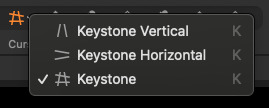
You can straighten both at the same time. Click the icon with both the two verticals and two horizontals. I recall it’s called keystone but I may be wrong. Line them up and hit the button in the center of the screen. I find it works well.
 
You can straighten both at the same time. Click the icon with both the two verticals and two horizontals. I recall it’s called keystone but I may be wrong. Line them up and hit the button in the center of the screen. I find it works well.
Maybe I didn't do both at same time.. Will try.
 
Doing final bumps for an interior design shoot, straightening them up in C1, It's not very good! Chasingmy tail!
When you fo the verticals it effects the horizontals, and then when you do the horizontals it then changes the verticals! What's going on?
In LR no issue.
There is a fair amount going on with the keystoning.

If you choose the keystone icon and click auto, C1 analyses multiple vertical and horizontal lines in the image looking for dominant lines.

You should then get a corrected mage which you can tweak with the control points, if needed, before applying the correction.

You can also adjust the amount of correction on a 0-100 % slider. This used to default to 80% because C1 decided fully corrected perspective looked artificial. But I think it now defaults to 100%.

There is also the sliders tab which allows you to make further subtle corrections to the perspective. There are 4 or 5 sliders but I can't remember what they do.

Although, the keystoning auto-crops, you can switch this off in the crop tool allowing "crop outside image" Thus allowing more flexibility in how you crop and before filling in the missing parts in Photoshop.

The C1 Pano feature allows you to use the clone tool in C1 to fill in the cropped out parts, but as far as I am aware this doesn't work anywhere else in C1.
 
Thanks all, not overly impressed with this 'keystnoning' tool, just does not seem to do as good a job as in LR, imo. Seems to be a bit more brutal in it's approach. I think I just about got by, but I serioulsy geek out on details that no one will notice so when a program limits me I get annoyed.
 
Thanks all, not overly impressed with this 'keystnoning' tool, just does not seem to do as good a job as in LR, imo. Seems to be a bit more brutal in it's approach. I think I just about got by, but I serioulsy geek out on details that no one will notice so when a program limits me I get annoyed.
I haven't watched this, but it may be useful: all of Paul Reiffer's videos are good.

(see also this post https://www.talkphotography.co.uk/t...or-at-straightening-lines.763906/post-9551635)

View: https://www.youtube.com/watch?app=desktop&v=eP5Hk20XRGc
 
Last edited:
Back
Top