


The23rdman
Suspended / Banned
- Messages
- 13,582
- Name
- Dean
- Edit My Images
- No
This has just stopped working and I can't think of a single reason why it would. I'm running Lightroom CC and CS5. Any ideas?

This has just stopped working and I can't think of a single reason why it would. I'm running Lightroom CC and CS5. Any ideas?
I haven't updated anything, Adam.The recent update?
Do you have creative cloud to automatically install updates? I know there's been issues with the most recent LR update.I haven't updated anything, Adam.
No, I always like to do my updates myself. I've not updated anything. :/Do you have creative cloud to automatically install updates? I know there's been issues with the most recent LR update.
Other than that, not a clue.

Didn't know that shortcut existed. Just tried it here and it works fine. Always used the Right Click>Edit in route. Does that still work for you?
No idea about upgrades. If there are any then they have applied automatically without any imput from myself.

Have you checked what the External Editor is set to in preferences?This has just stopped working and I can't think of a single reason why it would. I'm running Lightroom CC and CS5. Any ideas?
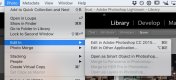

also what happens if instead of Crtl+E you right click to select and then left click?
It's set for CS5. What happens is that CS5 open up, the icon whirls around for a bit and then... nothing.Have you checked what the External Editor is set to in preferences?
I'm on a Mac, but there should be a menu item similar to this - does it have the shortcut displayed?
View attachment 48557
It's set for CS5. What happens is that CS5 open up, the icon whirls around for a bit and then... nothing.
That's worth exploring, thanks!Interestingly, I had a similar experience when looking earlier except I had a warning dialogue box pop up to tell me that there was a colour space mismatch.
Windows sometimes decides to hide warning boxes behind other windows so you can't see them. Perhaps this is what is happening with you. I think there's a way to tell CS5 to suppress any warnings and just open the file anyway - certainly worth a try to eliminate this.
That's interesting. I have recently added some Nik plugins, but they've been working fine with Ctrl+e.I found this: http://feedback.photoshop.com/photo..._to_photoshop_when_tagged_with_a_colour_label
Issue happening only on tagged images. One of the replies suggests disabling plug-ins as well.
Okay, more info on this. The problem only seems to be happening with my D610 files. My D700 ones are fine.
Okay, that makes sense. Upgrade it is then.I would suggest that this is a raw file compatibility issue then and the Adobe website would agree :
https://helpx.adobe.com/camera-raw/kb/camera-raw-plug-supported-cameras.html
D700 - works with v4.6, 5.1+ of camera raw.
D610 - works with v8.3+
The last version of camera raw that is compatible with CS5 is v6.7.
You'll need to upgrade your photoshop or start using DNG files as an intermediary step.

