

You are using an out of date browser. It may not display this or other websites correctly.
You should upgrade or use an alternative browser.
You should upgrade or use an alternative browser.
Canon Printer problems
- Thread starter swiftflo
- Start date


tijuana taxi
Suspended / Banned
- Messages
- 15,748
- Name
- Rich
- Edit My Images
- Yes
Not had any problem with mine printing from LR.
Just connected it up with Wi-Fi via the WPS button on my router and away it went.
Just connected it up with Wi-Fi via the WPS button on my router and away it went.
OP

swiftflo
Suspended / Banned
- Messages
- 1,336
- Name
- Peter
- Edit My Images
- Yes
I have downloaded the drivers from Canon web site so they should be okay. I have deleted the drivers and reinstalled them a couple of times, also reset printing on the Mac, but still no luck with photos.I have the Canon ip8750 printer it prints from both LR and PS, I seem to remember having to download software from Canon's web site when first installing the printer.
I have it connected to a USB port, not sure how to get it connected by WI-FI now.Not had any problem with mine printing from LR.
Just connected it up with Wi-Fi via the WPS button on my router and away it went.

Box Brownie
Suspended / Banned
- Messages
- 17,645
- Edit My Images
- No
I have downloaded the drivers from Canon web site so they should be okay. I have deleted the drivers and reinstalled them a couple of times, also reset printing on the Mac, but still no luck with photos.
I have it connected to a USB port, not sure how to get it connected by WI-FI now.
Ah! you mention using a Mac, I am not a Mac user but have read some reports of 'Air Print' causing big headaches with Canon printers. The advice seems to be, as I think I recall, to deselect Air Print in the driver settings and that will solve the problem!?
HTH

Last edited:

Bebop
Suspended / Banned
- Messages
- 7,318
- Edit My Images
- No
I don't have this printer, but I have a Mac and a Canon printer (Pro 1). If you are able to print text from another program - say Preview or Pages, then it sounds like it is the link to Lightroom and Photoshop that is the issue.
When you go into the Lightroom print module and select Printer, is it available in the drop down menu? If not, have you tried restarting your computer and then plugging the printer in before you open Lightroom?
@swiftflo I think printing from USB is much more reliable than using Wi-fi, so I'd definitely try it wired first.
When you go into the Lightroom print module and select Printer, is it available in the drop down menu? If not, have you tried restarting your computer and then plugging the printer in before you open Lightroom?
@swiftflo I think printing from USB is much more reliable than using Wi-fi, so I'd definitely try it wired first.
Last edited:

gramps
Suspended / Banned
- Messages
- 44,805
- Name
- 'Gramps'
- Edit My Images
- No
I have it connected to a USB port, not sure how to get it connected by WI-FI now.
USB option is fine, actually probably more reliable - is it showing as the default printer in System Preferences > Printers & Scanners?

Brentor
Suspended / Banned
- Messages
- 1,596
- Name
- Steve
- Edit My Images
- No
I have a Canon 3000 series printer which works fine with a usb connection but is a pain in the neck with wireless. The supplied intrustuctions are not adequate and I spent ages finding a solution on the web, which worked for a few weeks. We are back to a cable connection. Good luck.
OP
swiftflo
Suspended / Banned
- Messages
- 1,336
- Name
- Peter
- Edit My Images
- Yes
Yes the printers in the drop down menu, I have tried restarting the computer then plugging the printer in before opening LR.I don't have this printer, but I have a Mac and a Canon printer (Pro 1). If you are able to print text from another program - say Preview or Pages, then it sounds like it is the link to Lightroom and Photoshop that is the issue.
When you go into the Lightroom print module and select Printer, is it available in the drop down menu? If not, have you tried restarting your computer and then plugging the printer in before you open Lightroom?
@swiftflo I think printing from USB is much more reliable than using Wi-fi, so I'd definitely try it wired first.
Yes it is showing as the default printer in System preferences etc.USB option is fine, actually probably more reliable - is it showing as the default printer in System Preferences > Printers & Scanners?

angelpaaul
Suspended / Banned
- Messages
- 1,277
- Name
- Paul
- Edit My Images
- No
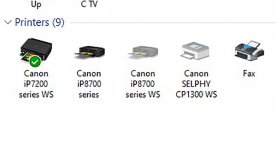
Does the Photoshop printer set up say Canon ip8750 series or ip8750 series WS?
OP
swiftflo
Suspended / Banned
- Messages
- 1,336
- Name
- Peter
- Edit My Images
- Yes
It says Canon IP 8750.Does the Photoshop printer set up say Canon ip8750 series or ip8750 series WS?
angelpaaul
Suspended / Banned
- Messages
- 1,277
- Name
- Paul
- Edit My Images
- No
Mine offers both. If I select the wrong one from the dropdown menu, then nothing happens.It says Canon IP 8750.
Bebop
Suspended / Banned
- Messages
- 7,318
- Edit My Images
- No
That is strange. I had a quick google - which you have probably already done. Of note, is recreating the instance of the printer, and also possibly checking the preferences in Photoshop - I'll include screenshot here from the link below it
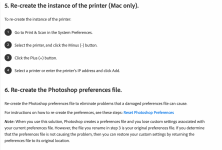
https://helpx.adobe.com/be_en/photoshop/kb/troubleshoot-printing-problems.html
https://helpx.adobe.com/be_en/photoshop/kb/troubleshoot-printing-problems.html
OP
swiftflo
Suspended / Banned
- Messages
- 1,336
- Name
- Peter
- Edit My Images
- Yes
Thanks done all that twice.That is strange. I had a quick google - which you have probably already done. Of note, is recreating the instance of the printer, and also possibly checking the preferences in Photoshop - I'll include screenshot here from the link below it
View attachment 332778
https://helpx.adobe.com/be_en/photoshop/kb/troubleshoot-printing-problems.html
OP
swiftflo
Suspended / Banned
- Messages
- 1,336
- Name
- Peter
- Edit My Images
- Yes
Further to my printer problems. Spent a lot of time yesterday trying out different settings, Now I don't know what I have done but I can now print from Photoshop. Yesterday I edited an image in LR I then transferred it to Photoshop and it then printed. What the problem is with LR I don't know.
I had also spoke to a tech (sic) at Canon, what a waste of time and money on a phone call, he was talking about things I could not even find on the Mac.
I had also spoke to a tech (sic) at Canon, what a waste of time and money on a phone call, he was talking about things I could not even find on the Mac.