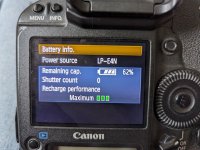
This indicates that you should calibrate the battery so that the correct battery level is detected and the camera’s battery level indicator can display the correct battery level. Calibration is not a required operation. If you want to just recharge the battery, you can let the battery start recharging automatically after approx. 10 sec. If you want to do the calibration, press the <CALIBRATE> button while the <CAL/CHARGE> lamp is blinking in red. The Charge level indicator will blink in red and the calibration (power discharge) will start.
After the calibration is completed, the battery will start recharging automatically. Note that the less depleted the battery, the longer the calibration will take. The <2h>, <4h>, and <10h> figures on the side of the Charge level indicator respectively indicate the approximate number of hours it will take to complete the calibration (power discharge). If the <10h> indicator blinks in red, it will take approx. 10 hours.
After the calibration is completed and the battery is totally drained, it will take a further 2 hours to recharge the battery fully. If you want to stop the calibration before it is completed and start recharging the battery, remove the battery from the charger and attach it again.
The <CAL/CHARGE> Lamp Blinks in Red
Charging the Battery
All Three Charge Level Indicators Blink
If all three Charge level indicators blink in green, it means that the battery’s internal temperature is not within 0°C - 40°C / 32°F - 104°F. The battery will start recharging when the internal temperature is within 0°C - 40°C / 32°F - 104°F.
If all the Calibration (discharge) status indicators blink in red or if all the lamps blink in red and green (including the <CAL/CHARGE> lamp), remove the battery from the charger and take it to your dealer or to nearest Canon Service Center.