Canon 7D MKII and Tamron 150-600

davholla

Suspended / Banned
Messages
3,325
Name
David
Edit My Images
Yes
I have had this combination for about a year and for good conditions it looks fine
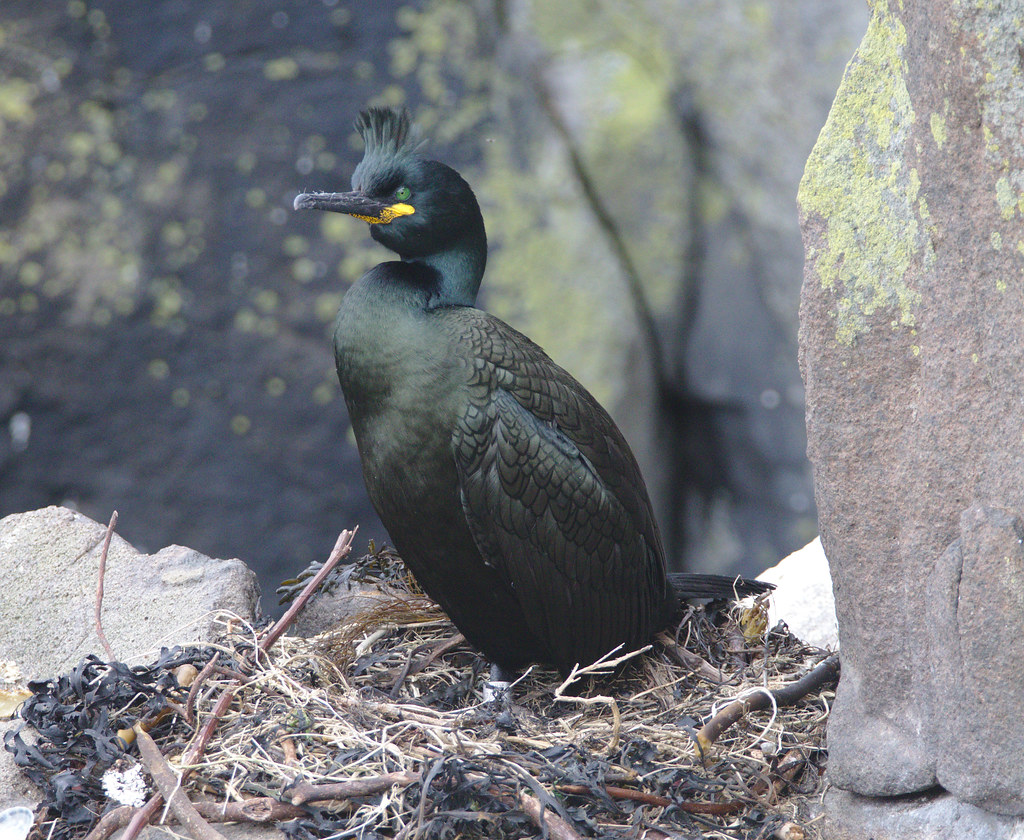
EF7A0347shagonnest by davholla2002, on Flickr

However in less than ideal it looks noisy any ideas?
Two big issues birds in flight and poor light (the below was both)
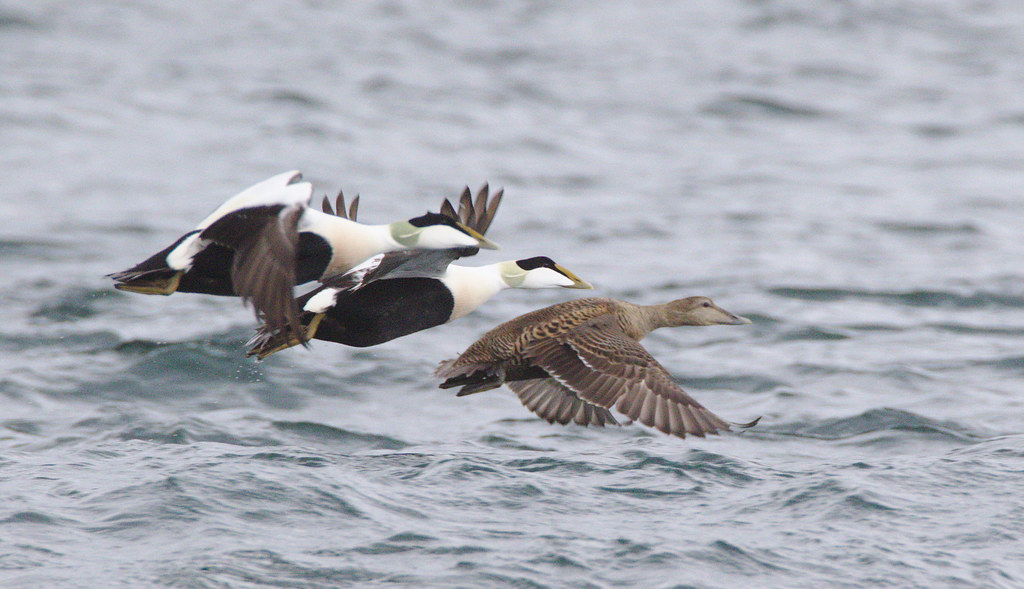
EF7A2775eiderducks by davholla2002, on Flickr

Birds in flight in good light is ok but I live in the UK so that is many months of the year out
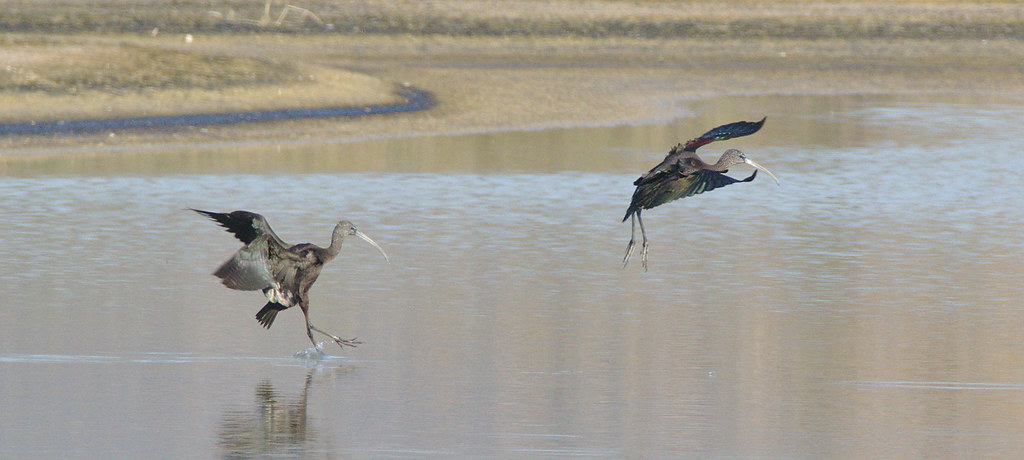
IEF7A04783cranes by davholla2002, on Flickr

Any tips on how to make it better would be appreciated. Sadly a shoulder injury caused me to miss some of the summer.
 
Oh to have good light year-round in the UK! :D
Sadly it's every photographers situation, good images in good light but struggling in the gloom ... the Eiderduck shot (which isn't bad, bad) is an example of what can happen, so what are the circumstances? Is it a large crop?
The image is showing a lot of noise and your ISO was set at 2500 ... how well does your camera cope in low light, I know nothing of Canon!
Did you need f9, or could you have opened up a bit and dropped the ISO down?
Most long zooms drop off in quality beyond 500/550 ... did you need to be at 600mm where IQ would not be at its best (more so if it's a large crop)?

The image can be improved by cautious use of noise reduction software and tweaking the levels but there is no substitute for getting it right in camera. :)
 
I think with the eider duck I had set it to the wrong aperture by mistake (and it was probably cropped a bit) also the day had really bad light.
 
Rest assured David, the equipment's fine, it's you to blame...

But seriously,most of my images are like yours, same lens but Nikon bodies, sometimes the combo produces an image that is spot on,so you know it works fine.

I can only offer encouragement really as i'm a learner, I use a tripod mostly and shoot in aperture or manual mainly.
 
it is a good combination unless you find faults with the lens, otherwise refine your skills... play with the settings until you are satisfied with your results. Not all burst images will come out sharp unfortunately, this also applies to 1Dx II...
I was hoping to have some advice about the settings. The lens seems good in good light. Saying that I will try with a lower f number e.g. 6.3
 
For these shots, it's always best to work wide open for max shutter speed and min ISO. Being a crop sensor, the 7D2 will be noisy so try and keep the ISO as low as possible. Also, take care with sharpening as excessive sharpening will make noise worse especially if you are compensating for a slightly soft lens.
 
My main experience of bif is off a boat at sea and I nearly always use +1 on the exposure compensation, it helps expose for the bird better against the water or sky. I have a 7d2 also and would say the noise is noticeable if you have to lift exposure or when you lift the shadows.
 
What post processing software are you using?
Slightly underexposed images contain less data, and more noise.
The noise is worse in the dark areas.

Mask the subject.
Apply separate noise reduction to the subject and the background.
The bright white bird needs mainly luma noise reduction - worst in the dark underwing.
The background needs mainly chroma noise reduction as this is quite underexposed - You can be quite aggressive here as you aren't worried about loss of detail in the background.
Apply some sharpening to the subject only.

Assume you are using Raw files you should be able to get much better result than I have editing your low resolution jpeg.

hVT3le5.jpg
 
What post processing software are you using?
Slightly underexposed images contain less data, and more noise.
The noise is worse in the dark areas.

Mask the subject.
Apply separate noise reduction to the subject and the background.
The bright white bird needs mainly luma noise reduction - worst in the dark underwing.
The background needs mainly chroma noise reduction as this is quite underexposed - You can be quite aggressive here as you aren't worried about loss of detail in the background.
Apply some sharpening to the subject only.

Assume you are using Raw files you should be able to get much better result than I have editing your low resolution jpeg.

ps. You'll see some edge artifacts to the bird in my image - I did the quickest, roughest mask of the bird possible.
If you do it, take your time and feather the mask edge to get the best results.

hVT3le5.jpg
Wow I am amazed at how you changed it.
I have been using darktable although I am not very good at doing it. I will investigate to see if this possible in darktable and if not look at getting a new PC and lightroom (one reason why I don't have lightroom is because my PC probably could not cope with it, it is 8 and a bit years old and runs Vista).

Quick question what software did you use to do this?
 
Last edited:
I have been using darktable although I am not very good at doing it. I will investigate to see if this possible in darktable and if not look at getting a new PC and lightroom

I'll save you some money - I did this in Darktable. :)
Took about 7 mins to do, most of which was adding a drawn path to the bird. Would have been quicker, but I haven't got my pen tablet with me today, so had to use the laptop touchpad instead.
 
I'll save you some money - I did this in Darktable. :)
Took about 7 mins to do, most of which was adding a drawn path to the bird. Would have been quicker, but I haven't got my pen tablet with me today, so had to use the laptop touchpad instead.
That is good news. The bad news is that I have no idea on how to do this but I will check when I get home and see if I can do this.
How did you apply separate noise reduction to the subject and the background?
 
On the header bar for the Denoise (non local means) tool there is a 'multiple instances' option (Looks like several squares stacked on top of each other).
This creates a completely separate copy of the denoise tool.

Create a drawn mask around the bird.
Apply luma noise reduction and a little sharpening to the bird.
Create a new instance of the denoise tool.
Select drawn mask, then rather than redrawing it, select the mask you've already drawn from the shapes menu. Click the minus sign to invert the mask.
Apply chroma and some luma reduction to the background.

I also tweaked the exposure a little - The blacks were a little light and the top edge of the birds wing was blowing a small amount. Obviously better to deal with this on the Raw file than the jpeg.
This is subjective and down to personal taste, but I think it adds separation from the background and helps the bird 'pop' a little.

The Darktable site has lots of mini tutorials and there are some good resources on Youtube. Can't post links yet, as I haven't made three posts.
 
On the header bar for the Denoise (non local means) tool there is a 'multiple instances' option (Looks like several squares stacked on top of each other).
This creates a completely separate copy of the denoise tool.

Create a drawn mask around the bird.
Apply luma noise reduction and a little sharpening to the bird.
Create a new instance of the denoise tool.
Select drawn mask, then rather than redrawing it, select the mask you've already drawn from the shapes menu. Click the minus sign to invert the mask.
Apply chroma and some luma reduction to the background.

I also tweaked the exposure a little - The blacks were a little light and the top edge of the birds wing was blowing a small amount. Obviously better to deal with this on the Raw file than the jpeg.
This is subjective and down to personal taste, but I think it adds separation from the background and helps the bird 'pop' a little.

The Darktable site has lots of mini tutorials and there are some good resources on Youtube. Can't post links yet, as I haven't made three posts.
Thank you so much. I just hope I can do this.
I work in IT but poor co-ordination, lack of space at home to move the mouse and a shoulder injury mean that I have problems with the mouse. Fortunately for my job I can use shortcut keys and almost never have to use the mouse.
 
Thank you so much. I just hope I can do this.
I work in IT but poor co-ordination, lack of space at home to move the mouse and a shoulder injury mean that I have problems with the mouse. Fortunately for my job I can use shortcut keys and almost never have to use the mouse.

I work in IT and haven't used a mouse in 15 years - I used to get upper back problems from them. I use touchpads and an A5 Wacom tablet, and of course shortcut keys.
Once you are used to them pen tablets allow much more accurate work on images. I recommend a small tablet as you are then only moving your hand to work, rather than your arm, meaning the wrist can mainly rest on the tablet.

If you have problems drawing an accurate mask because of mouse issues remember that a path is editable - so it is always recoverable.

So, job #1 is to minimise the noise in camera, as mentioned by others above. Exposing to the right maximises the amount of information in the raw file and improves the information to noise ratio.
https://www.google.co.uk/search?q=ettr+noise+reduction (Apologies if I am teaching you to suck eggs here).

Sometimes, everything conspires against you, you accidentally underexpose and the image contains excessive noise. That's where Darktable skills come to the rescue.
https://www.darktable.org/usermanual/ch03s02s07.html.php - Drawn Masks (Paths).
https://www.darktable.org/usermanual/ch03s04s04.html.php - Denoise
https://www.darktable.org/usermanual/ch03s02s04.html.php - Multiple Instances

Be interested to see your results. Forgot to mention - Nice shot. Like the composition, the pose of the bird and the nice clean background.
 
I work in IT and haven't used a mouse in 15 years - I used to get upper back problems from them. I use touchpads and an A5 Wacom tablet, and of course shortcut keys.
Once you are used to them pen tablets allow much more accurate work on images. I recommend a small tablet as you are then only moving your hand to work, rather than your arm, meaning the wrist can mainly rest on the tablet.

If you have problems drawing an accurate mask because of mouse issues remember that a path is editable - so it is always recoverable.

So, job #1 is to minimise the noise in camera, as mentioned by others above. Exposing to the right maximises the amount of information in the raw file and improves the information to noise ratio.
https://www.google.co.uk/search?q=ettr+noise+reduction (Apologies if I am teaching you to suck eggs here).

Sometimes, everything conspires against you, you accidentally underexpose and the image contains excessive noise. That's where Darktable skills come to the rescue.
https://www.darktable.org/usermanual/ch03s02s07.html.php - Drawn Masks (Paths).
https://www.darktable.org/usermanual/ch03s04s04.html.php - Denoise
https://www.darktable.org/usermanual/ch03s02s04.html.php - Multiple Instances

Be interested to see your results. Forgot to mention - Nice shot. Like the composition, the pose of the bird and the nice clean background.
Thanks for all that, the composition was really a bit of luck. Black headed gulls fly faster than I can compose a photo.
However they and pigeons are the most common bird I see so best to practice on.
You are definitely not teaching me stuff I already know, rather embarrassingly I had never thought of using this then again none of the hundreds of people who have worked in the same office as me have using a pen tablet either.
I will get a pen tablet and try your advice at the weekend - no more photos will be edited until I try this.
Would this tablet be any good do you think?
http://www.argos.co.uk/static/Product/partNumber/4458548.htm
 
Thanks for all that, the composition was really a bit of luck. Black headed gulls fly faster than I can compose a photo.
Would this tablet be any good do you think?
http://www.argos.co.uk/static/Product/partNumber/4458548.htm

I'm not up to date with the current offerings (My tablet hasn't been made for a number of years, but still works fine), but it looks suitable to me.
Surprised there is only the odd mention of graphics tablets in the talk-equipment forum on here.
Don't forget - they take a little practice when you first use one, but I'd never go back to not using one.

Looking at all the current Wacom offerings they all say they are compatible with Win 7, 8 or 10. I have no idea if they will just work with Vista or whether you will have to dig around for an older driver.
http://www.wacom.com/en-us/support/product-support/drivers
 
I'm not up to date with the current offerings (My tablet hasn't been made for a number of years, but still works fine), but it looks suitable to me.
Surprised there is only the odd mention of graphics tablets in the talk-equipment forum on here.
Don't forget - they take a little practice when you first use one, but I'd never go back to not using one.

Looking at all the current Wacom offerings they all say they are compatible with Win 7, 8 or 10. I have no idea if they will just work with Vista or whether you will have to dig around for an older driver.
http://www.wacom.com/en-us/support/product-support/drivers
I suppose if people are happy with using a mouse why use a graphic tablet. We are not for similar but slightly different reasons.
Saying that looking at the reviews people say things like
"The Intuos draw is a very good product, easy to use on computer programs such as Krita, Gimp and Inkscape. I use the Mint 18 Linux OS and this drawing tablet was picked up immediately, if you use Windows you will have no problems. The price for what you get is excellent, the Tablet itself is very good for either beginner or more advanced artist."
And

"Wanted to draw more accurately in Photoshop, this did it."

So it is surprising no one else uses it.
Thanks again for the help and I love your hummingbird hawk moth photo.
 
Back
Top