Canon 5dmk3 - Focus Error - Symbol with disc/circle + brackets...

mrk123

Suspended / Banned
Messages
290
Name
kane
Edit My Images
No
Canon 5dmk3 -
Issue - Won't take photo and now MENU, INFO + Q buttons do not bring screens up on the rear LCD. It's all a bit weird.
I have repl;aced the small CR1616 with a new battery, taken the lens and SD card out and tried to hard reset it all... but the issue is it just won't take a photo... in auto focus mode the green dot with brackets pops up in the viewfinder... if i put it in manual mode, just the large green circle... I have no idea what is going on...
Any help?
Thanks.
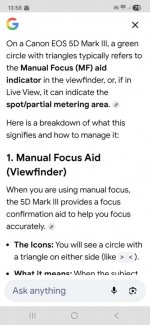
WhatsApp Image 2026-02-15 at 15.39.17.jpegWhatsApp Image 2026-02-15 at 15.39.17(1).jpeg
 
Based on the info above - if the picture fits what you're seeing, check the contacts on the camera & lens (does it happen with all lenses or just that one - if it happens with just one lens, check the lens; if all check the body)

Blindingly obvious question though - you haven't set the lens (or body) to manual focus have you?
 
Based on the info above - if the picture fits what you're seeing, check the contacts on the camera & lens (does it happen with all lenses or just that one - if it happens with just one lens, check the lens; if all check the body)

Blindingly obvious question though - you haven't set the lens (or body) to manual focus have you?
Hi..
Fiestly some luck.. I was reading an post on the canon user forum and someone said take everything off the camera that comes off and start putting it back on piece by piece and see if you start to get functioanlity... I put the main battery in and then I suddenly had the back screen func back, I then put the lens back on and it would let me focus but not take pic as no SD card.. it said "add card" somewhere, not sure what made me think but after trying the SD card again and then the same issue, I pulled the SD out and tried an old CF card (I never use CF now).. but amazingly with the CF card in I could take photos again, and just use EOS image downloader so I now have func again, not sure what that SD card is doing to the camera tho... I have not tried another SD yet as I only had one 256GB card.. will need to try another SD card soon. ! This camera is from 2011 so I expect a few glitches but this is strange.
I was considering buying a mk4 but really did not want to for very little upgrade from the mk3.
 
Hi..
Fiestly some luck.. I was reading an post on the canon user forum and someone said take everything off the camera that comes off and start putting it back on piece by piece and see if you start to get functioanlity... I put the main battery in and then I suddenly had the back screen func back, I then put the lens back on and it would let me focus but not take pic as no SD card.. it said "add card" somewhere, not sure what made me think but after trying the SD card again and then the same issue, I pulled the SD out and tried an old CF card (I never use CF now).. but amazingly with the CF card in I could take photos again, and just use EOS image downloader so I now have func again, not sure what that SD card is doing to the camera tho... I have not tried another SD yet as I only had one 256GB card.. will need to try another SD card soon. ! This camera is from 2011 so I expect a few glitches but this is strange.
I was considering buying a mk4 but really did not want to for very little upgrade from the mk3.
I was under the impression the 5D mk iii was limited to 128GB and smaller SD cards (some users report 256GB works but officially the max is 128GB), maybe this was the issue?
 
This camera is from 2011 so I expect a few glitches but this is strange.

That would count as almost brand new for me, I have many cameras much, much older.

It would be worth trying to reformat the SD card (in camera if it will do it, or with a computer). The next step (as you outline above) would be a new SD card.
 
I was under the impression the 5D mk iii was limited to 128GB and smaller SD cards (some users report 256GB works but officially the max is 128GB), maybe this was the issue?
I have had this SD card for 5 years now with no issues.. I am happy with the outcome if the only thing that has gone wrong is with the SD card / port. I will get a new SD card or try an old one and see if it works.
 
That would count as almost brand new for me, I have many cameras much, much older.

It would be worth trying to reformat the SD card (in camera if it will do it, or with a computer). The next step (as you outline above) would be a new SD card.
Yeah the mk3 is a real workhorse.. I am wondering of the mk4 would be much of an upgrade for me.. most likley not.. and I do not fancy mirrorless, I hread a lot of mirrorless users are moving back to DSLR.. The makers really need to keep DSLR, It's the mainstay of photography for the last 100 years!
 
Yeah the mk3 is a real workhorse.. I am wondering of the mk4 would be much of an upgrade for me.. most likley not.. and I do not fancy mirrorless, I hread a lot of mirrorless users are moving back to DSLR.. The makers really need to keep DSLR, It's the mainstay of photography for the last 100 years!
Manufacturers aren't going to keep DSLRs going, I'm afraid — they simply don't have the incentive. They've invested heavily (arguably too heavily) in mirrorless, and maintaining two separate production lines just isn't something they see as worthwhile. I haven't made the switch myself yet, but I've used quite a few mirrorless bodies for work and they really are brilliant in many ways — though obviously it depends a great deal on the specific body, the brand, and a whole host of other factors.

If I were you, I'd seriously consider making the jump to the Mk IV — it genuinely is a significant step up from the Mk III. The only real concern I'd have is how much longer Canon will continue to service it, so there's a chance you could end up having to rely on third-party repairers down the line. It all depends on your budget, what you're shooting, and how hard you work the gear.
 
Back
Top