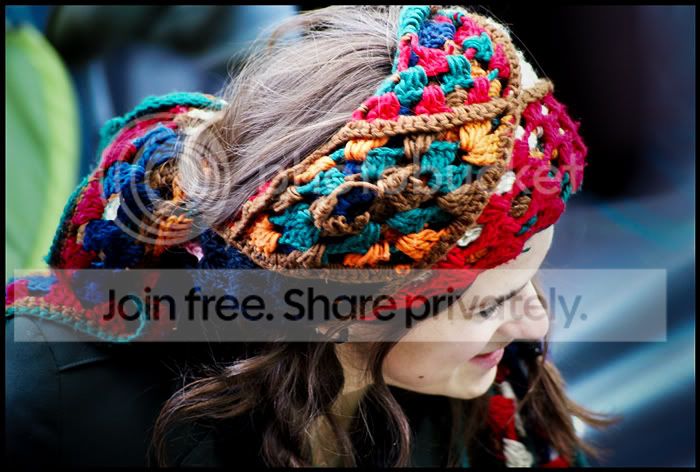
Can someone help process my pics please?

onikami

Suspended / Banned
Messages
1,916
Name
Sir Oni
Edit My Images
Yes
Hello,

I took these two pics a while back. They look over exposed. I've tried fooling about on photoshop to fix the problem somewhat, but being new to this, I cant get anywhere. Can someone who is good with photoshop assist?

Please feel free to save the pic and re-post if you are able to adjust. I'm not in a rush, so anyone who has free time with photoshop sometime, please help! :)

So here are the pics:

#
scarf1.jpg


scarf2.jpg
 
I'm no photoshop expert , but love playing about on it

heres my attempt until someone who knows what they're doing comes along

scarf1.jpg
 
this any better? I guess its personal preference how you want the brightness/contrast/saturation. I've mainly taken saturation down a touch and played around with curves. changed brightness + contrast on second one as well:

might want to sharpen them up a bit if you want too

scarf1.jpg


scarf2.jpg
 
Shoulda kept some more saturation in the hair i think in my edits as mrgas has brought out some nice warm colour there (though the scarf is a little too saturated?)
 
this any better? I guess its personal preference how you want the brightness/contrast/saturation. I've mainly taken saturation down a touch and played around with curves. changed brightness + contrast on second one as well:

might want to sharpen them up a bit if you want too

scarf1.jpg


scarf2.jpg


Cheers, kman.I will save it and tinker with it to see where I can take it from there :thumbs:
 
I'm no photoshop expert , but love playing about on it

heres my attempt until someone who knows what they're doing comes along

scarf1.jpg

mrgas, that is great. As suggested above, are you able to tone the scarf colour down a bit as it is little too saturated?

Also, could you attempt the other pic as well, when you habe time, that is :)
 
you can't keep tinkering with a jpeg without losing quality - save as a PSD or something else.
 
As above I'm no expert, in fact I'm right at the bottom of photoshop skills, but here is my go. Just Hue and Saturation, Contrast and a bit of Colour Balance.

scarf1.jpg
 
try croping in from the left and add a vignette
 
As above I'm no expert, in fact I'm right at the bottom of photoshop skills, but here is my go. Just Hue and Saturation, Contrast and a bit of Colour Balance.

scarf1.jpg

:thumbs:

cheers, anymore attemps would be great. This is one of my fav pics, so I'm trying to do it some justice. :)
 
mrgas, that is great. As suggested above, are you able to tone the scarf colour down a bit as it is little too saturated?

Also, could you attempt the other pic as well, when you habe time, that is :)

i'll do them both for you no probs , i see what you mean about the scarf though

i've gotta get the kids ready for school then i'll have a go , if you want you can email the bigger files to me at neusales@ntlworld.com
 
mrgas, that is great. As suggested above, are you able to tone the scarf colour down a bit as it is little too saturated?

Also, could you attempt the other pic as well, when you habe time, that is :)

I am intrigued to know how much better the OP is going to get in Photoshop if he posts images here for other people to fix :shrug:
 
He/She'd get more from it if people explained the process behind their efforts.
 
i'll do them both for you no probs , i see what you mean about the scarf though

i've gotta get the kids ready for school then i'll have a go , if you want you can email the bigger files to me at neusales@ntlworld.com

Mrgas, I have sent you bigger versions of the two pics. Look out for an email in your inbox.

Cheers :thumbs:
 
I’m not quite sure what your looking for in a final image but the top picture below is your original and the bottom I have adjusted very slightly using shadow /highlights using just the highlight slider to darken those areas.
and sharpened the final image a little using the unsharp mask.
scarf2up.jpg
 
I am intrigued to know how much better the OP is going to get in Photoshop if he posts images here for other people to fix :shrug:

Sometimes you need to see what you can achieve with PS in order to set your goals. This way he'll know that a picture like that can be 'saved' and what can be done.

I guess a cool exercise would be to give people the same image and using only photoshop to edit it and see the different interpretations that people would post back up.

He/She'd get more from it if people explained the process behind their efforts.

Yup, that would help out a lot too though.
 
Just had a quick go with the first image all i did was open it as a raw image in cs4 and used the gradient adjust tool to alter exposure and also cranked up the saturation.

scarf1.jpg
 
Original -
20090401_173418_1_LR.jpg


Edit -
20090401_173418_1_LR-2.jpg


Lightroom Edit History -
20090626_123651_0009.jpg
 
I’m not quite sure what your looking for in a final image but the top picture below is your original and the bottom I have adjusted very slightly using shadow /highlights using just the highlight slider to darken those areas.
and sharpened the final image a little using the unsharp mask.
scarf2up.jpg

Awesome, Cyb. Cheers for that :thumbs:
 
Just had a quick go with the first image all i did was open it as a raw image in cs4 and used the gradient adjust tool to alter exposure and also cranked up the saturation.

Thanks, adam.

Will have a good look at all of them when I get home from work.
 
Can anyone have an attempt at # 2?

:thumbs:

PS.

Cheers also to Chaz for his help.
 
tdodd, that is greeeat! Any chance of helping with the other one? :D

Well it would be easy enough to do, but what would be the point? I firmly believe in the "teach a man to fish" philosophy. I've shown you what I did and what software I used. As you will note from the edit history I did not do much and did not use any fancy editing tricks like layers/masks etc.. It was quite simple adjustments - basically just exposure and colour balance. I don't wish to be an arse but what is to be gained by me editing the other one for you?

I presume you do have some sort of editing software....? If not, why not? There is free stuff, such as Picasa or Photoshop Express, that can do basic edits, and you can download a free 30 day trial of Lightroom and have a play with it. How will you learn if you just have people fixing up your photos for you? If you like my edit then I recommend you have a go yourself. You can use the adjustments I applied to the first picture as your starting point. From the look of the two images I doubt there will be a need to do anything different, but why not have a go and see for yourself?
 
Well it would be easy enough to do, but what would be the point? I firmly believe in the "teach a man to fish" philosophy. I've shown you what I did and what software I used. As you will note from the edit history I did not do much and did not use any fancy editing tricks like layers/masks etc.. It was quite simple adjustments - basically just exposure and colour balance. I don't wish to be an arse but what is to be gained by me editing the other one for you?

I presume you do have some sort of editing software....? If not, why not? There is free stuff, such as Picasa or Photoshop Express, that can do basic edits, and you can download a free 30 day trial of Lightroom and have a play with it. How will you learn if you just have people fixing up your photos for you? If you like my edit then I recommend you have a go yourself. You can use the adjustments I applied to the first picture as your starting point. From the look of the two images I doubt there will be a need to do anything different, but why not have a go and see for yourself?


Point taken. I'll try it. :thumbs:
 
Sometimes you need to see what you can achieve with PS in order to set your goals. This way he'll know that a picture like that can be 'saved' and what can be done.

I would disagree with that. It is only by pushing bounderies that we truly learn what we are capable of. Sometimes it means experimenting with different things in Photoshop so you know what they do. Other times it means having the idea in your head of how you want the image to look - and then making it happen.

If you realy on others to tell you what Photoshop can do you are limiting your outlook because not everyone uses the full capabilities of the software - myself included.
 
Back
Top