Camera setting adjustments needed? or is this just the way it is!?

DoubleT

Suspended / Banned
Messages
1,318
Name
Matt
Edit My Images
Yes
So! been spending some time in photoshop recently and came across auto colour correction....

Now if noticed it im seeing it in all my photos.

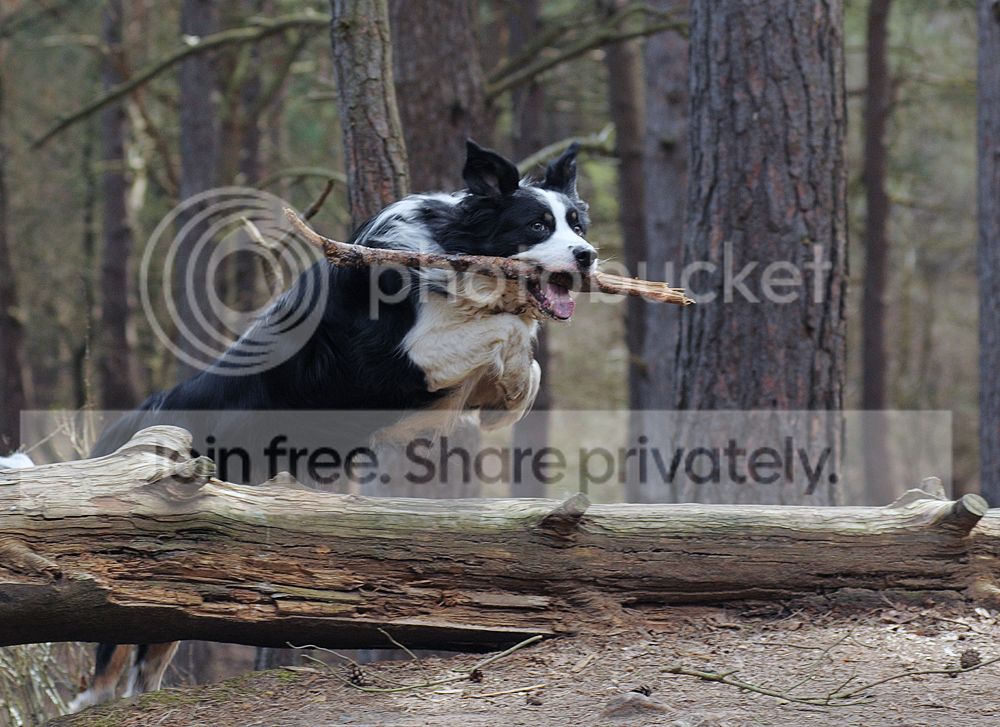
heres a before an after example

Before
before.jpg


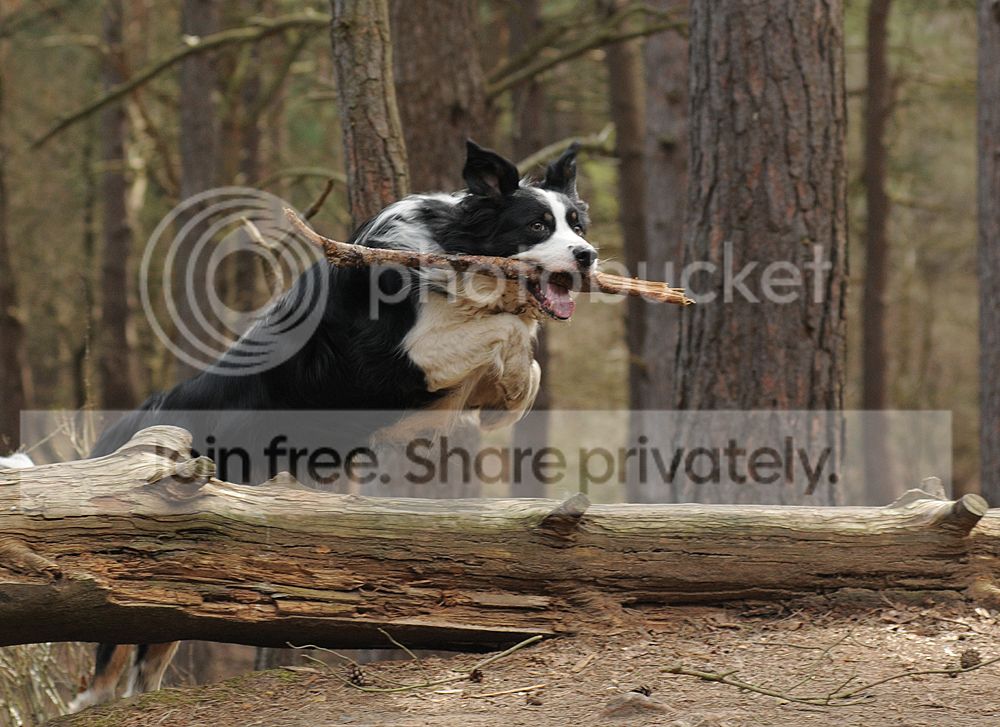
After auto colour correction
after.jpg


you can see on the before shot that there is quite a difference in colour, i find the after shot to be alot more natural in colour but slightly colder.


is this just down to white balance settings?

I always shoot in K mode ( 5500k in daylight), never rely on auto w/b. how do you measure your white balance when you are out on a shoot through different types of light, are you constantly changing it? how do you know when to change it when the light change seems to be very minimal.


what do you guys do? and also which one of the above do you prefure?
thanks
 
Last edited:
2nd is better IMHO.

The problem with "daylight" is that it changes with the environment. Daylight in a wood is different to daylight on a sunny beach.

Personally, I shoot in raw and adjust later...
 
Correct doesn't mean best. Give me the original any day of the week!

Light temperature varies all over the place, shadows will typically be much bluer than open ground, your eyes don't really notice this, but if you actually force yourself to notice you can see it. Digital cameras make it incredibly obvious, as they can only really fine tune to a narrow band of colour temperature.

Generally people like the golden hour best - because the light is precisely that, golden. If you were then to apply 'correct' white balance to shots taken in such conditions, you'd find them looking like they were shot at mid day.

As for how I shoot, well I like to emphasise colour shifts so I just leave it in Shade preset and work from there during Raw development, tweaking by eye till I get the mix I want.
 
I always shoot in K mode ( 5500k in daylight), never rely on auto w/b. how do you measure your white balance when you are out on a shoot through different types of light, are you constantly changing it? how do you know when to change it when the light change seems to be very minimal.


what do you guys do? and also which one of the above do you prefure?
thanks


First of all.. do you shoot in RAW? If you do, it makes no difference really, as you have full control over white balance post shoot.

Why 5500K? That's only really true for mid day on a clear day (and even then it may not be 5500K... probably nearer 6500K). On a cloudy say it can be anything up to 10,000K... in evening sunlight it may be as low as 3000K.

Using auto WB will probably be accurate more of the time than keeping it set to 5500K.
 
Thanks for your replies , I don't shoot in raw simply because of the laborious editing process ,maybe I should give it another try . I set it at 5500 just to be relitively safe when shooting in the day time . Maybe I should take more control of this
 
I set it at 5500 just to be relitively safe when shooting in the day time . Maybe I should take more control of this
Yes. You would probably be better with auto WB for most cases. The WB will be dictated to by both the light available AND the surroundings you are in. Modern cameras tend to do an OK job of guessing (there are exceptions - Canon, I'm looking at you on tungsten lighting here ;)).
 
In the second photo the trees look mauve and I have yet to see trees this colour. Forget auto colour in photoshop and rely more on the actual colours you saw when you took the photo.

Realspeed
 
In the second photo the trees look mauve and I have yet to see trees this colour.
You really need to get your monitor calibrated... ;)
 
You really need to get your monitor calibrated... ;)

this is just my works computer/monitor which may explain it , havn't looked at the pictures with my main computer with a decent monitor I use for photographic work.

Realspeed
 
havn't looked at the pictures with my main computer with a decent monitor I use for photographic work.
which also needs calibrating ;)
 
Thanks for your replies , I don't shoot in raw simply because of the laborious editing process ,maybe I should give it another try . I set it at 5500 just to be relitively safe when shooting in the day time . Maybe I should take more control of this

Auto WB is pretty good in many circumstances, but working in RAW gives you far more control over the final image in all circumstances and isn't really any more laborious once you've got the basics - honest!

You can open a jpeg in the RAW dialogue (in Photoshop, FILE>OPEN AS>CAMERA RAW) and play with the WB.
 
Personally I find the second version a little cold, I'd be tempted to go somewhere inbetween the two.
 
I agree with the Mauve comment on the trees, 2nd pic does not look natural pic 1 does for me. I very rarely PP as its not my bag I prefer to learn from the picture taking and adapt, sometimes it takes a while but I prefer that to some folks answer of just fix it in PP.

As a few folk have suggested the WB was a bit wangy.
 
I agree with the Mauve comment on the trees, 2nd pic does not look natural pic 1 does for me. I very rarely PP as its not my bag I prefer to learn from the picture taking and adapt, sometimes it takes a while but I prefer that to some folks answer of just fix it in PP.

As a few folk have suggested the WB was a bit wangy.

PP generally isn't about fixing, it's about finishing. What happens in the camera is just one part of the process of photography.
 
I'm a bit meh about whether the second is too cold or not. Auto WB will get you close, but isn't a substitute for properly post processing. What is clear is that fixing WB on 5500K will be like using a broken watch - it will be correct twice a day and be out by varying amounts at all other points.

I'd agree with post just being about finishing (I view it as developing). You have a choice of letting the camera doing the post processing or doing it yourself. Neither is right or wrong, but if you go JPEG and set your camera up badly, the results from in camera processing will need as much if not more processing than starting with a raw. The only difference being you've thrown away all your leeway by going from raw to JPEG in camera. If you take JPEGs and post more than just a crop and rotate, you really, really should be thinking about a raw workflow with good raw processing software instead. Note: the two raw processing packages that came with my two makes of cameras (Canon and Panasonic) are NOT good raw processing workflows....
 
I'd imagine by inferring that the 2nd pic looks more natural, you intended to show the dog's white coat as a 'purer white' maybe?

I'd personally use a white neutralizer filter, such as that on Nik's Color Efex Pro series, to affect the white-ish areas only and leave the surrounding natural woodland looking...erm....natural lol. ;)
 
I'd personally use a white neutralizer filter, such as that on Nik's Color Efex Pro series, to affect the white-ish areas only and leave the surrounding natural woodland looking...erm....natural lol. ;)
The problem is that the WB is off on the whole picture. The auto hasn't done a bad job, but it's probably not 100% correct. The colours of the trees in the first aren't natural either... they look like they have been passed through a 1950s filter to me ;)
 
great responses guys, thank you very much, this is the reason why i critisize my own work so much, because i have to keep learning!

im going to give RAW another good go, and try and simplifiy the editing, because after a days shooting at a wedding i always found raw very hard work i only use Photoshop CS 5 extended , so it has plenty of software attached so hopefully has a good RAW program.

But i do like to try and get it right in camera all the time. and WB has always been a head ache for me, i shoot with my camera in Manual mode so i am checking all the settings everytime i hit the shutter release, so putting the camera in AUTO WB will give me one less thing to worry about unless of course its really dodgy light.....

But one question.... how do you get around more than one colour temperature at a time, say for instance you are shooting inside and you have ambient light and also say a 3200k tungstan light.... is this when i should use the custom WB option, i bought a WB filter for me to be able to do this but just becomes a pain when you need to take the shot quickly.....


thanks again
 
Try downloading Lightroom 5 beta. Its free until end of June i believe.
It really will speed up your work flow, although of course its something you will need to lean first (its not hard)
In LR you can have more than one WB applied. For example you can have corrected WB for inside a room, and at the same time get rid of the blue tinted windows by using the local correction tool, set for WB.
Otherwise if you want to get it right in camera i think you would need to use gels on the Tungsten lights, to bring them in line with the ambient.

For colour correcting multiple images at the same time its a boon, in fact you can do anything to multiple images at once if you need to. I know how time consuming using Photoshop can be if you need to work on many shots. Unless you need the advanced features of PS LR is a real time saver, and it will work with JPG's as well, although the results wont be the same.

In your dog shots above i think the second shot is closer to what i would expect to see, but i would reduce the blues. This should neutralise the cast in the trees and the dog.
 
The problem is that the WB is off on the whole picture. The auto hasn't done a bad job, but it's probably not 100% correct. The colours of the trees in the first aren't natural either... they look like they have been passed through a 1950s filter to me ;)
Lol.

Admittedly I'm viewing on an uncalibrated iPad 2, but the trees look pretty natural in colour to me with a nice warm tone in the first pic.
 
Lol.

Admittedly I'm viewing on an uncalibrated iPad 2, but the trees look pretty natural in colour to me with a nice warm tone in the first pic.
Exactly, the greens are too yellow IMHO - in fact everything has a yellow cast. It's fine if you like that colour, but it isn't a natural colour cast... unless the light really was like that (close to either golden hour).
 
Try downloading Lightroom 5 beta. Its free until end of June i believe.
It really will speed up your work flow, although of course its something you will need to lean first (its not hard)
In LR you can have more than one WB applied. For example you can have corrected WB for inside a room, and at the same time get rid of the blue tinted windows by using the local correction tool, set for WB.
Otherwise if you want to get it right in camera i think you would need to use gels on the Tungsten lights, to bring them in line with the ambient.

For colour correcting multiple images at the same time its a boon, in fact you can do anything to multiple images at once if you need to. I know how time consuming using Photoshop can be if you need to work on many shots. Unless you need the advanced features of PS LR is a real time saver, and it will work with JPG's as well, although the results wont be the same.

In your dog shots above i think the second shot is closer to what i would expect to see, but i would reduce the blues. This should neutralise the cast in the trees and the dog.


Wow. Thanks for your input Dave . Ive user light room before . Ill give it another stab . I think im getting a little lady with m'y photography and need to raise thé game and pull my finger out.
 
Exactly, the greens are too yellow IMHO - in fact everything has a yellow cast. It's fine if you like that colour, but it isn't a natural colour cast... unless the light really was like that (close to either golden hour).

To me it looks like it was taken close to either golden hour, which is why I find the woodland natural in appearance. If it wasn't, then I would still find that the photo lends itself well to that type of lighting and hue.

It just needs the whites neutralized on the dog to make him 'pop'. :)
 
To me it looks like it was taken close to either golden hour,
Well... if the exif is correct, it was taken at 2:15pm on Sunday.... ;)

It just needs the whites neutralized on the dog to make him 'pop'.
So, you want to set the dog to the correct white balance, and leave the rest off... :)
 
Well... if the exif is correct, it was taken at 2:15pm on Sunday.... ;)

So, you want to set the dog to the correct white balance, and leave the rest off... :)

TBH if you knew anything about PP (and great imagery in general) then you would realise that the best images focus on the subject and let the background do it's own thang.

If that means having the subject matter set on a different WB to the rest of the image to draw the eye to the main focal point then yes....I'd set correct WB on the dog amd leave the rest as it is.

What would you do arad....make it look consistent and 'boring'? ;)
 
TBH if you knew anything about PP (and great imagery in general) then you would realise that the best images focus on the subject and let the background do it's own thang.
You have no idea how much I know about post, but I know enough to say good post doesn't generally isolate subject from background simply by applying arbitrary white balance differences between the two ;) In fact, WB the dog on it's own might just make the image look plain weird...

What would you do arad....make it look consistent and 'boring'? ;)
I have no idea why you would consider consistency as being boring.... But anyway, the correct WB is just a starting point for further processing.
 
TBH if you knew anything about PP (and great imagery in general) then you would realise that the best images focus on the subject and let the background do it's own thang.

If that means having the subject matter set on a different WB to the rest of the image to draw the eye to the main focal point then yes....I'd set correct WB on the dog amd leave the rest as it is.

What would you do arad....make it look consistent and 'boring'? ;)

Oh dear... :help:
 
Back
Top