camera comparison

realspeed

Suspended / Banned
Messages
8,827
Name
Bazza
Edit My Images
No
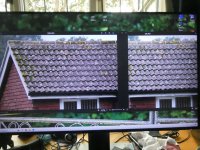
Now I have the Panasonic G9ii I was wondering about the difference between that and the G9 earlier version. So did a simple test as shown below. Only alteration was to make the photos small enabled to to be posted on here.
Same settings for both In Jpeg -Aperture f6.3 and shutter speed 320. also same lens Panasonic 100.300mm set at 300mm for both. same SD card and shot on a tripod in same position-ISO in auto mode.

G9II

G9ii a.JPG
G9 a.JPG


members thoughts welcomed. the difference does not show up so much due to he interweb
 
Last edited:
Were they JPEGS or RAW?

JPEGS will show nothing meaningful
 
Neither photo looks sharp on my screen and in fact these look decidedly soft on my screen with no clear point of focus but that could be because of the posting process. Other than that, I'd imagine any differences are going to have to be big to be noticeable here.

How do you think they compare?
 
STEVE
I had to use Jpeg because Microsoft doesn't recognise Panasonic n G9ii Raw files. Typically Microsoft are years behind modern technology even though the G9ii was released in 2023.
the Panasonic editing suite does (silkyp ******) but only do prints due to bloody microsoft

So at the moment this is the best I can do. the photos above are totally unedited to try and give a fair comparison.
looking at them on my 4K monitor soes show up the difference

P1060567a.JPG
maybe this is better? the roof tiles are more individual
 
Last edited:
STEVE
I had to use Jpeg because Microsoft doesn't recognise Panasonic n G9ii Raw files. Typically Microsoft are years behind modern technology even though the G9ii was released in 2023.
the Panasonic editing suite does (silkyp ******) but only do prints due to bloody microsoft

So at the moment this is the best I can do. the photos above are totally unedited to try and give a fair comparison.
looking at them on my 4K monitor soes show up the difference
The reason is that it may use a different image processor, also the JPEG conversion parameters may not be the same. They can be set on both cameras, but the same setting on both may not give the same results depending on the cameras software.

Taking raw files, and not doing any adjustments except exporting them as JPEGS with no corrections would be a better comparison.

All the reviews I have read have stated there is essentially no noticeable difference under most conditions.
 
STEVE

I wish I could but I only have Adobe elements editing program I have seen someone suggesting Photoshop but to get that means a monthly fee. Even the so called free download is not free adobe want £9 upfront first. there have been so many complaints about this issue to microsoft but they are taking no notice
 
Last edited:
The shot taken on the G911 has more contrast.
 
If you select a Photo Style, you can then adjust the CONTRAST, SHARPNESS, NOISE REDUCTION and SATURATION that are applied to the JPEG in camera.

You can get better images by turning the SHARPNESS and NOISE REDUCTION right down and adjusting in post if needed.

These settings or the effects of them on the default setting vary from one camera model to the next,

Panasonic are known to give excellent quality JPEGS, and there are quite a few guides on how to set them up from people who find they don't need to shoot RAW.

The G9ii is a fantastic camera, with some innovations that can make a huge difference to some specific conditions, and features that will help many people do what they want (especially video), but the only feature that would be useful to me is the higher resolution for tighter crops. Most of the others I am happy with on the G9 or don't use or need.
Not forgetting you can buy 4 s/h G9s for the price of one new G9ii :). I thought of selling my two G9s and getting a G9ii, but the extra features would be far less useful than the advantages of two cameras. Maybe when there are lots on the s/h market :)


STEVE

I wish I could but I only have Adobe elements editing program I have seen someone suggesting Photoshop but to get that means a monthly fee. Even the so called free download is not free adobe want £9 upfront first. there have been so many complaints about this issue to microsoft but they are taking no notice

There are several ways to deal with RAWs, RawTherapee is free and really excellent, and Affinity is a one time payment (probably a half price offer coming up in the next couple of months) which is inexpensive, intuitive and easy to use, and does everything in one place.
 
If you select a Photo Style, you can then adjust the CONTRAST, SHARPNESS, NOISE REDUCTION and SATURATION that are applied to the JPEG in camera.

You can get better images by turning the SHARPNESS and NOISE REDUCTION right down and adjusting in post if needed.

These settings or the effects of them on the default setting vary from one camera model to the next,

Panasonic are known to give excellent quality JPEGS, and there are quite a few guides on how to set them up from people who find they don't need to shoot RAW.

The G9ii is a fantastic camera, with some innovations that can make a huge difference to some specific conditions, and features that will help many people do what they want (especially video), but the only feature that would be useful to me is the higher resolution for tighter crops. Most of the others I am happy with on the G9 or don't use or need.
Not forgetting you can buy 4 s/h G9s for the price of one new G9ii :). I thought of selling my two G9s and getting a G9ii, but the extra features would be far less useful than the advantages of two cameras. Maybe when there are lots on the s/h market :)


There are several ways to deal with RAWs, RawTherapee is free and really excellent, and Affinity is a one time payment (probably a half price offer coming up in the next couple of months) which is inexpensive, intuitive and easy to use, and does everything in one place.
+1 for Affinity here; I use it and it's excellent.
 
I did say the issue is with Microsoft not any editing suite . Maybe a response is from those actually owning the Panasonic G9ii would be helpful
 
Last edited:
STEVE
You have missed to point entirely. I wanted a comparison between the two without any editing or alterations.
 
I did say the issue is with Microsoft not any editing suite . Maybe a response is from those actually owning the Panasonic G9ii would be helpful
How is the issue with Microsoft?
Microsoft what does not recognise the files? Might help if you specified the Microsoft software that you think is at fault!
How are the RAW files from the G9ii different to those from the G9 or any other recent Panasonic camera?
 
STEVE
You have missed to point entirely. I wanted a comparison between the two without any editing or alterations.
I think it is you who have missed the point, if you are comparing JPEGS from the camera, they have already been altered in the camera :)

I was making the point that if you want to do the comparison as you stated, it would need to be RAWs
 
I CAN'T DO RAW WITH THE PANASONIC G9II :headbang:
You said "I had to use Jpeg because Microsoft doesn't recognise Panasonic n G9ii Raw files."

I asked what MS programme, I also asked if there was a difference in the RAW files between the G9 and the G9ii, as if you can open RAW files from the G9 and not from the G9ii it suggests there could be a difference

I downloaded some G9ii RAW files from the review on DPreview and they open fine on IrfanView, FastStone and Affinity. (I didn't try anything else)
All running on a Microsoft W10 machine.

To just blame MS and say they are behind the times doesn't make much sense, might be more useful to find out why your machine isn't doing as you expect, for example there is a codec you can download for .RW2 files, but then of course if you didn't have that, you would not be able to view the G9 files either :)
 
I give up! its a bit like trying to put a mini car engine into a Rolls Royce , the G9 and the G9ii are completed different cameras with different circuit main boards.

Why don't you try it with yours without going into any editing suit?
 
You said "I had to use Jpeg because Microsoft doesn't recognise Panasonic n G9ii Raw files."

I asked what MS programme, I also asked if there was a difference in the RAW files between the G9 and the G9ii, as if you can open RAW files from the G9 and not from the G9ii it suggests there could be a difference

I downloaded some G9ii RAW files from the review on DPreview and they open fine on IrfanView, FastStone and Affinity. (I didn't try anything else)
All running on a Microsoft W10 machine.

To just blame MS and say they are behind the times doesn't make much sense, might be more useful to find out why your machine isn't doing as you expect, for example there is a codec you can download for .RW2 files, but then of course if you didn't have that, you would not be able to view the G9 files either :)

I think he means that the photo editing software built into Windows will not show you a RAW image. It shows the files as being there, but there is no preview, and you can't view them.
 
Either image should be worth showing at Les Rencontres d'Arles 2025 - but advisedly, don't enter both ... ;-)

 
I give up! its a bit like trying to put a mini car engine into a Rolls Royce , the G9 and the G9ii are completed different cameras with different circuit main boards.

Why don't you try it with yours without going into any editing suit?

Yes, I should think everyone knows that, but that is not the point under discussion.
Plus, it seems the format of the RAW files on both is the same, though I have asked if it differs, as I can't see any sign it does. (The "circuit board" would not change that)

And I have already asked what windows programme won't open it, and given examples of viewing programmes on my machine that do open them.
Windows photo viewer does open them, and I have suggested a reason why it may not on yours. (The lack of correct codec)

Don't give up, the solution is probably very simple :)
 
I think he means that the photo editing software built into Windows will not show you a RAW image. It shows the files as being there, but there is no preview, and you can't view them.
Yes, that is why I suggested IrfanView, FastSone or the missing codec.
And Windows Photo Viewer does display them on my machine (though I don't know what windows app he found wouldn't work), and I see the previews in folders, so in all likelihood it would just be a case of downloading and installing the missing codec, less than 5 minutes work could well solve the issue.
 
Here's the first three results on a duckduckgo search (google may give different)


The first link goes straight to the download page
Plus the MS Raw Image Extension

Now, I am not 100% sure but IIRC I installed this on my new build in 2023 to be able to view my OM1 mk2. My original mk1 was ok but with the mk2 all I saw was a placeholder icon.

On my Dell ultrabook with W11 Pro I did not have install the "extension" so finally MS have added it natively to the OS.

I was going to download a a G9 mk2 raw from DPReview to see if I could view the file type in Windows Explorer.....will do so later today.

PS I am not aware of a raw file editor within Windows 10 or 11 ??? A viewer yes, but editor......unless I have not realised it will 'edit' as I use other way more capable software.
 
All those links came out well before the G9ii which was released only a year ago. Maybe someone else that has the Panasonic G9ii has any suggestions. I thank everyone for their attempt at helping but if they don't own the camera then maybe the solutions given are not the right ones

So are there any members here that actually own the Panasonic G9ii camera???/?
 
Last edited:
All those links came out well before the G9ii which was released only a year ago. Maybe someone else that has the Panasonic G9ii has any suggestions. I thank everyone for their attempt at helping but if they don't own the camera then maybe the solutions given are not the right ones

So are there any members here that actually own the Panasonic G9ii camera???/?


Have you tried it?

Those are the links given in answer to questions on the G9ii, there was no further comments they did not work in the thread.

If the Panasonic link does not work, why have Panasonic not supplied the same for the G9ii

My (not very new) laptop opens and views RAW files from G9ii without any problem, yours does not. Does it not seem sensible to ask why?
I have found nothing on the net to suggest that the G9ii RAW files are different, have you? Seriously, from all I have found they are the same, I would welcome a link correcting me.
 
Waiting for her bus to come in. This was taken through 5 layers of glass at Exeter bus station and I'm surprised that it shows as much detail as it does. (G9 / 100-400mm)

For me, there is no major difference between any of the top line cameras and lenses in terms of achieving a usable image.

Woman waiting at bus station Exeter 100-400 G9 P1014568.jpeg
 
Last edited:
Andrew you are using the G9 ( NOT THE G9ii version) in that photo. I have found an editing suit at last thanks to a member on another site called "Zoner photo X" studio"

Quote "I'm surprised that it shows as much detail as it does. (G9 / 100-400mm)"
 
Last edited:
They look like they have quite different exposures of the sky and roof top, I assume ISO was also the same? Were picture profiles also the same, I know when I shot olympus different picture settings would expose differently. Or was it that you could change the exposure curve?

I agree with @woof woof in that neither look sharp though :thinking:
 
Last edited:
Andrew you are using the G9 ( NOT THE G9ii version) in that photo. I have found an editing suit at last thanks to a member on another site called "Zoner photo X" studio"

Quote "I'm surprised that it shows as much detail as it does. (G9 / 100-400mm)"

Glad you got it sorted.
Didn't realise that was free software, I thought it cost as much for a years subscription as Affiniy Photo costs for a once of purchase.
Let us know how it goes, free software is always worth looking at :)
 
Looking at the two images I don't think the comparison shot is ever going to tell you the differences between the G9 and the G9ii.

As stated earlier in the thread, all high quality cameras will take a good image in the right situation and under the right circumstances.

Yes, there's a slight bump in resolution from the G9 to the G9ii but the bigger advancements come from the dual native ISO, higher dynamic range, the Phase Detect Hybrid AF, the increased dynamic range, the improved IBIS and the expanded range of video codecs and frame rates not to mention 10 bit video.

A more suitable scenario than houses shot in pretty flat light will likely tell you a lot more about the differences.

When I upgraded from the S5 to the S5ii (similar upgrade path, just full frame instead of MFT but I'd say G9 to G9ii is a bigger leap than S5 to S5ii) the actual 'image quality' was more or less even. The S5ii however had big advantages in other aspects of shooting that were more specific. It was far better on fast moving subjects, the background pulsing caused by Contrast Detect AF in video was gone etc etc.

I think you'll discover just how good the g9ii is the more you use it across more varied scenarios as this small comparison doesn't really prove anything.
 
As noted by Toby, the main difference I can see at this size/resolution is the difference in exposure and resulting highlight retention (sky).

Because colors are demosaiced from RGBG channels/pixels, and because those values are not given equal weight in the conversion, exposure shifts will result in different colors and w/ differing brightness/saturation/contrast; even after equalizing/resetting in post (E.g. the ETTR technique).
 
Yeah, too many variables.

I think if the two shots were taken within a few minutes of each other: camera removed from tripod, lens removed, replaced, camera back in more-or-less the same position, you'd still get such variations ... different camera body or exactly the same camera body.

I mean, this is not scientific proof of anything.
 
One of the biggest upgrades on the G9ii, was Panasonic finally adding phase detect autofocus, which is now the norm for nearly all recent bodies.
 
One of the biggest upgrades on the G9ii, was Panasonic finally adding phase detect autofocus, which is now the norm for nearly all recent bodies.
I have only ever had a problem once with the G9, and that was my fault not the camera's. I was using spot focus at night, as soon as I widened the focussing are slightly it was fine.

Otherwise it is lightning quick and accurate, and the feature to be able to focus on the nearest or furthest subject of two close together I could not do without (think bird on a twig behind a twig)


The G9ii has other improvements that I would like, but "better" auto focus isn't one of them :)
 
I have only ever had a problem once with the G9, and that was my fault not the camera's. I was using spot focus at night, as soon as I widened the focussing are slightly it was fine.

Otherwise it is lightning quick and accurate, and the feature to be able to focus on the nearest or furthest subject of two close together I could not do without (think bird on a twig behind a twig)


The G9ii has other improvements that I would like, but "better" auto focus isn't one of them :)
You’re obviously a sensible person who’s not caught up in the FOMO upgrade cycle that manufacturers want us all to be in. I found the S5 AF spot on in 90% of scenarios too and if I didn’t rely on subject detection AF for video and hadn’t started doing more and more pet photoshoots I’d have likely stuck with it for a lot longer.

That’s why I wonder why so many people will blindly buy equipment or upgrade without asking themselves what issue it would fix or what difficulty it would ease.

Also, even if it does improve something, is it tangible enough to be worth the financial outlay? When I’m shooting shots of dogs running rapidly towards camera the old CDAF was hitting half at best. Now it’s between 8/10 and 10/10 every burst and has lead to me getting shots I might have missed before. To me that’s worth it. To others I’d seem ridiculous for spending all that money to upgrade as a hobby shooter.
 
Adam
What you tend to forget is people like to keep up with the latest technology , not just camera either. As for financial outlay if one can afford why not I ask you? Just look at all those buying electric cars for example. For me I like to have more than one camera after what had happened in the past, and went a long time without one waiting for a repair.
It is not a case of buying a new camera, more an issue with third parties not keeping up with the latest products. Why do people move and buy a new house then.
The answer is simple, because they want to . At my time of life (80 in a few months time) is the time to enjoy many years of hard work whatever that enjoyment is.
So often people get jealous of others for whatever reason, instead of finding out why they can afford then trying to use them as an example.
 
Last edited:
Adam
What you tend to forget is people like to keep up with the latest technology , not just camera either. As for financial outlay if one can afford why not I ask you? Just look at all those buying electric cars for example. For me I like to have more than one camera after what had happened in the past, and went a long time without one waiting for a repair.
It is not a case of buying a new camera, more an issue with third parties not keeping up with the latest products. Why do people move and buy a new house then.
The answer is simple, because they want to . At my time of life (80 in a few months time) is the time to enjoy many years of hard work whatever that enjoyment is.
So often people get jealous of others for whatever reason, instead of finding out why they can afford then trying to use them as an example.

You misunderstood me, I wasn't implying you should or shouldn't buy whatever on earth you want to spend your money on. I am exactly the same, if I want something then I'll get it.

My question was down to your comparison which was not tailored to give you any meaningful results in comparison of the two cameras.

Your technical issue wasn't the title or topic of the thread, it just popped up when you struggled to view Raw files from your new G9ii and proceeded to ignore any technical advice given by other posters.

For the sake of time and convenience, wouldn't it be better to buy some software that is fit for purpose rather than expecting a generic operating system to keep up with the multitude of new Raw file parameters with each new camera model released?

Even Adobe sometimes has a couple of weeks delay with reading Raw files from new release cameras sometimes as they're reliant on receiving integration information from the manufacturer and patching out updates to their own software based on that.

I don't understand why people will from £1000s on a camera but then baulk at a small software investment to maximise their output and decrease stress and inconvenience when dealing with the Raw files.

It's a bit bizarre that you think my comment was based in any type of jealousy when the points I presented were based solely around your own desire to compare two cameras in the most rudimentary and least informative way possible.
 
Back
Top