

You are using an out of date browser. It may not display this or other websites correctly.
You should upgrade or use an alternative browser.
You should upgrade or use an alternative browser.
BSOD
- Thread starter gman
- Start date

- Messages
- 18,695
- Name
- LongLensPhotography
- Edit My Images
- No
can you test with different RAM?
I experienced similar with crucial from ebay. a test gave a big green PASS, but clearly was a faulty one stick.
now of course it may just not like the speed setting in BIOS, but in my case that stick just wouldn't accept anything. I never tried it on the new motherboards as I have now upgraded.
But then my old sticks work at full speed now whereas they required to be 2 clicks slower before.
I experienced similar with crucial from ebay. a test gave a big green PASS, but clearly was a faulty one stick.
now of course it may just not like the speed setting in BIOS, but in my case that stick just wouldn't accept anything. I never tried it on the new motherboards as I have now upgraded.
But then my old sticks work at full speed now whereas they required to be 2 clicks slower before.

OP

gman
Suspended / Banned
- Messages
- 11,100
- Name
- Graham
- Edit My Images
- Yes
can you test with different RAM?
I experienced similar with crucial from ebay. a test gave a big green PASS, but clearly was a faulty one stick.
now of course it may just not like the speed setting in BIOS, but in my case that stick just wouldn't accept anything. I never tried it on the new motherboards as I have now upgraded.
But then my old sticks work at full speed now whereas they required to be 2 clicks slower before.
I've had the XMP profile set in BIOS since the build, so hoping it's not related to that. It's got two 16GB sticks in it just now, but I think I can rustle up some other sticks from somewhere. The only real change is installing a game recently.
How do you know it's ram> ? I google searched the error code and it said it had to do with the kernel of the operating system. Or a drive error. Are you running your harddrives/ssd's in sata mode?
When I looked it up I think that was the Microsoft response, but there were other things. There's been quite a few BSOD's with various messages. In the Event View the critical warning is the dump file, which I think is related to System Restore. I've cleaned it out and set new restore points and then this BSOD came up. Thing is, once the computer has started up it seems to be fine, so I would be inclined to be looking at startup items and services.
I'll be changing my HD soon anyway, so I'll do a fresh install and if it still happens then that will probably narrow it down to hardware.
Cheers for the replies.
- Messages
- 18,695
- Name
- LongLensPhotography
- Edit My Images
- No
I've had the XMP profile set in BIOS since the build, so hoping it's not related to that. It's got two 16GB sticks in it just now, but I think I can rustle up some other sticks from somewhere. The only real change is installing a game recently.
When I looked it up I think that was the Microsoft response, but there were other things. There's been quite a few BSOD's with various messages. In the Event View the critical warning is the dump file, which I think is related to System Restore. I've cleaned it out and set new restore points and then this BSOD came up. Thing is, once the computer has started up it seems to be fine, so I would be inclined to be looking at startup items and services.
I'll be changing my HD soon anyway, so I'll do a fresh install and if it still happens then that will probably narrow it down to hardware.
Cheers for the replies.
1. a good scan of the drive
2. try different ram
3. 24h2 upgrade presuming you haven't done it yet. That should overwrite most sys files.
all of these should give a pretty good clue.
when my ram was messing up it was usually during startup or very shortly after, giving all sorts of wildest errors.
OP
gman
Suspended / Banned
- Messages
- 11,100
- Name
- Graham
- Edit My Images
- Yes
1. a good scan of the drive
2. try different ram
3. 24h2 upgrade presuming you haven't done it yet. That should overwrite most sys files.
all of these should give a pretty good clue.
when my ram was messing up it was usually during startup or very shortly after, giving all sorts of wildest errors.
I've done a quick scan but I could probably look at doing a more thorough one. All Windows updates are done and also motherboard drivers updated earlier this week.
RAM is on the list!
OP
gman
Suspended / Banned
- Messages
- 11,100
- Name
- Graham
- Edit My Images
- Yes
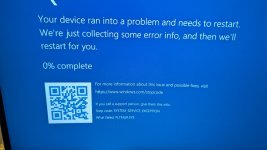
Just powered up and another bsod. Just after I typed in my windows pin it started to fade to the desktop but froze for a second. It was at that moment I knew ...
Restarted fine though. It's rather odd. Different message this time.
Event log pointing to volmgr 161, I'm thinking a recent Windows update could have done it.
Will check my GPU driver as well.
Restarted fine though. It's rather odd. Different message this time.
Event log pointing to volmgr 161, I'm thinking a recent Windows update could have done it.
Will check my GPU driver as well.
Last edited:

Chunkey Monkey
Suspended / Banned
- Messages
- 355
- Name
- Mark
- Edit My Images
- Yes
Kingston is very good stuff usually carries lifetime warranty as well
OP
gman
Suspended / Banned
- Messages
- 11,100
- Name
- Graham
- Edit My Images
- Yes
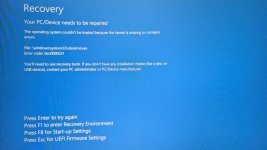
Well, it started happening again and became progressively worse over the last week. Only happened when booting up and rarely whilst actually in Windows. Each restart would come up with a BSOD showing a different error until it would eventually kick in.
System Restore failed as well in the recovery menu, but it must have shunted something as I got one last successful boot. Now it is BSOD with a consistent Critical Process Died. Time to wipe the slate clean. New M2 Drive popped in and that's me just back up and running after an hour. Didn't bother doing a clone or transferring apps etc as I don't want to risk transferring any corrupted files.
Now have the long slog of reinstalling everything, setting up emails etc. Damn you Windows. Still, at least I now have a fresh OS.
EDIT: Fresh install and the BSOD has returned. My guess it must be either BIOS or hardware, but looks like it could be Microsoft.
KB5016061: Secure Boot DB and DBX variable update events
TPM-WMI
1796
The Secure Boot update failed to update a Secure Boot variable with error Secure Boot is not enabled on this machine.. For more information, please see https://go.microsoft.com/fwlink/?linkid=2169931
Looks like I'm not alone: View: https://www.reddit.com/r/WindowsHelp/comments/1g5c9sa/wmitpm_1796_error_fresh_install_windows_11_24h2/?rdt=57059
System Restore failed as well in the recovery menu, but it must have shunted something as I got one last successful boot. Now it is BSOD with a consistent Critical Process Died. Time to wipe the slate clean. New M2 Drive popped in and that's me just back up and running after an hour. Didn't bother doing a clone or transferring apps etc as I don't want to risk transferring any corrupted files.
Now have the long slog of reinstalling everything, setting up emails etc. Damn you Windows. Still, at least I now have a fresh OS.
EDIT: Fresh install and the BSOD has returned. My guess it must be either BIOS or hardware, but looks like it could be Microsoft.
KB5016061: Secure Boot DB and DBX variable update events
TPM-WMI
1796
The Secure Boot update failed to update a Secure Boot variable with error Secure Boot is not enabled on this machine.. For more information, please see https://go.microsoft.com/fwlink/?linkid=2169931
Looks like I'm not alone: View: https://www.reddit.com/r/WindowsHelp/comments/1g5c9sa/wmitpm_1796_error_fresh_install_windows_11_24h2/?rdt=57059
Last edited:
OP
gman
Suspended / Banned
- Messages
- 11,100
- Name
- Graham
- Edit My Images
- Yes
Can you roll back to 23H2?
I tried to via System->Recovery, but then when I went to roll back updates it started to update! lol I've done a BIOS update, latest one was Oct 24 so I'm hoping there's a fix in it. So far so good. I'm not doing any more Windows updates until I see a fix noted.
On the plus side, browsing has become super snappy again. Both this computer and another one I use were getting very slow to open certain webpages, even on this site. DNS Flushes and all sorts wouldn't sort it, but this fresh install has. Windows....

Paulie-W
Suspended / Banned
- Messages
- 9,194
- Name
- Paul
- Edit My Images
- Yes
There's loads of stuff on the usual tech sites about problems with the H24 update. Hopefully it'll get sorted.I tried to via System->Recovery, but then when I went to roll back updates it started to update! lol I've done a BIOS update, latest one was Oct 24 so I'm hoping there's a fix in it. So far so good. I'm not doing any more Windows updates until I see a fix noted.
On the plus side, browsing has become super snappy again. Both this computer and another one I use were getting very slow to open certain webpages, even on this site. DNS Flushes and all sorts wouldn't sort it, but this fresh install has. Windows....


OP
gman
Suspended / Banned
- Messages
- 11,100
- Name
- Graham
- Edit My Images
- Yes
Well, after a clean install on a brand new drive and having only installed email and steam, I'm now locked out with it telling me to setup a new pin, which doesn't actually do anything and just repeats itself in an infinite loop.
Tried the registry workaround from the boot restore options, but doesn't work. I don't think I want to waste time hoping it may work again anyway.
The plan and solution? A new install, but this time I'm going to do Windows 10 because Windows 11 can sod right off.
I'm very close to browsing macs lol
Tried the registry workaround from the boot restore options, but doesn't work. I don't think I want to waste time hoping it may work again anyway.
The plan and solution? A new install, but this time I'm going to do Windows 10 because Windows 11 can sod right off.
I'm very close to browsing macs lol

Sangoma
Suspended / Banned
- Messages
- 2,951
- Name
- Steve, Coventry, England
- Edit My Images
- Yes
Well, after a clean install on a brand new drive and having only installed email and steam, I'm now locked out with it telling me to setup a new pin, which doesn't actually do anything and just repeats itself in an infinite loop.
Tried the registry workaround from the boot restore options, but doesn't work. I don't think I want to waste time hoping it may work again anyway.
The plan and solution? A new install, but this time I'm going to do Windows 10 because Windows 11 can sod right off.
I'm very close to browsing macs lol
Out of interest, are you setting it up with an M$ account?
And if the key in eprom, or do you have to enter it each time?
OP
gman
Suspended / Banned
- Messages
- 11,100
- Name
- Graham
- Edit My Images
- Yes
Out of interest, are you setting it up with an M$ account?
And if the key in eprom, or do you have to enter it each time?
No choice now, they demand your Microsoft details. All the workarounds no longer seem to work.
It's just a simple pin instead of a password. BSOD are back as well. MB is MSI and latest bios update is October, so it's not like they aren't bothering keeping things up to date. Judging from the online carnage you read online about their various updates, the common denominator is always Microsoft and their updates.
Sangoma
Suspended / Banned
- Messages
- 2,951
- Name
- Steve, Coventry, England
- Edit My Images
- Yes
I meant the licence key, sorryNo choice now, they demand your Microsoft details. All the workarounds no longer seem to work.
It's just a simple pin instead of a password. BSOD are back as well. MB is MSI and latest bios update is October, so it's not like they aren't bothering keeping things up to date. Judging from the online carnage you read online about their various updates, the common denominator is always Microsoft and their updates.
OP
gman
Suspended / Banned
- Messages
- 11,100
- Name
- Graham
- Edit My Images
- Yes
I meant the licence key, sorry
Oh that, I don't put it in. I buy my Microsoft software directly through my Microsoft account, so it knows it's licenced, presumably also looking at my hardware to verify or maybe that's no longer the case.
Come to think of it, I think I'm going to have to login to Windows to authenticate the OS. It doesn't bother me too much having to log in, I've nothing to hide etc. But I still think it should be fully optional.
OP
gman
Suspended / Banned
- Messages
- 11,100
- Name
- Graham
- Edit My Images
- Yes
Windows update installed a week or so for me, I've been getting BSOD constantly ever since...
Sorry to hear this, there's definitely some serious issues going on. I ended up popping a new M.2 drive in and going back to Windows 10.

ancient_mariner
Moderator
- Messages
- 27,766
- Name
- Toni
- Edit My Images
- No
I've just paused updates for 5 weeks, just in the hope that by the time 24H is rolled out to us it will be fixed.
I've an Acer box upstairs that I let uodate to W11 late last year, and having re-started it to use for WFH, it did a major update, demanding microsoft ID. I went part-way through the process using nospam@nospam.com as my email + a nonsense password, then cancelled the login and went back a couple of screens and it allowed me to skip without logging into microsoft.
Sorry you guys are getting BSODs all the time.
I've an Acer box upstairs that I let uodate to W11 late last year, and having re-started it to use for WFH, it did a major update, demanding microsoft ID. I went part-way through the process using nospam@nospam.com as my email + a nonsense password, then cancelled the login and went back a couple of screens and it allowed me to skip without logging into microsoft.
Sorry you guys are getting BSODs all the time.
OP
gman
Suspended / Banned
- Messages
- 11,100
- Name
- Graham
- Edit My Images
- Yes
And the BSOD is back. 
Looks like a recent Windows update that has caused it (again) and it's so bad that it won't even let me roll back to a previous restore point. I eventually got into Windows, discovered that there's an emergency update patch to address the problem, so against my better judgement of removing the offending update, I downloaded the fix instead. Restarted the computer and now my BIOS is broke! lol FFS Microsoft.
Rolling my sleaves up for what will be a long process. I'm also hearing rumblings that Microsoft are using AI to write code for their updates.
Looks like a recent Windows update that has caused it (again) and it's so bad that it won't even let me roll back to a previous restore point. I eventually got into Windows, discovered that there's an emergency update patch to address the problem, so against my better judgement of removing the offending update, I downloaded the fix instead. Restarted the computer and now my BIOS is broke! lol FFS Microsoft.
Rolling my sleaves up for what will be a long process. I'm also hearing rumblings that Microsoft are using AI to write code for their updates.

Box Brownie
Suspended / Banned
- Messages
- 17,645
- Edit My Images
- No
I surmise you are talking about W11And the BSOD is back.
Looks like a recent Windows update that has caused it (again) and it's so bad that it won't even let me roll back to a previous restore point. I eventually got into Windows, discovered that there's an emergency update patch to address the problem, so against my better judgement of removing the offending update, I downloaded the fix instead. Restarted the computer and now my BIOS is broke! lol FFS Microsoft.
Rolling my sleaves up for what will be a long process. I'm also hearing rumblings that Microsoft are using AI to write code for their updates.
Can you say which KB update was responsible for the problem? As I wonder if it widespread or hardware specific?
OP
gman
Suspended / Banned
- Messages
- 11,100
- Name
- Graham
- Edit My Images
- Yes
I surmise you are talking about W11
Can you say which KB update was responsible for the problem? As I wonder if it widespread or hardware specific?
Yes Windows 11. I can't remember which KB update that is was, but as it was installed yesterday and then I started getting BSOD then it's pretty likely to be the culprit. I think the update itself may actually be from a little earlier but it wasn't until yesterday that my computer installed it. I looked it (or the fix) up and it mentioned things about login issues etc.
Been looking today and there's some known stuff regarding a Jan update that Nvidia card PC's can have problems with and a fix came out, but I'm not sure if that's related to my issue.
Feeling very much like a beta tester for Microsoft sometimes.
ancient_mariner
Moderator
- Messages
- 27,766
- Name
- Toni
- Edit My Images
- No
Feeling very much like a beta tester for Microsoft sometimes.
It's feeling quite a bit like that at the moment. All our work W11 machines have been affected by clear type font presentation being switched off, and text becoming very difficult to read. It's not difficult to turn back on, but it just should not happen.
Box Brownie
Suspended / Banned
- Messages
- 17,645
- Edit My Images
- No
For fear of asking the obvious......
Have tried booting into "safe mode"?
Have tried booting into "safe mode"?
OP
gman
Suspended / Banned
- Messages
- 11,100
- Name
- Graham
- Edit My Images
- Yes
For fear of asking the obvious......
Have tried booting into "safe mode"?
lol went way past that. Safe mode, command prompt, auto repair, advanced startup etc, tried fixing mbr, boot, bcd, sfc scans etc. It all just returns to the same BSOD. This was before I applied the update that was supposed to fix the update. I did a full SSD scan from BIOS, it was 100% fine. I tried turning secure boot on and it got me in, that's when I installed the fix for the fix and then it went to BIOS with a lovely message saying that my BIOS is buggered.
Was fine when actually in Windows, it's just when starting up - which therefore all points to these damn updates.
I'll see how it goes later this evening when I've got more time.
ancient_mariner
Moderator
- Messages
- 27,766
- Name
- Toni
- Edit My Images
- No
At least it should be possible to reinstall the bios from a bootable memory stick.
OP
gman
Suspended / Banned
- Messages
- 11,100
- Name
- Graham
- Edit My Images
- Yes
At least it should be possible to reinstall the bios from a bootable memory stick.
Aye, prepared it today with the latest BIOS firmware. It's always squeaky bum time when flashing a new bios! haha
If that gets me back into Windows I'll delete the last couple of updates. Pretty annoying though, I've been doing regular Backups since the last time so that I could use the Restore feature, but this time it wouldn't let me into it during the recovery screens.
I've got another stick which I put Win 11 on it today with their media creation tool ready for the worse scenario. I might just reinstall Windows anyway for a nice clean install.
OP
gman
Suspended / Banned
- Messages
- 11,100
- Name
- Graham
- Edit My Images
- Yes
Reflashed BIOS and nothiong, but I've just spotted the cpu debug light on the MB is solid white. I mind this MB didn't support the 5600X processor out of the box and needed a firmware update after the build. However, it also indicates the CPU may not be seated properly and I've had this once before with this computer and I was wondering about it this time and forgot about the debug lights.
Going to have to dig out the thermal paste! I'm wondering if my mahooooosive heatsink is too heavy and the door to the room might be getting banged into the computer and contributing to it.
Going to have to dig out the thermal paste! I'm wondering if my mahooooosive heatsink is too heavy and the door to the room might be getting banged into the computer and contributing to it.
OP
gman
Suspended / Banned
- Messages
- 11,100
- Name
- Graham
- Edit My Images
- Yes
Removed CPU, cleaned it up and reinstalled with the stock cooler and fan; it's tiny!
Reflashed BIOS again, clenched... and I'm back! haha CPU running a touch hotter at idle, but jumps up quicker under load - the price I'll have to pay at the moment.
Here's the Windows update and the subsequent "fix". Now that I'm back in the OS I'm not sure whether to leave things alone or to uninstall these before powering off again.
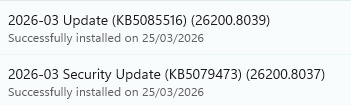
EDIT: Successful restart completed. May the unclenching commence.
Reflashed BIOS again, clenched... and I'm back! haha CPU running a touch hotter at idle, but jumps up quicker under load - the price I'll have to pay at the moment.
Here's the Windows update and the subsequent "fix". Now that I'm back in the OS I'm not sure whether to leave things alone or to uninstall these before powering off again.
EDIT: Successful restart completed. May the unclenching commence.
Last edited:
Box Brownie
Suspended / Banned
- Messages
- 17,645
- Edit My Images
- No
Looked it and saw this report..................
 www.notebookcheck.net
My small Dell is W11 but on a local account but my OH's Dell is still using the MS Account Signin.
Apart from the fix I wonder if MS will remove the damaging KB and release one to supercede it with the remedy in it??? IIRC in the past they have done that sort of thing
Microsoft confirms Windows 11 KB5079473 can break Microsoft sign-ins
Microsoft has acknowledged a new known issue in Windows 11 update KB5079473 that can block Microsoft account sign-ins in apps, including Teams Free, OneDrive, Edge, Word, and Excel.
www.notebookcheck.net
My small Dell is W11 but on a local account but my OH's Dell is still using the MS Account Signin.
Apart from the fix I wonder if MS will remove the damaging KB and release one to supercede it with the remedy in it??? IIRC in the past they have done that sort of thing
OP
gman
Suspended / Banned
- Messages
- 11,100
- Name
- Graham
- Edit My Images
- Yes
Yep, that sounds like what I read. I think KB5085516 is what fixed it. The CPU thing may have been a bit of a red herring, or perhaps the BIOS got corrupted with all the restarts that it failed to recognise it (hence the solid white light on the MB).
I've been actively resisting installing updates since the last BSOD, but they always end up slipping through. It's a right pain when this happens.
I've been actively resisting installing updates since the last BSOD, but they always end up slipping through. It's a right pain when this happens.