Brighten images in CS3

Rosso86

Suspended / Banned
Messages
110
Name
Matt
Edit My Images
Yes
Hi Guys,

I'm a complete beginner to photoshop (as well as photography in general) and was wondering how to brighten up photos in CS3. Basically I've taken a load of my dog running around in the snow but because it was quite overcast it's come out quite dark and dingy!
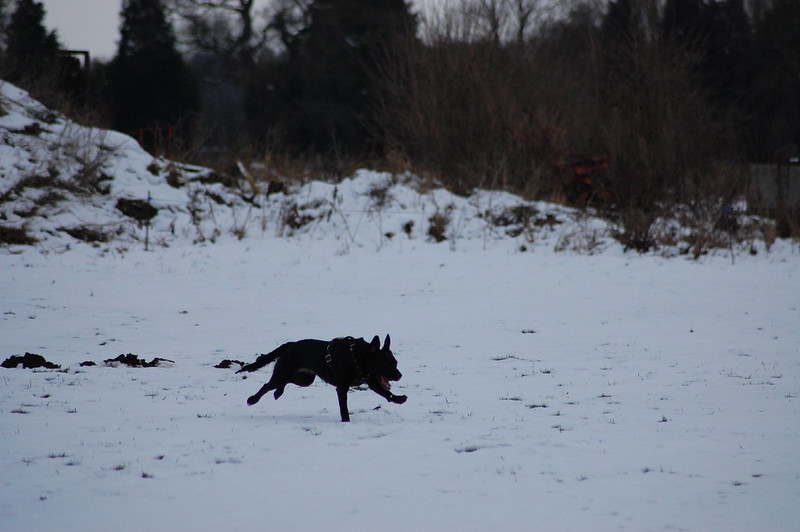
8399375406_d00f31c1f5_c.jpg


This is the kind of photo I'm working with so any help would be appreciated, I'm aware it's not a particularly great photo but just wanted a few nice natural ones of my dog!

Thanks, Rosso
 
Without getting too fussy by trying to select areas, you can improve it quite a bit using levels:

8399375406_d00f31c1f5_c.jpg


I'd be inclined to crop the original first to make the dog larger in the frame:

image.jpg
 
That's exactly what I'm after 4wd, how exactly do you use levels? Sorry, completely new to this!

And Dave - I shoot in JPEG, would you recommend shooting in RAW if I am going to PS things as I tend to shoot in JPEG cos it seems to be a better quality image to me although maybe I'm wrong!
 
Hi Matt. Trying to get your camera to get a good exposure of a black dog on a white snowy background is going to test the limits of the camera. Its fallen fowl of the auto exposure meter which has turned your white snowy background to 18% grey or thereabouts. So its underexposed. I believe your Nikon D40 displays a histogram. See this for one tutorial about levels.

Perhaps RAW and its conversion is a bit advanced at the moment. Investigate levels first of all.
 
I would shoot raw file you have more control when in ps , just remember when shooting snow I would up your exposure compensation to +1 or 2 as it will be fooled by the bright white snow :thumbs:
 
Learning RAW is no harder than learning jpeg and you really need to learn both. RAW in general will give better results.

Try the shadow/highlights adjustment in CS3 for that shot, but don't get your hopes up too high - the dog is quite underexposed so you may end up with loads of noise in the shape of a dog!
 
And Dave - I shoot in JPEG, would you recommend shooting in RAW if I am going to PS things as I tend to shoot in JPEG cos it seems to be a better quality image to me although maybe I'm wrong!

I only ever shoot Raw, as youve got more control in ACR or what ever software for raw editing, then open it in PS or what ever for final adjustments
 
Hi Rosso.

Seeing as you are shooting JPEG, you should try using the D40's built in 'D-Lighting' feature before saving and then opening in CS3.

It's in the 'Retouch' section of the D40's menu. See what difference it makes to the dog - it should give you less noise than trying to brighten the dog completely with levels only in CS3.

Good luck!
 
And Dave - I shoot in JPEG, would you recommend shooting in RAW if I am going to PS things as I tend to shoot in JPEG cos it seems to be a better quality image to me although maybe I'm wrong!

Just a quick comment on this...

It is fairly common for people starting to use raw to be initially disappointed with the output and to feel it is lower quality than a jpeg. I was.

The reason for this is that the jpeg you get from the camera is the original raw file, together with the cameras automatic enhancement and processing to convert that raw. These automatic enhancements can usually be tailored (to a limited extent) and may include such things as colour enhancement, sharpening, contrast improvement etc. When you get the raw you get, well the raw file without any of these automatic enhancements. You will always need to do some post processing on a raw image to get the best from it (not always a lot!)

So what's the benefit of using the raw file?

Firstly, you get to control the processing completely rather than relying on the algorithms programmed into your camera (and those can never know exactly what picture you've taken or your intentions for it)

Secondly, for those of us who don't take perfect pictures every time, the raw file contains more image data than the jpeg (which has some data discarded during the conversion) which means we can make bigger changes to the file before it all goes horribly wrong.
 
Don't forget if you are shooting in snow this will fool the cameras meter by underexposing which is what you have in your pic.
It thinks the snow is 18% grey.
Add 1.5-2 stops exposure compensation and like others have said shoot in RAW and do a custom white balance or use something like a whibal card.
 
Forget PP.. learn how to expose properly. Lots of bright white in the background will always force the camera to under expose a little. Learn to predict things like this and open up a bit, or use exposure compensation.

Getting it right to begin with is far more satisfying than fixing things post shoot.

For this shot though... use levels if already a JPEG or TIFF, or if it's a raw, just increase the exposure slider a little.
 
Back
Top