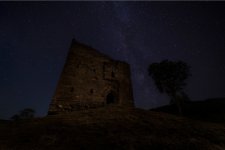
Blending sky with foreground (Astro)

A_S

Suspended / Banned
Messages
864
Name
Andrew
Edit My Images
Yes
Any advise on the best way to do it in the modern day? Recently Ive been using sky replacement in photoshop but that is quite complex to use as it means exporting your sky as a seperate image and reimporting it into the tool.

I am thinking that in the modern AI world of PS there must be a better way than the old fashioned layer masks etc that used to take (me at least) hours! Appreciate this is a complex one and still very much WIP in terms of the sky foreground balance etc.....
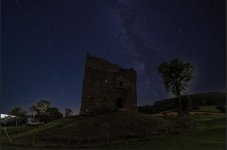
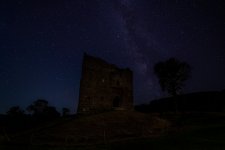
Screenshot 2025-09-23 183139.jpg
 
Typically, I shoot separately with sky replacement in mind and tend to use that these days - rather that the old manual way of doing things.

What do you have? Separate sky and foreground, or single images to stack?
 
seperate sky and foreground, shot the sky from in front of the tree on the left. When you say sky replacement you mean the photoshop element where you load the sky image into sky replacement and it does the work?
 
Yes. Open the foreground image, then click sky replacement & add the sky shot through it.

Thanks the way I've done it before but it means loading an exported sky image unless there is another way?

Also seems to make placing the sky image where i want more difficult, I'll give it a go anyway!
 
Do you not have the foreground & sky as separate exported/finished images anyway?

I haven't done much astro this year, but I'm pretty sure once the 'mask' from the sky replacement is in place, you should be able to move the sky around behind it. If I remember correctly!
 
I have them finalised in lightroom, I'll have a play tonight or tomorrow! Thanks
 
It worked well although exported at SRGB here its gone a lot darker, always seem to have colour issues when exporting for some reason, need to work out why

Milky_way 1.jpg
 
Any ideas on how to export so I see the same colour balance and brightness as i do on lightroom and windows? The web, whatsapp and even uploading to google drive and sharing the link, the photos appear really dark
 
Any ideas on how to export so I see the same colour balance and brightness as i do on lightroom and windows? The web, whatsapp and even uploading to google drive and sharing the link, the photos appear really dark
I can't tell here, but you probably have a color space issue. Although exporting as jpeg from LR makes it pretty foolproof...
 
I can't tell here, but you probably have a color space issue. Although exporting as jpeg from LR makes it pretty foolproof...

Exported as srgb and pro colour (or similar not at my computer) and both give the same issue.

I Mitty try on another external screen to see if it’s my laptop brightness
 
Your first edit is slightly brighter than the second. They are both dark though.

I used to get issues after stacking in one of the programs where the file would lose its 'colour calibration' - right click, properties, and the 'srgb' would be blank. That used to cause issues even though the original jpegs used would be srgb.
 
does still say SRBG. If it was my monitor I'd still expect it to look the same on whatsapp (desktop version) or uploaded google drive version so I am slightly unsure what is causing it
 
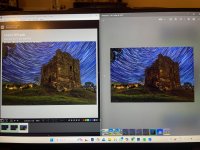
here is a screenshot from lightroom which is why i am a bit puzzled even that looks darker here.

Screenshot 2025-09-24 183945.jpg
 
best way i can explain it. lightroom and whatsapp side by side on the screen


IMG_1716.jpg
 
A really difficult subject to mask when you include the trees. To be honest your ate probably better to increase the iso when shooting or light paint as softly as you can. Most of my MW images are on the coast so I tend to do longer exposures for the foreground and my 20s exposure for the stars and blend the two using PS masks. The masks get difficult with more intricate foregrounds though.

Here's an example of a 2 blend shot, 6mins for the foreground, 20s for MW.

Sea Peak by Neil Burnell, on Flickr
 
I think i got on ok using sky replacement and worked on the tree manually, but i guess i was expecting with AI, it to be clever enough to work it rather than me having to manually blend.

Thats a wonderful image by the way. If only I could get close to something similar!!!!
 
Back
Top