As a few have asked for a tutorial on how I managed to capture my image for "Spread", I have posted below. Not a tutorial as such because I am far from an authority on this, more of a how I did it than a definitive tutorial.
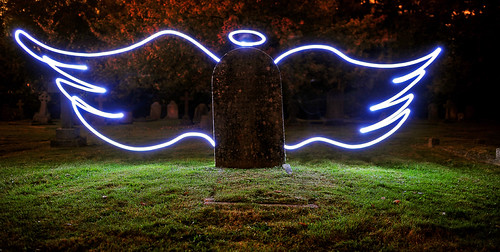 43 - Spread
 by
iain blake, on Flickr
Equipment:
Camera
Cable release
Tripod
Light source: I used a set of battery operated led fairy lights which were bunched and taped together that I made up for doing light orbs before:
 Close Encounter
 by
iain blake, on Flickr
A torch or other small light source is fine also.
I set the camera up on the tripod with the cable release attached.
I set the camera to manual, with manual focus too.
I focussed on the headstone using a torch to illuminate it to assist as there was very little ambient light in the graveyard.
Settings wise: Low iso (200)
Aperture 2.8 to let in as much ambient light as possible.
Shutter speed to bulb.
At first I tried to set the shutter speed to 30 sec but it wasn't letting in enough ambient, hence bulb.
I then activated the cable release and locked it open.
Wearing dark clothes and gloves to minimise any chance I would be in the frame, I moved behind the headstone and switched on my light source.
Try to move the light source smoothly and keep it moving so as not to get "hotspots" on your light painting.
This took quite a few goes to get a composition I was happy with.
This is probably only about the third time I have done light painting, and as such, as I said, I am no authority on it. This is how I did it and it worked for me.
Funnily enough, the first time I tried it was for my 52 in 2010, this was for the weekly theme of "Light" my take was light as a feather

 35 Light
 by
iain blake, on Flickr
It was very much trial and error for me but it is quite fun to do. I hope this is of some benefit to others. Iain