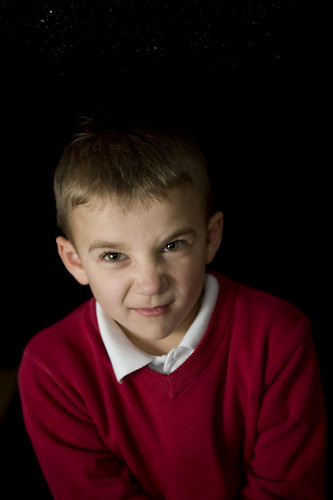
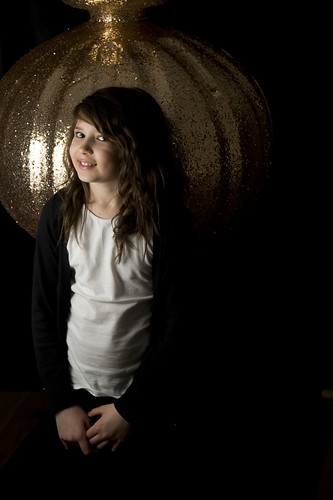
black background harsh light

stressless

Suspended / Banned
Messages
538
Name
Michael
Edit My Images
Yes
lighting with a black background I have tried a few tomes to use the off shoe flash setup but feel the light is still far to harsh and some shots getting the black blown greyish too any advise please.

Michael.
 
lighting with a black background I have tried a few tomes to use the off shoe flash setup but feel the light is still far to harsh and some shots getting the black blown greyish too any advise please.

Michael.

I seem to get the best results not lighting a black background.Some-one else with more experience will probably tell you the right way.
 
I seem to get the best results not lighting a black background.Some-one else with more experience will probably tell you the right way.

but how do you light the subject without the light spill should I turn the flash down really low?

stand 5 foot away from the background?

I just cant get it right


Michael.
 
but how do you light the subject without the light spill should I turn the flash down really low?

stand 5 foot away from the background?

I just cant get it right


Michael.

yes stand further away from background,You need to keep the flash at the right setting to get the subject exposed properly
 
thanks will get the gear out after tea and try again, was looking for the my last attepmts but must have binned them due to being so crap.

Michael
 
If the lighting is too harsh for you, you need to light to be larger relative to the subject - that means making it physically bigger by using a softbox or umbrella (for example) and/or moving it closer to the subject.

Moving it closer to the subject also takes care of unwanted light on the background, because the greater the difference in distance that the light has to travel first to the subject and then to the background, the less effect the light reaching the background will have.
 
pretty much as above, stick the lights closer to the model and the model further away from the background.

i do a lot of portraits in really tiny spaces (the joys of living in a 'cosy' old house!), and often light backgrounds with models only a few feet away. its pretty tricky to get right and not spill light onto the background but once you learn what you can and cant do its easy. careful positioning is key and making the best use of your space. i usually have my main lights practically touching the model and my back squished flat against the furthest wall, it helps maximise the space!

practice practice.
 
Move your subject further from your background, expose for the subject as you should. Move your light source closer to the model :)
What mods are you using on your flash out of interest? brollys will make it more difficult to control the light spill onto the BG compared to a softbox/snoot. You could overcome this with taping a bin bag over half the brolly if you wanted too (thats if your using one)
 
get the light close to the subject and the subject as far from the bg as possible

also if the room isn't v light coloured (to reduce bounce) then feather the light off the subject further forward so that they get the edge of the beam, wastes power but reduces light hitting bg

also use more restrictive mods, a softbox over a shoot through brolly for instance (in fact do not even try to control the light from a shoot through)
 
It's all in the distance between the flash, the subject and the background

If you've got the flash 5ft from the subject an they're 5ft from the background then the subject gets roughly double the light the background gets.

If you move the subject to 1ft from the flash, then they get roughly 8 times as much flash as the background.

This thread of mine is where we discussed a similar thing.
http://www.talkphotography.co.uk/forums/showthread.php?t=157008

As Garry said above, making the light source bigger allows you to get it closer without being harsh (hence "soft"box). You can get the damn things right in close (just out of frame), wind the power down and make the background disappear into the darkness.

It may be that you're getting the ambient light polluting the background too. So another thing you want to check is that when you set your exposure, that the background is completely black if you shoot it without flash. Start with the highest sync speed you can (1/250th on the D700 iirc) and work from there, shooting at f2.8 isn't going to help control the ambient either, so I'd start around f8 until I'd got it black at 1/250th or slower.

Once it's black with no flash, then you can start dialling up the flash, moving it around, and if you get a grey background, you know it's being lit by the flash, so you adjust a bit more, drop the power, move it closer to the subject and so on.

Experiment, but only change one thing at a time, otherwise you'll not spot which change is the right one ;)
 
Experiment, but only change one thing at a time, otherwise you'll not spot which change is the right one ;)

This is the best advice here. I wasted a lot of time at first by not being methodical. If you have the patience, have a laptop beside you and stop between shots (or every few) to check the results on screen. Good luck :thumbs:
 
right thanks Folks, here are are few from last night

a foot away from son
4270592559_f9b21e0ff5.jpg


5 foot away from Daughter
4269777492_59e875626f.jpg


for these I did use the off camera flash and a brolly but will use the softbox next time kids where getting bored as always.

thanks for your input. feel free to comment.

Michael
 
Are these with them both against the same background and the same distance from the background? Hope so, as that would be a perfect example of the difference changing the light position will have.

They look like your heading in the right direction, and now you know what result you get from these positions try experimenting with others along these lines

1. Background and subject stay put, but you move the lights nearer, further away, adjust the power etc.

2. Light and subject stay same distance apart, and at same power, but move them closer to, then further from the background.

This will give you an idea of what effects these tiny changes can make.

Once you're comfortable with all of this, we start looking at creating separation from the background with a reflector, but not until you've got this where you're happy you can recreate it quickly. ;)
 
Back
Top